59
LC-32LB261U Sharp 32" LED TV
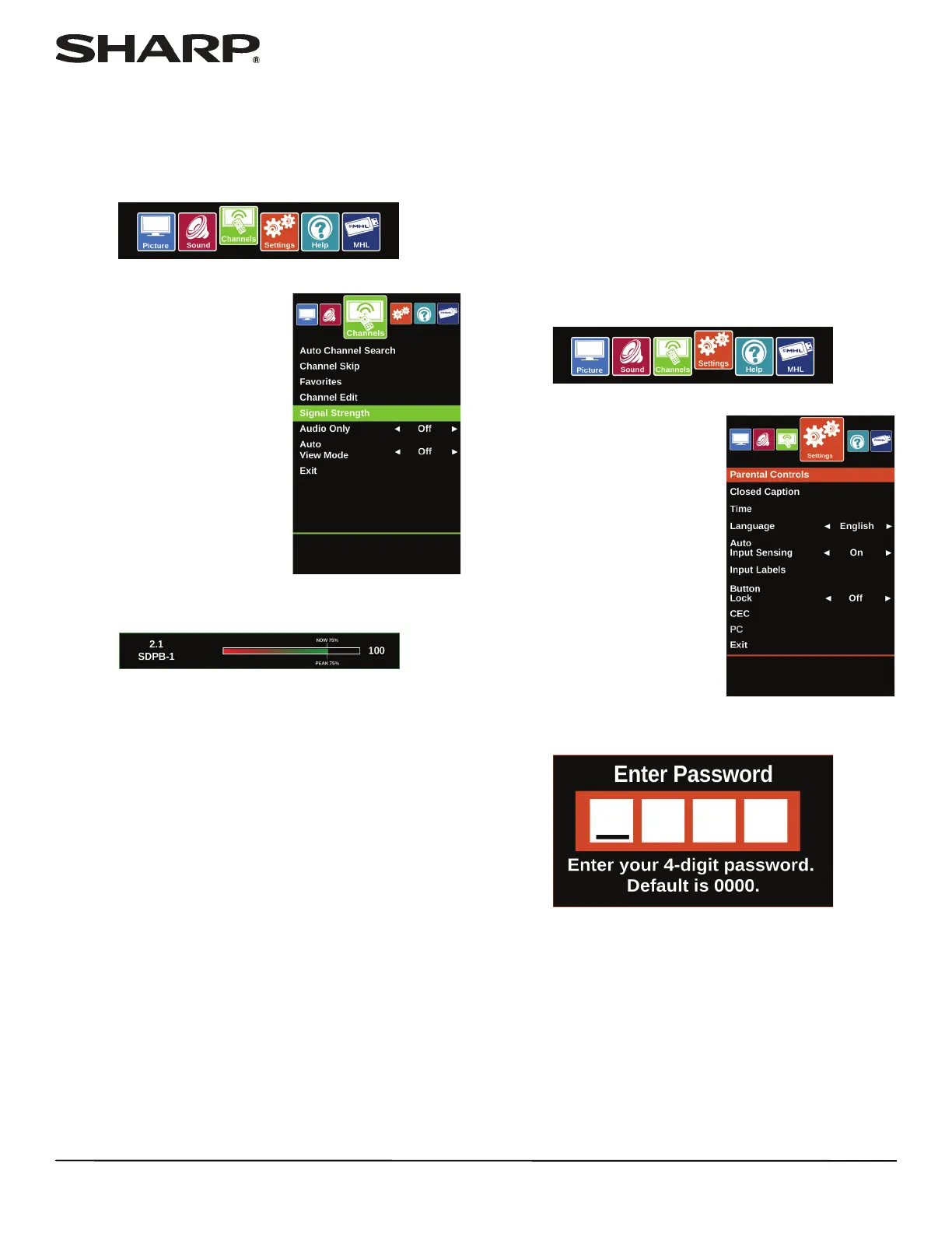
Checking the digital signal strength
You can check the digital signal strength to determine if you
need to adjust your antenna or digital cable input. The higher
the signal strength, the less likely you are to experience picture
degradation.
1 Press MENU.
2 Press
W or X to highlight
Channels, then press ENTER.
3 Press
S or T to highlight Signal Strength, then press
ENTER.
4 Press MENU to return to the previous menu, or press EXIT
to close the menu.
Setting parental
controls
Parental controls let you prevent your children from watching
inappropriate material on TV. When set, parental controls read
the rating of the program (with some exceptions, such as news
and sports) and deny access to programs that exceed the
ratings level you select. To watch programs that exceed the
selected rating, you must enter a password.
Setting or changing the password
1 Press MENU.
2 Press
W or X to highlight
Settings, then press ENTER.
3 Press
S or T to highlight Parental Controls, then press
ENTER.















 To Next Page