MX-5001N ADJUSTMENTS 5 – 74
2) Select the mode to be adjusted with the scroll key.
3) Enter the adjustment value with 10-key.
When the adjustment value of adjustment item A is increased,
copy density of red image is decreased. When the adjustment
value is decreased, copy density of red image is increased.
When the adjustment value of adjustment item B is increased,
copy density of red image is increased. When the adjustment
value is decreased, copy density of red image is decreased.
4) Press [OK] key.
5) Make a copy in monochrome text/printed phto copy mode
(manual), check the copy.
If a satisfactory result is not obtained, return to the SIM 46-37
mode and change the adjustment value.
Repeat the above procedures until a satisfactory result is
obtained.
20-M Black ingredient amount adjustment in
color copy mode
(Normally unnecessary to adjust)
Use to adjust the black ingredient amount in the color copy mode.
(except character and line image)
As a result of this adjustment, the gradation of the shade part
changes.
This adjustment is required in the following cases.
* When reproduction as solid of black image is required.
* To make the black background and the dark area darker
* When change of gradation of the shade part is required.
* U2 trouble has occurred.
* When the MFP PWB is replaced.
* When the EEPROM on the MFP PWB is replaced.
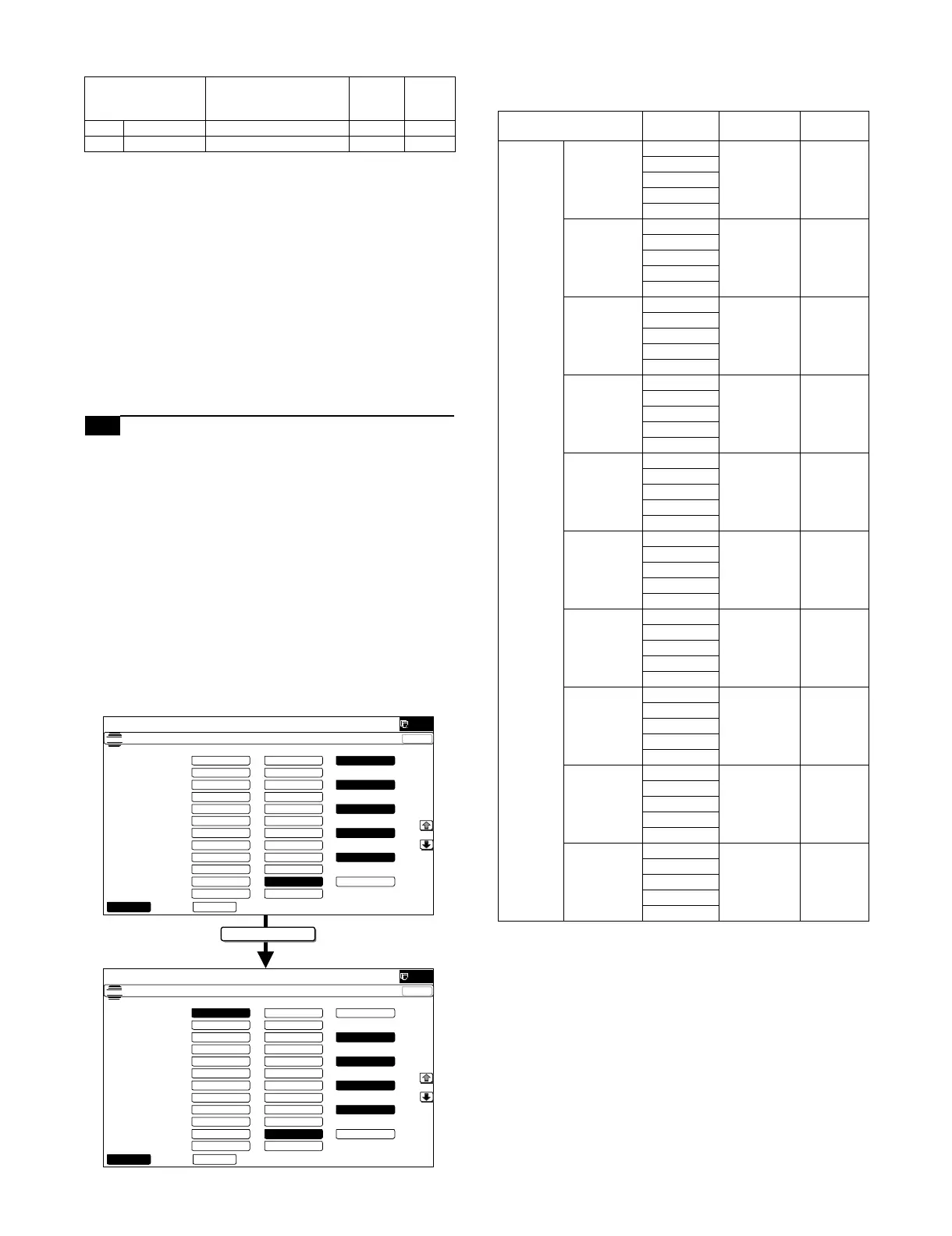
1) Enter the SIM 46-38 mode.
2) Select the AUTO MODE or the MANUAL MODE with the mode
key.
3) Select the mode to be adjusted with the scroll key.
Display/Item
(Copy mode)
Content
Adjust
ment
range
Default
A R/G Gray making setting (R/G) 0 - 99 21
B B/G Gray making setting (B/G) 0 - 99 0
(-)LUT2
ǂǂǂ6,08/$7,21ǂǂ12
&/26(
7(67
%/$&.,0$*(&5($7($'-8670(17
˄˅/ 87 120$/˄˅/87
7(;7ǂ357 ˖
˄˅/ 87 ˄˅/87
˄˅/ 87 120$/˄˅/87
7(;7 ˖
˄˅/ 87 ˄˅/87
˄˅/ 87 120$/˄˅/87
35,17('ǂ3+272
˖
˄˅/ 87 ˄˅/87
˄˅/ 87 120$/˄˅/87
3+272 ˖
˄˅/ 87 ˄˅/87
˄˅/ 87 120$/˄˅/87
7(;7ǂ3+272 ˖
˄˅/ 87 ˄˅/87
˄˅/ 87 120$/˄˅/87
0$3 ˖
˄˅/ 87 ˄˅/87
$8720$18$/
ǂǂǂ6,08/$7,21
ǂǂ12
&/26(
7(67
%/$&.,0$*(&5($7($'-8670(17
˄˅
/87
120$/˄˅
/87
7(;7ǂ
357
˖
˄˅
/87
˄˅
/87
˄˅
/87
120$/˄˅
/87
7(;7 ˖
˄˅
/87
˄˅
/87
˄˅
/87
120$/˄˅
/87
35,17('
ǂ3+272 ˖
˄˅
/87
˄˅
/87
˄˅
/87
120$/˄˅
/87
3+272 ˖
˄˅
/87
˄˅
/87
˄˅
/87
120$/˄˅
/87
7(;7ǂ
3+272
˖
˄˅
/87
˄˅
/87
˄˅
/87
120$/˄˅
/87
0$3 ˖
˄˅
/87
˄˅
/87
$8720$18$/
Display/Item (Copy
mode)
Select
button
Content Default
MANUAL TEXT PRT (-) LUT2 Text print
(Manual)
NORMAL
(-) LUT1
NOMAL
(+) LUT1
(+) LUT2
TEXT (-) LUT2 Text (Manual) NORMAL
(-) LUT1
NOMAL
(+) LUT1
(+) LUT2
PRINTED
PHOTO
(-) LUT2 Printed photo
(Manual)
NORMAL
(-) LUT1
NOMAL
(+) LUT1
(+) LUT2
PHOTO (-) LUT2 Photograph
(Manual)
NORMAL
(-) LUT1
NOMAL
(+) LUT1
(+) LUT2
TEXT
PHOTO
(-) LUT2 Text/
Photograph
(Manual)
NORMAL
(-) LUT1
NOMAL
(+) LUT1
(+) LUT2
MAP (-) LUT2 Map (Manual) (+) LUT1
(-) LUT1
NOMAL
(+) LUT1
(+) LUT2
CP ORG/
TEXT PRT
(-) LUT2 Copy
document/
Text printed
(Manual)
NORMAL
(-) LUT1
NOMAL
(+) LUT1
(+) LUT2
COPY ORG/
TEXT
(-) LUT2 Copy
document/
Text (Manual)
NORMAL
(-) LUT1
NOMAL
(+) LUT1
(+) LUT2
COPY ORG/
PHOTO
(-) LUT2 Copy
document/
Printed photo
(Manual)
NORMAL
(-) LUT1
NOMAL
(+) LUT1
(+) LUT2
LIGHT
ORIGINAL
(-) LUT2 Light
document
(Manual)
(+) LUT1
(-) LUT1
NOMAL
(+) LUT1
(+) LUT2



 To Next Page