MX-5001N ADJUSTMENTS 5 – 79
2) Press OC key to select the front surface copy density adjust-
ment mode.
3) Select an adjustment mode with the scroll key.
To adjust the density in the low density area, select "COPY
SIDE A LOW." To adjust the density in the high density area,
select "COPY SIDE A HIGH."
4) Enter an adjustment value with 10-key.
To increase the density, enter a greater number. To decrease
the density, enter a smaller number.
5) Press [OK] key.
6) Press [CLOSE] key to exit the simulation mode.
7) Make a copy and check the copy density.
Repeat the above procedures until a satisfactory result is obtained.
(Back surface copy density adjustment)
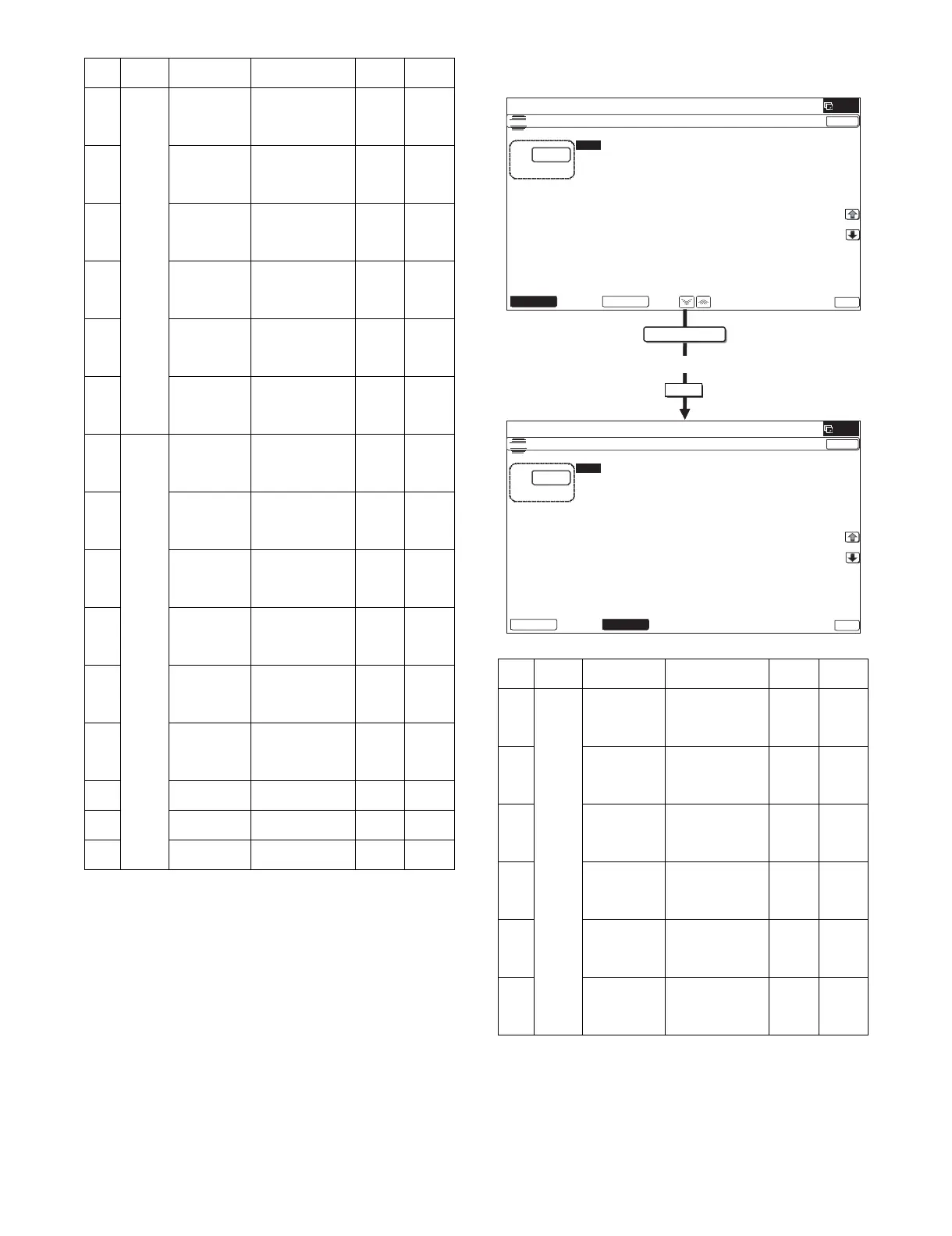
1) Enter the SIM46-9 mode.
Item Button Display Content
Setting
range
Default
value
A OC COPY SIDEA:
LOW
DSPF copy mode
exposure
adjustment (Low
density side)
1 - 99 47
B SCAN SIDEA:
LOW
DSPF scanner
mode exposure
adjustment (Low
density side)
1 - 99 47
C FAX SIDEA:
LOW
DSPF FAX mode
exposure
adjustment (Low
density side)
1 - 99 47
D COPY SIDEA:
HIGH
DSPF copy mode
exposure
adjustment (High
density side)
1 - 99 52
E SCAN SIDEA:
HIGH
DSPF scanner
mode exposre
adjustment (High
density side)
1 - 99 52
F FAX SIDEA:
HIGH
DSPF FAX mode
exposure
adjustment (High
density side)
1 - 99 52
A DSPF COPY SIDEB:
LOW
DSPF copy mode
exposure
adjustment (Low
density side)
1 - 99 47
B SCAN SIDEB:
LOW
DSPF scanner
mode exposure
adjustment (Low
density side)
1 - 99 47
C FAX SIDEB:
LOW
DSPF FAX mode
exposure
adjustment (Low
density side)
1 - 99 47
D COPY SIDEB:
HIGH
DSPF copy mode
exposure
adjustment (High
density side)
1 - 99 50
E SCAN SIDEB:
HIGH
DSPF scanner
mode exposre
adjustment (High
density side)
1 - 99 50
F FAX SIDEB:
HIGH
DSPF FAX mode
exposure
adjustment (High
density side)
1 - 99 50
G BALANCE
SIDEB: R
DSPF color
balance R
1 - 99 50
H BALANCE
SIDEB: G
DSPF color
balance G
1 - 99 50
I BALANCE
SIDEB: B
DSPF color
balance B
1 - 99 50
Item Button Display Content
Setting
range
Default
value
A OC COPY SIDEA:
LOW
DSPF copy mode
exposure
adjustment (Low
density side)
1 - 99 42
B SCAN SIDEA:
LOW
DSPF scanner
mode exposure
adjustment (Low
density side)
1 - 99 42
C FAX SIDEA:
LOW
DSPF FAX mode
exposure
adjustment (Low
density side)
1 - 99 42
D COPY SIDEA:
HIGH
DSPF copy mode
exposure
adjustment (High
density side)
1 - 99 53
E SCAN SIDEA:
HIGH
DSPF scanner
mode exposre
adjustment (High
density side)
1 - 99 53
F FAX SIDEA:
HIGH
DSPF FAX mode
exposure
adjustment (High
density side)
1 - 99 53
OK
DSPF
(;32685($'-8670(1763)
˖&23<6,'($˖/2:
˖6&$16,'($˖/2:
˖)$;6,'($˖/2:
˖&23<6,'($˖+,*+
˖)$;6,'($˖+,*+
˖6&$16,'($˖+,*+
(;32685($'-8670(1763)
˖&23<6,'(%˖/2:
˖6&$16,'(%˖/2:
˖)$;6,'(%˖/2:
˖&23<6,'(%˖+,*+
˖)$;6,'(%˖+,*+
˖6&$16,'(%˖+,*+
10-key



 To Next Page