11
MAKING COPIES
REDUCTION/ENLARGEMENT/ZOOM
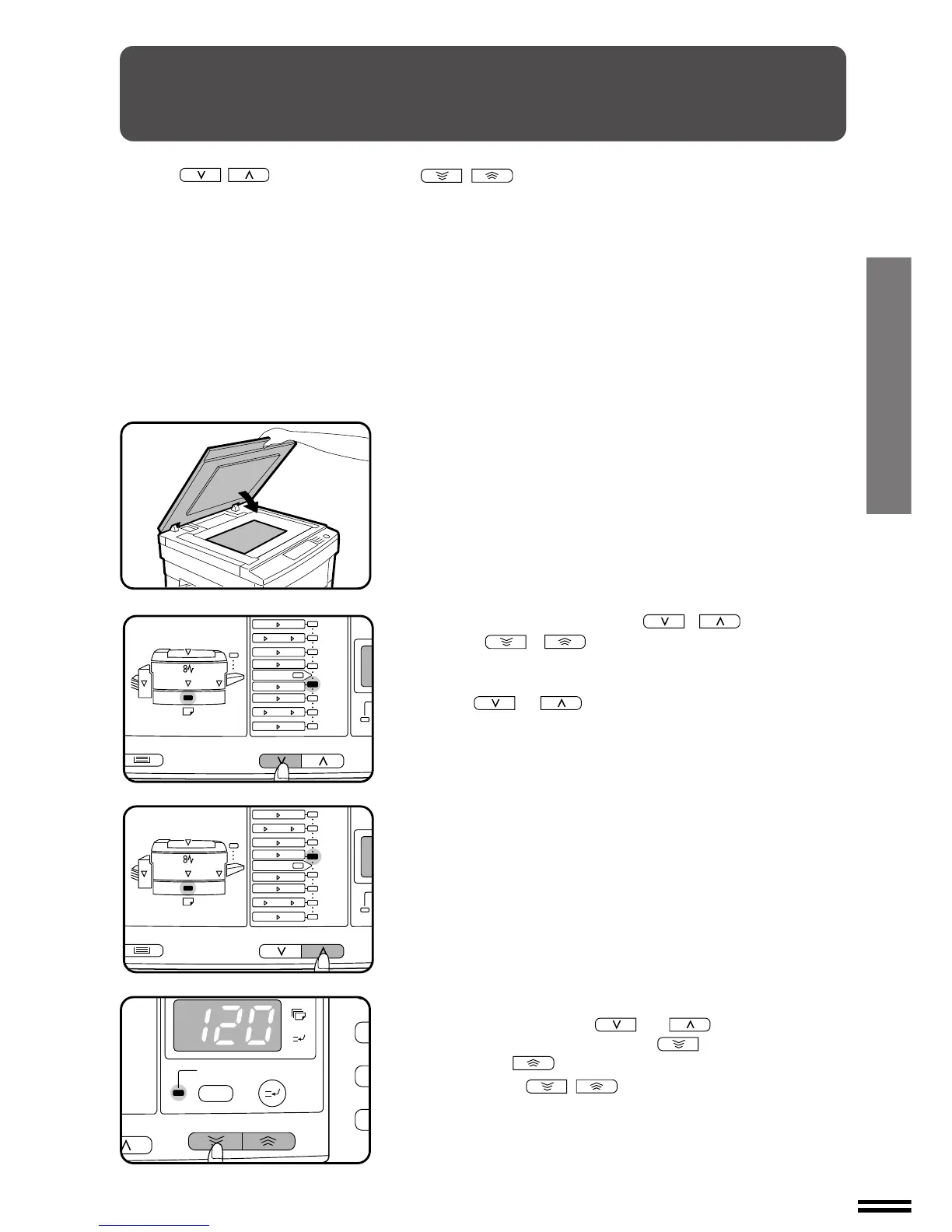
Reduction and enlargement ratios can be selected with the copy ratio
selector ( , ) keys and/or the zoom ( , ) keys.
The zoom function enables precise copy ratio selection from 50% to
200% in 1% increments.
1
Place the original on the document glass and close the
document cover.
2
Use the copy ratio selector ( , ) keys and the
zoom (
, ) keys to select the desired copy
ratio.
●
To select a preset reduction or enlargement copy ratio, press
the or key repeatedly until the indicator for the
desired copy ratio is lit.
A. Preset reduction ratios are: 86%, 81%, 70%, and 50% (95%,
77%, 64%, and 50%).
B. Preset enlargement ratios are: 115%, 122%, 141%, and 200%
(121%, 129%, 141%, and 200%).
C. Zoom ratios: Any ratio from 50% to 200% can be set, in 1%
increments. Press the or key to set the ap-
proximate ratio, then press the key to decrease the
ratio or the key to increase the ratio.
When a zoom ( , ) key is pressed, the ZOOM indicator
will light up and the zoom ratio will be displayed in the copy quantity
display for at least one second.
Reduction/enlargement/zoom



 To Next Page