UX-B700U
FO-B1600U
8 – 7
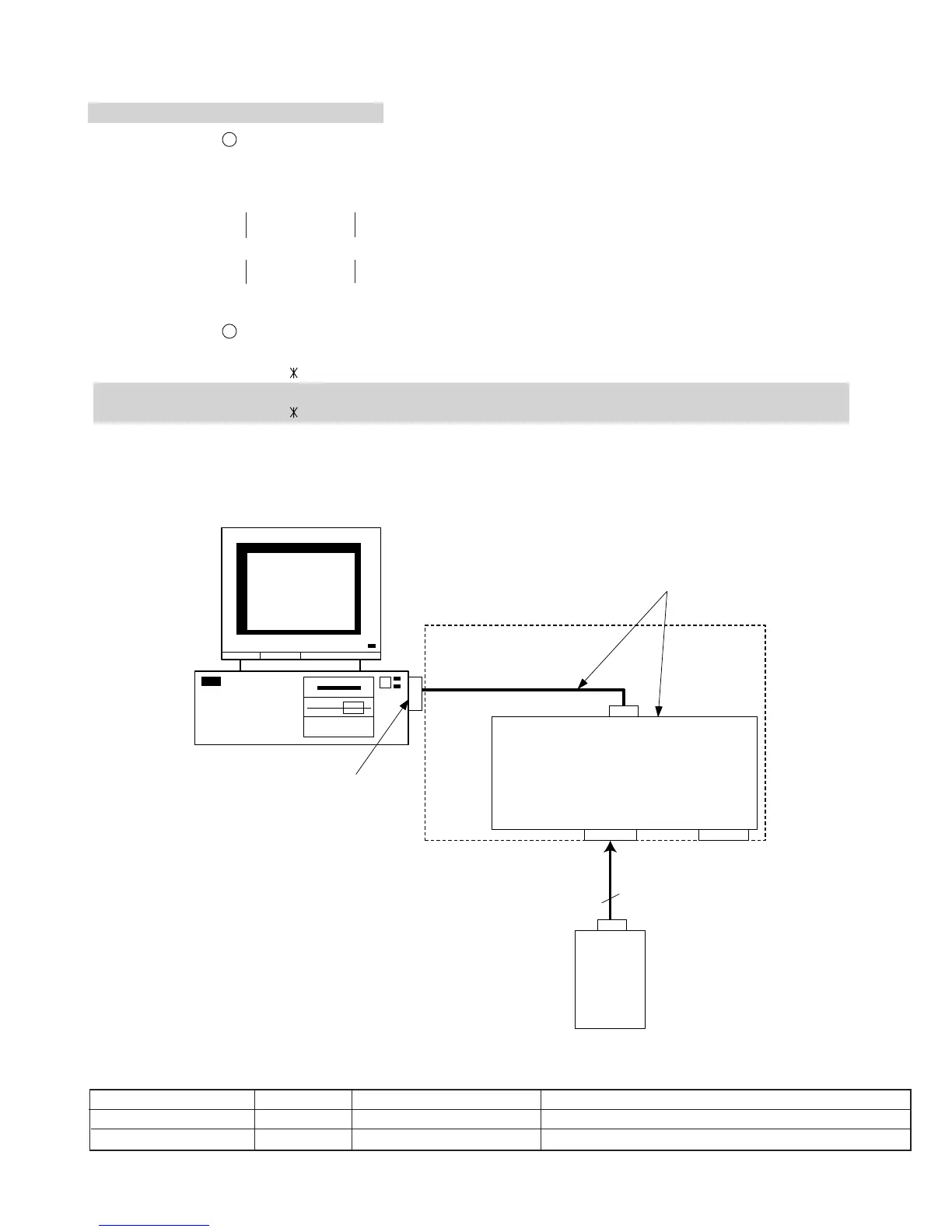
Fig. 1. Connected chart
CNPRG
FAX
Machine
Control
PWB
CN2CN1
3PIN
RS-232C DSUB 9PIN
RS-232C
Cable
DUNTK404CSCZZ
Com
Port
PC
Program Loader BOX
Main Cable
QCNW-306BSCZZ
Table 1. Program loader unit
PART CORD PRICE RANK NAME REMARKS
DUNTK404CSCZZ DG Program loader BOX Includes RS-232C cable
QCNW-306BSCZZ BF Main cable Connects Program loader BOX and FAX machine.
TYPE1: FAX ENGINE FLASH ROM
TYPE2: PRINTER ENGINE FLASH ROM
Step 1 File setting 1
Execute “FAX_LOADER.EXE” and extract the compressed file.
File contents:
¥FAX_LOADER¥ ----+----¥CMD¥-----+---- Atl0.cmd
----+----¥
CONFIG
¥--+---- FAX_DOWNLOAD.txt
----+----¥
DATA
¥----+---- ¥FAX¥
Step 2 File setting 2
TYPE1: FAX ENGINE FLASH ROM
Copy the downloaded file ( .VER) to ¥FAX_LOADER¥DATA¥FAX¥ in the default directory (given directory).
TYPE2: PRINTER ENGINE FLASH ROM
Copy the downloaded file ( .ESC) to ¥FAX_LOADER¥DATA¥FAX¥ in the default directory (given directory).
Step 3 Flash rewriting
Description for application is detailed in the attached document below.
· Rewriting the flash for the FAX or PRINTER engine (with software (Tera Term) for the PC)
[3] Rewriting version up the FLASH ROM



 To Next Page