Operations Manual Perdix
Manual DocRev B
17
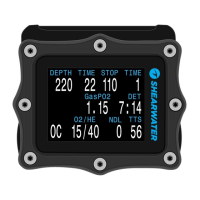
THE CENTER ROW
The center row displays PPO2. PPO2 units are absolute atmospheres
(1ata = 1013mbar).
The layout varies depending on the current mode
Mode Menu Setup Center Row Display
Open Circuit
Closed
Circuit with
Internal PPO2
Setpoints
CC Internal Setpoint
OC Gas
In CC mode, PPO2 displays in Flashing Red when less than 0.40 or greater than 1.6.
In OC mode, PPO2 displays in Flashing Red when less than 0.19 or greater than 1.65.
The above limits can be adjusted in the Adv. Config 2 menu.


 To Next Page