Operations Manual Perdix
Manual DocRev B
86
CHANGING THE BATTERY
NOTE: A large coin or washer is required for this section.
Remove the battery cap
Insert the coin or washer into the battery cap slot. Unscrew by turning counter
clockwise until the battery cap is free. Be sure to store the battery cap in a clean dry
space.
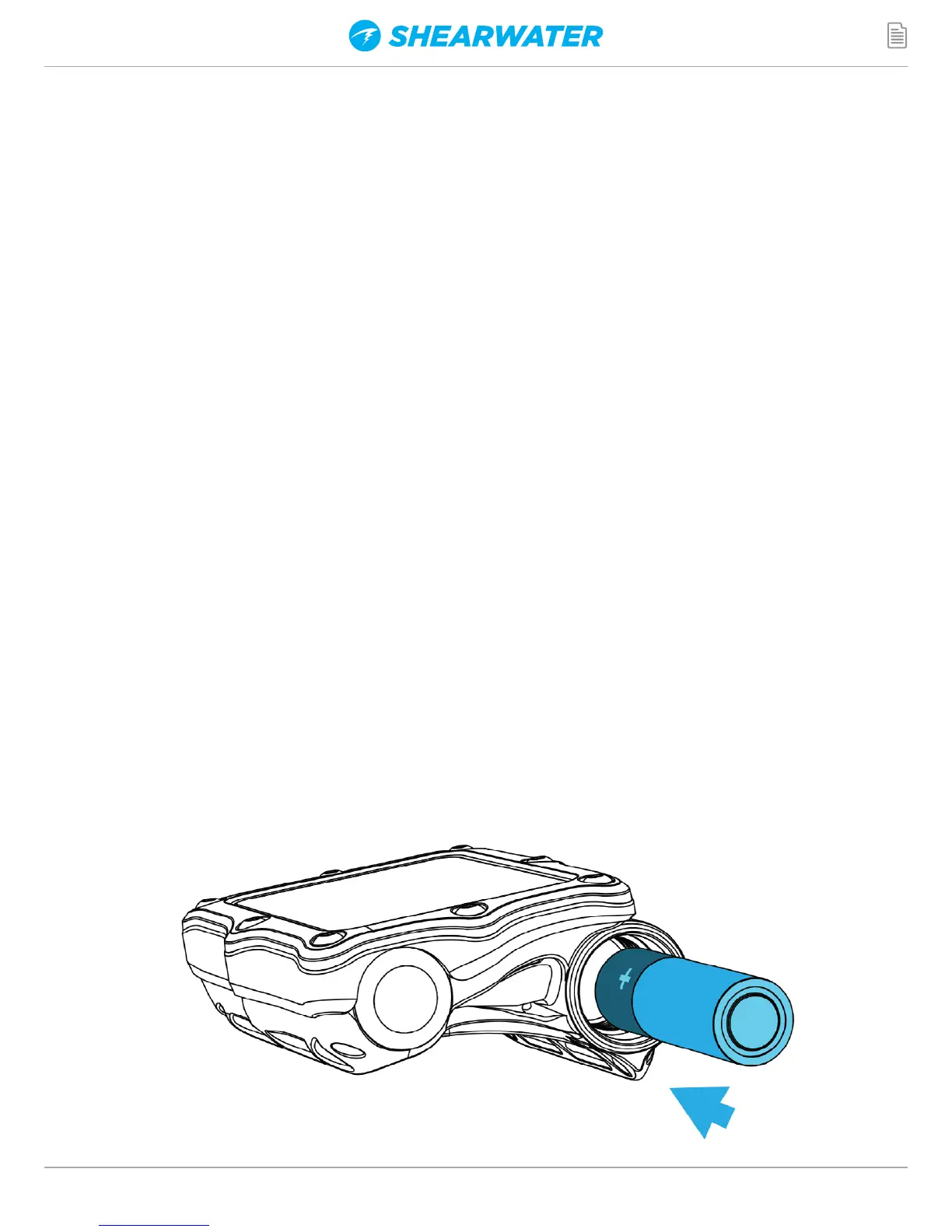
Exchange the battery
Remove the existing battery by tilting the Perdix computer. Insert the new battery
positive contact first. A small diagram on the bottom of the Perdix shows the proper
orientation.
Accepted battery types
The Shearwater Perdix can accept a wide variety of AA sized batteries. The Perdix can
accept any AA sized (or 14500 size) battery that outputs a voltage between 0.9V and
4.3V.
Reinstalling the battery cap
It is very important that the battery cap O-rings are clear of dust or debris. Carefully
inspect your O-ring for any debris or damage and gently clean. It is recommended
that you lubricate your battery cap’s O-ring on a regular basis with an O-ring lubricant
compatible with Buna-N (Nitrile) O-rings. Lubricating helps ensure that the O-ring
seats properly and does not twist or bunch.
Insert the battery cap into the Perdix and compress the battery contact springs. While
the springs are compressed rotate the battery cap clockwise to engage the threads.
Be sure not to cross thread the battery cap’s threads. Tighten the battery cap until
snug and the Perdix powers on. Do not over tighten the battery cap.


 To Next Page