Operations Manual Perdix
Manual DocRev B
66
Example 0.00
Example 0.00
Example 0.00
Example 0.00
Example 0.00
Example 0.00
Example 0.00
Example 0.00
Example 0.00
Example 0.00
0
System Setup
SYSTEM SETUP
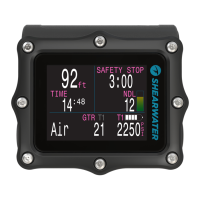
System Setup contains configuration settings together in a
convenient format for updating the configuration before a dive.
System setup cannot be accessed during a dive.
However, many of the settings are also available during the dive
in a single line interface. Although all of the settings available in
Dive Setup are available in System Setup, not all settings in System
Setup can be edited in Dive Setup.
The MENU and SELECT buttons are context sensitive to each sub
menu and individual setting.
When cycling through the sub-menus, MENU will carry the user
to the next sub-menu, while SELECT will allow the user to edit the
options in this submenu.
Once the user has pressed SELECT to edit a submenu, MENU
will cycle the user through the different submenu listings, while
SELECT will let the user edit those listings.
Once the user has pressed SELECT to edit a submenu listing
MENU will be used to change the context sensitive variable, while
the SELECT button will be used to move to the next field. Once
the user has pressed SELECT through all the fields, the new user
preferences will be saved.


 To Next Page