Operations Manual Perdix
Manual DocRev B
60
0
0
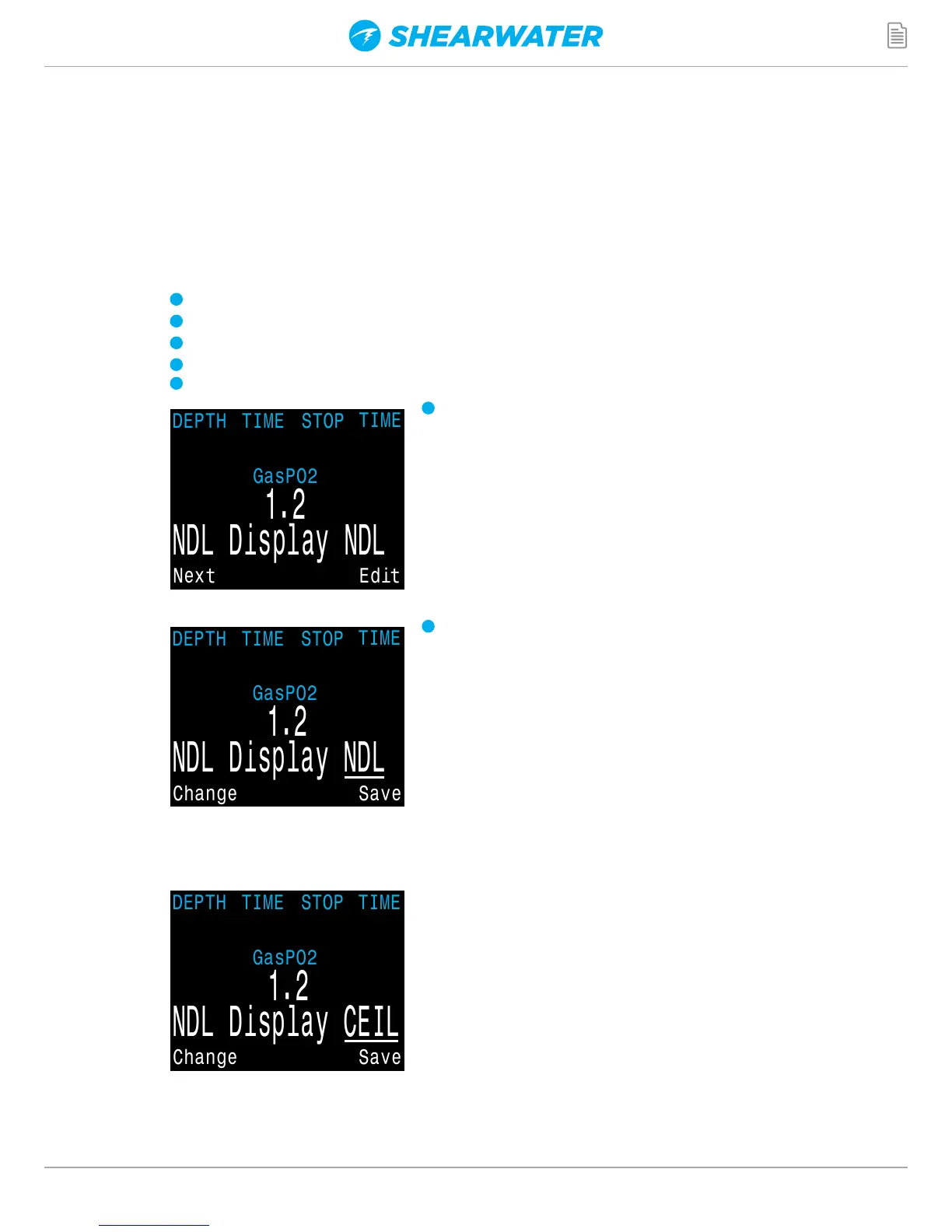
NDL Display
The NDL Display option allows you to display four different values during
the dive. The display can be changed during the dive to provide different
information. The value selected here replaces the NDL on the main screen once
decompression stops are required.
1
NDL
2
CEIL
3
Buhlmann
4
@+5
5
Δ+5
Pushing SELECT will make the NDL display
editable. The first choice available will be NDL. If
you select NDL, the NDL will always be displayed
during the dive whether or not you have a
decompression ceiling.
The next selection is CEIL. With this setting, as long
as the NDL time is 0 (you have a decompression
ceiling), the raw ceiling will be displayed instead
of the NDL. This is the equivalent of the ‘Man on
a rope’. It will show your ceiling without it being
rounded up to the next even 10 foot or 3 meter stop.
Please note that there is very limited information on
the effects of following a continuous ceiling instead
of stopping at stops and only moving up to the next
stop when the stop has cleared.
It is the Shearwater's opinion that all stops should
be honored. It seems intuitive that if you have
bubbles, and you stop, you give the bubbles an
opportunity to be resorbed. If you continuously
ascend, the ambient pressure is continuously
reduced which prevents bubbles from shrinking.
Because of this belief, the computer will give one
MISSED DECO STOP message during the dive and
one after the dive, and will flash the stop depth
and time in red as long as you are above the stop
depth. It will use the increased gradient though,
and your calculated off-gassing will be faster than
staying at the stops.
1
2
0


 To Next Page