Operations Manual Perdix
Manual DocRev B
33
Menus perform actions and allow settings to be changed
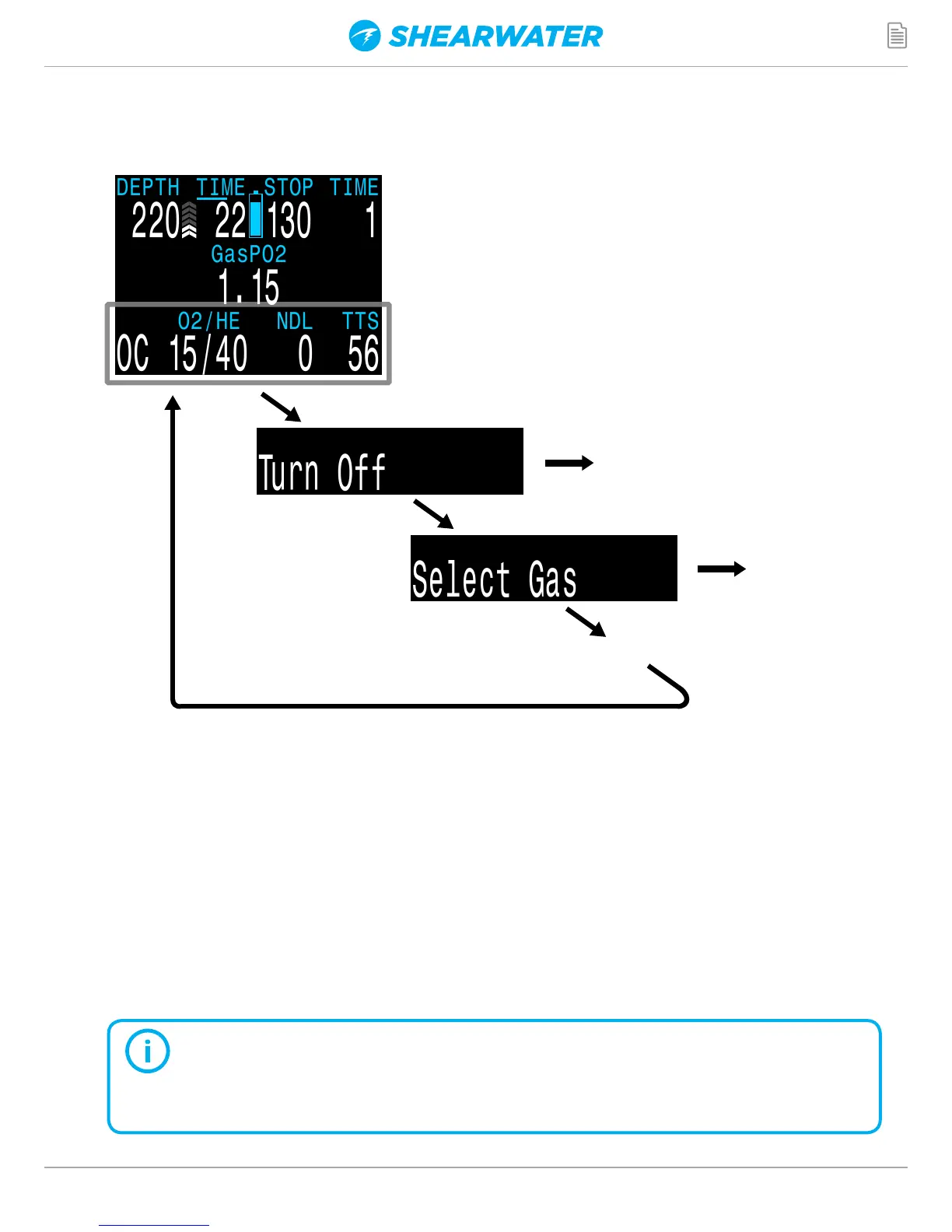
Starting from the main screen, pressing the MENU (left) button steps through the
menus. When all menus have been viewed, pressing MENU again will return to the
main screen.
Pressing the SELECT (right) button when a menu is displayed, either performs that
action or enters a sub-menu.
If no buttons are pushed for 1 minute, the menu system will time-out, returning to the
main screen. Anything that had been previously saved will be retained. Anything that
was in the middle of editing will be discarded.
Only menus necessary for the current mode are shown. This keeps
operation simple, prevents mistakes, and reduces buttons presses.
ADAPTIVE MENUS
MENU button
MENU button
Press MENU (left) button to step
through the menus.
Press SELECT (right) button to
execute command or enter sub-menu.
Menus display on the bottom row.
MENU button
SELECT
button
Perdix Turns Off
SELECT
button
Enter
Select Gas
sub-menu
MENUS
...


 To Next Page