ENGLISH
36
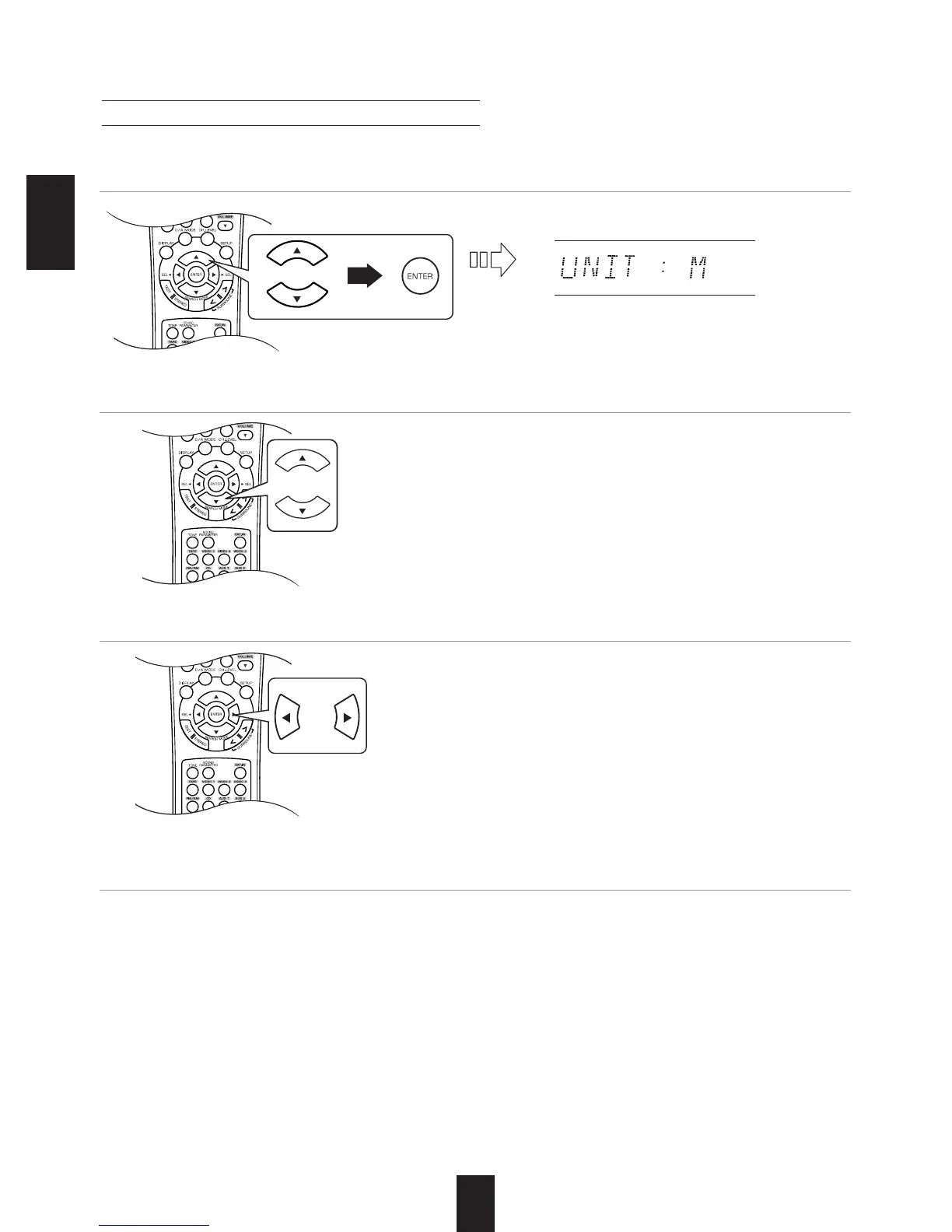
When selecting the desired unit
• You can select either "M (Meter)" or "FT (Feet)".
• Once a unit is selected, the distances are
automatically changed in the selected unit.
When setting the distance
• You can set the distance within the range of 0.0 ~
9.0 meters in 0.3 meter intervals (or 0 ~ 30 feet in
1 feet intervals).
When selecting the DISTANCE
Note :
• You cannot select the speakers set to "N (None or
No)".
About the speaker distance
When enjoying multi-channel surround playback with Dolby Digital and DTS sources, etc., it is ideal that the
center, surround and subwoofer speakers should be the same distance from the main listening position as the
front speakers. By entering the distance between the listening position and each speaker, the delay times of
center, surround and subwoofer speakers are automatically adjusted to create an ideal listening environment
virtually as if the center, surround and subwoofer speakers were at their ideal locations respectively.
1. Press the CURSOR UP()/DOWN() buttons to select the DISTANCE, then press the ENTER
button.
2.
Press the CURSOR UP()/DOWN() buttons to select the desired item.
3. Press the CURSOR LEFT()/RIGHT() buttons to set the selected item as desired.
4. Repeat the above steps 2 and 3 until the distances are all set as desired.



 To Next Page
 Loading...