Shure Incorporated
57/101
1.
2.
◦
◦
◦
•
•
1.
2.
1.
2.
3.
4.
Setting the Number of Active Speakers
The MXCW system allows up to 8 active speakers. Once the speaker list is full, participants must wait until their turn to speak.
If they attempt to speak before their turn, their microphone LED ring flashes momentarily and then turns off as a reminder.
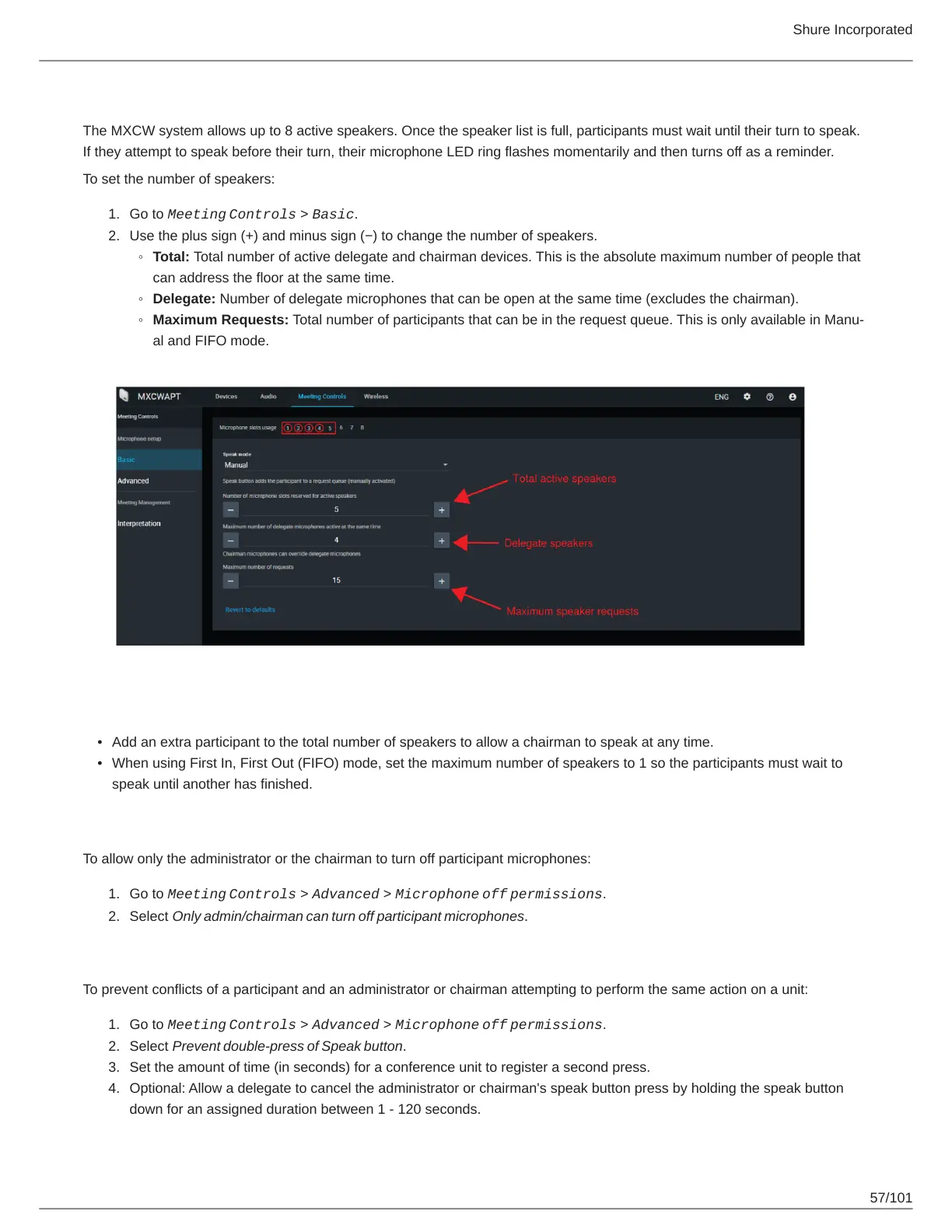
To set the number of speakers:
Go to Meeting
Controls > Basic.
Use the plus sign (+) and minus sign (−) to change the number of speakers.
Total: Total number of active delegate and chairman devices. This is the absolute maximum number of people that
can address the floor at the same time.
Delegate: Number of delegate microphones that can be open at the same time (excludes the chairman).
Maximum Requests: Total number of participants that can be in the request queue. This is only available in Manu
al and FIFO mode.
Best Practices for Setting Active Speakers
Add an extra participant to the total number of speakers to allow a chairman to speak at any time.
When using First In, First Out (FIFO) mode, set the maximum number of speakers to 1 so the participants must wait to
speak until another has finished.
Participant Microphone Control by Admin/Chairman
To allow only the administrator or the chairman to turn off participant microphones:
Go to Meeting
Controls > Advanced > Microphone
off
permissions.
Select Only admin/chairman can turn off participant microphones.
Prevent Speak Button Conflicts
To prevent conflicts of a participant and an administrator or chairman attempting to perform the same action on a unit:
Go to Meeting
Controls > Advanced > Microphone
off
permissions.
Select Prevent double-press of Speak button.
Set the amount of time (in seconds) for a conference unit to register a second press.
Optional: Allow a delegate to cancel the administrator or chairman's speak button press by holding the speak button
down for an assigned duration between 1 - 120 seconds.



 To Next Page