Description
3.6 Design
SIMATIC Rack PC 840 V2
Operating Instructions, Edition 05/2006, A5E00248055-04
3-7
3.6 3.6 Design
3.6.1 External structure
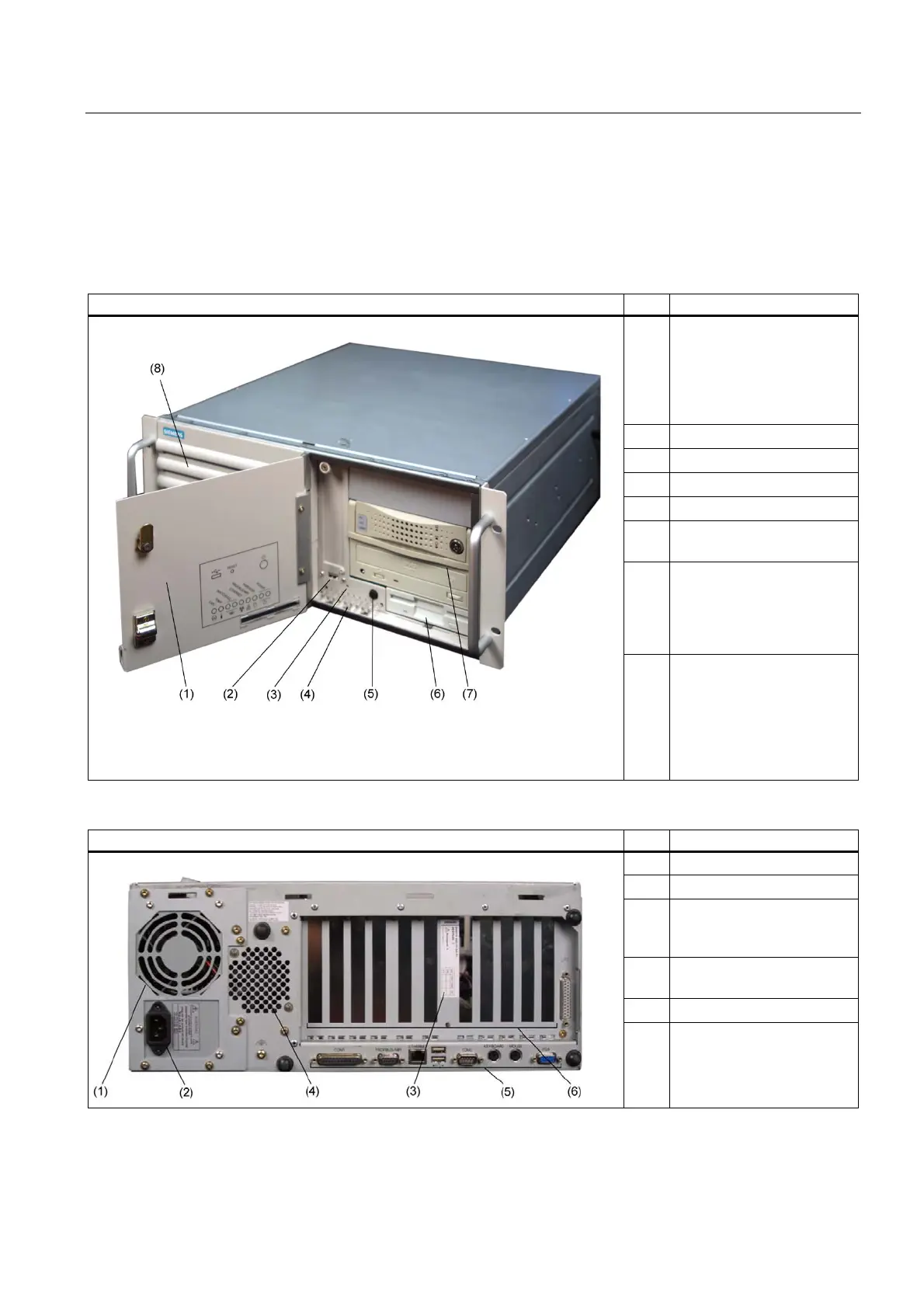
Front view of the device Pos Description
(1) Front door with lock,
provides protection against
dirt and unauthorized
access. Keep the door
closed during normal
operation.
(2) USB port
(3) Reset button
(4) Status displays
(5) On/off button
(6) Option of installing a floppy
disk drive
(7) Option for installing
DVD-ROM, DVD-ROM/
CD-RW drives, DVD burners
and removable racks for
hard disks
(8) Front panel with openings
for ventilating the device
(filter mat and fan are
positioned behind the front
panel). Check the filter mat
regularly for soiling and, if
appropriate, replace it.
Rear view of the device Pos Description
(1) Fan / power supply unit
(2) Power supply connection
(3) Rating plate (may also be
mounted on the inside of the
front panel door)
(4) Drive cooling fan at the rear
(optional)
(5) Connecting elements
(6) Expansion slots














 To Next Page