Description
3.6 Design
SIMATIC Rack PC 840 V2
Operating Instructions, Edition 05/2006, A5E00248055-04
3-9
3.6.3 Connecting elements
Interfaces
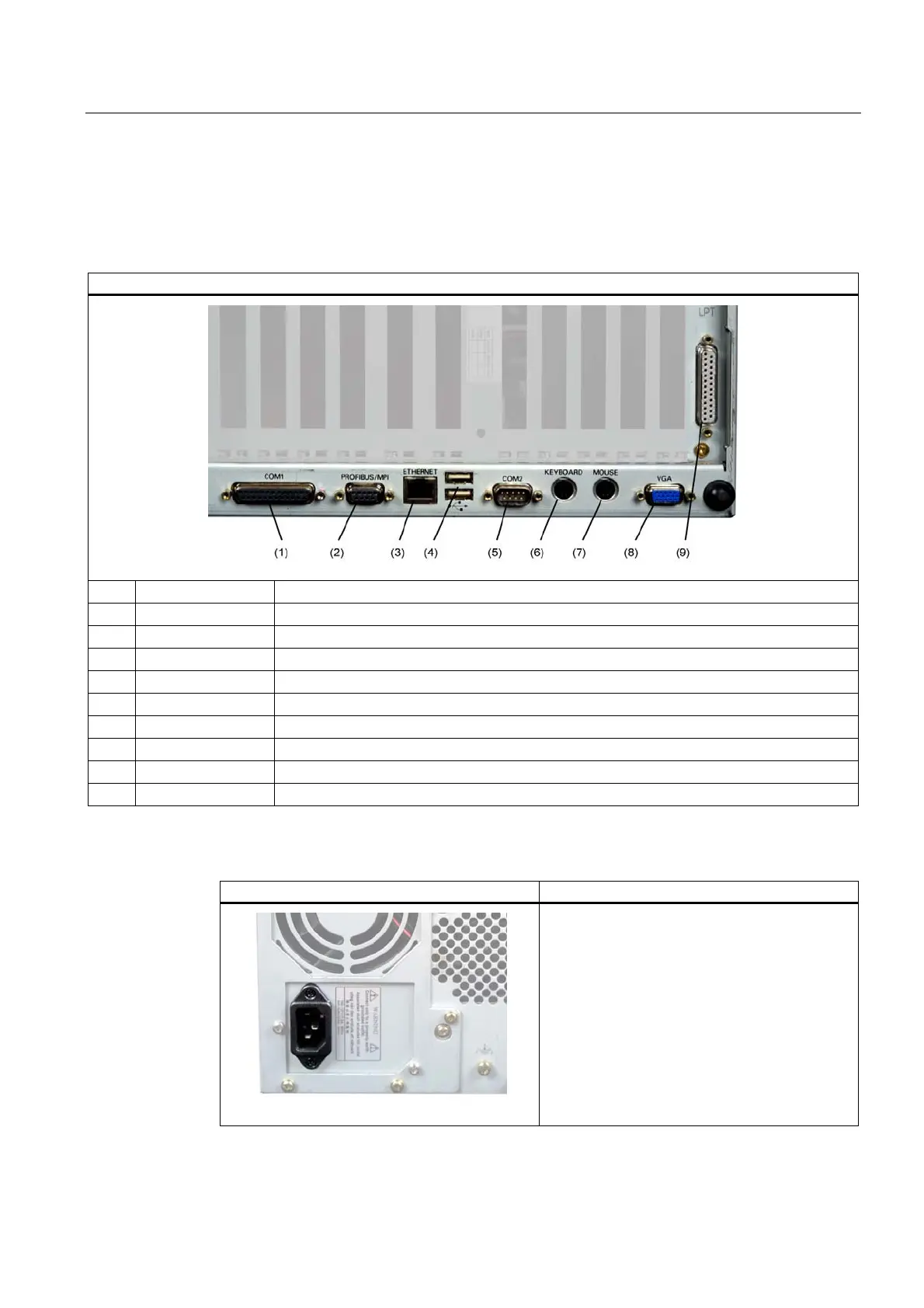
Layout of the interfaces on the rear of the device
Pos Designation Description
(1) COM 1 Serial port 1 (V.24), 25-pin sub D socket
(2) PROFIBUS/MPI MPI interface (RS485, electrically isolated), optional 9-pin sub D socket
(3) ETHERNET RJ 45 Ethernet connection 10/100 Mbps
(4) USB USB-device connectors. Bottom USB port 1, top USB port 2.
(5) COM2 Serial port (V.24), 9-pin sub D plug
(6) KEYBOARD Connection for a PS/2 keyboard
(7) MOUSE Connection for a PS/2 mouse
(8) VGA Connection for VGA monitor
(9) LPT1 Parallel interface, 25-pin
Power supply
Position of the IEC power connector Description
IEC power connector for the AC power supply to
the device. The allowable supply voltage is
120 V AC or 230 V AC














 To Next Page