EasyManua.ls Logo

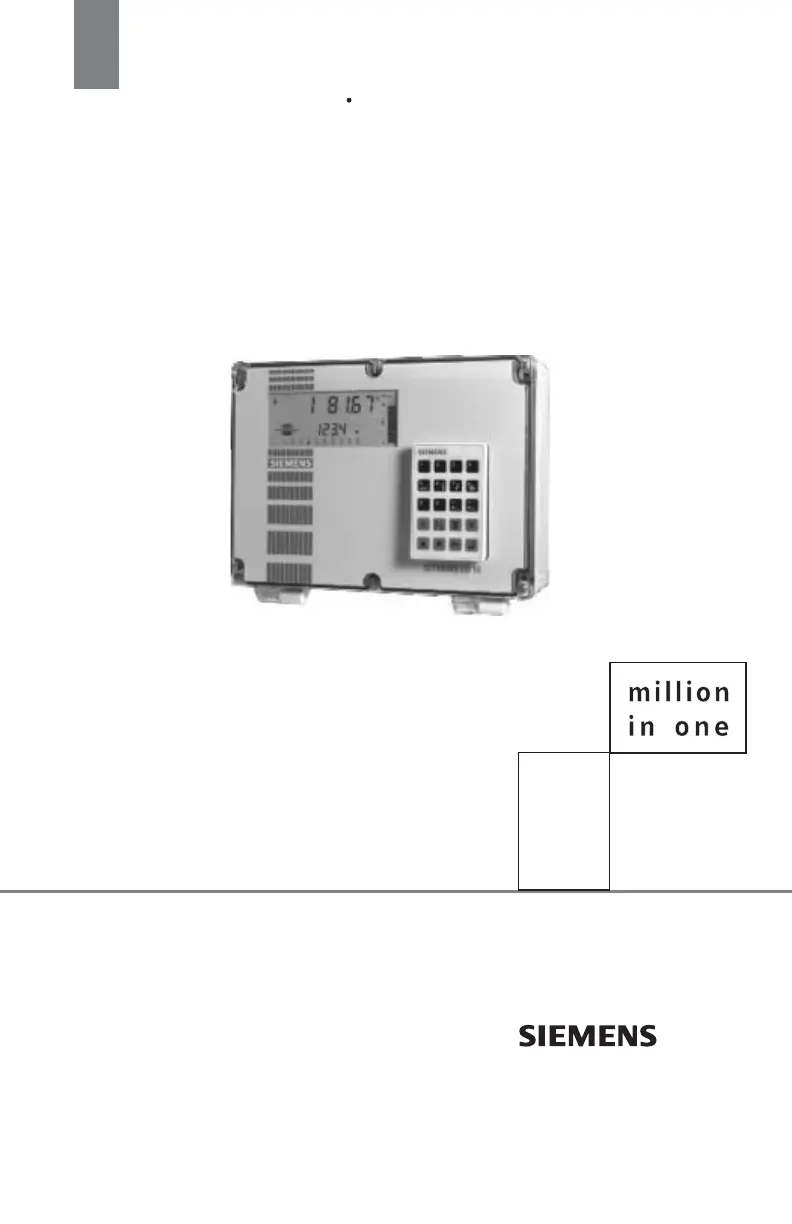
Siemens sitrans LU10 - User Manual

Siemens sitrans LU10
113 pages
Print Icon
To Next Page IconTo Next Page
Loading...
Instruction Manual May 2008
LU10
sitrans

Table of Contents

Questions and Answers

  • C
    coxdamonAug 18, 2025
    What to do if my Siemens Control Systems display is blank?
    • C
      Christina SalinasAug 18, 2025
      If the display is blank, the transmit neon isn't flashing, and the transducer isn't pulsing, the cause may be no power. Check the power supply, wiring, and voltage selection switch.
  • J
    Jerry MaxwellAug 20, 2025
    Why does my Siemens Control Systems display "EEEE"?
    • C
      carrolljanetAug 20, 2025
      If your Siemens Control Systems display shows "EEEE", it indicates that the reading is too high. To resolve this, select larger units (P005) or lower the Convert Reading value (P061).
  • A
    andrea26Aug 23, 2025
    What to do if Siemens Control Systems displays "Error" and "tb:(#)"?
    • R
      Renee SmithAug 23, 2025
      If the display shows "Error" and "tb:(#)", it means that the transducer is connected incorrectly or the wrong transducer (P004) is being used. Try reversing the BLK and WHT wires. If that doesn't work, enter the correct value for the transducer.
  • B
    Brandon ReyesAug 25, 2025
    What causes a Siemens Control Systems reading to fluctuate when the material level is still?
    • J
      Jamie StewartAug 26, 2025
      Fluctuating readings while the material level is still (or vice versa) indicate incorrect measurement stabilization. To fix this, alter the Measurement Response (P003) accordingly.
  • N
    Nathan BestAug 28, 2025
    What does "LOE" mean on my Siemens Control Systems display and how to fix it?
    • K
      krollinsAug 28, 2025
      If the display shows "LOE", it indicates a weak or non-existent echo. You should relocate and/or re-aim the transducer at the material level or object.
  • W
    William HammondAug 29, 2025
    What to do if Siemens Control Systems displays "Open" and "tb:(#)"?
    • P
      Patricia GreenAug 30, 2025
      If the display shows "Open" and "tb:(#)", it could mean the transducer is not connected, there is an open circuited transducer cable, or the transducer is defective. First, connect the transducer or remove the Point # from service (P001=0). If that doesn't work, repair or replace the transducer cable or the transducer as necessary.
  • V
    vfrazierSep 1, 2025
    Why is my Siemens Control Systems reading fixed, regardless of the material level?
    • T
      Tiffany SharpSep 1, 2025
      If the reading is fixed regardless of the actual material level, it could be that the transducer beam is obstructed, the standpipe is too narrow, or the transducer mounting is resonant. Relocate and/or re-aim the transducer at the material level or object.
  • S
    Sean LeeSep 3, 2025
    Why is my Siemens Control Systems measurement accuracy better when the level is near the transducer?
    • J
      Jessica TranSep 3, 2025
      If measurement accuracy improves as the level nears the transducer, it indicates an incorrect sound velocity used for distance calculation. Use an ultrasonic/temperature transducer or a TS-3 temperature sensor.
  • K
    Kyle KingSep 6, 2025
    What to do if Siemens Control Systems displays "Short" and "tb:(#)"?
    • H
      hmartinezSep 6, 2025
      If the display shows "Short" and "tb:(#)", it indicates a short-circuited transducer cable or a defective transducer. Repair or replace the cable or transducer as necessary.
  • M
    Matthew BruceSep 8, 2025
    How to fix a Siemens Control Systems reading that is always off by the same amount?
    • F
      felicia45Sep 8, 2025
      If the material level reported is always "off" by the same amount, it indicates an incorrect Empty (zero) reference. See Empty (P006), Reading Offset (P063), Offset Calibration (P650), & Offset Correction (P652).

Summary

Introduction to SITRANS LU10

About the SITRANS LU10

Details the SITRANS LU10's design, ultrasonic measurement capabilities, and applications.

Important SITRANS LU10 Features

Highlights key fixed features like enclosure and display, and programmable features.

Installation and Setup

Location and Mounting

Recommendations for choosing an ideal mounting location and instructions for mounting the unit.

Optional Cards, Interconnection, and Power

Information on installing optional cards, connecting system components, and making power connections.

Programming and Operation

Programming Mode Entry and Parameter Alteration

Steps to enter PROGRAM mode and change parameter values using direct or scroll access.

System Performance Evaluation

Steps to verify system programming and performance before operating process control equipment.

Parameters Configuration

Application Parameters

Parameters to alter SITRANS LU10 display, failsafe, relay, and mA output operation.

Enhancement Parameters

Parameters for altering operation to suit preferences or overcome measurement difficulties.

Range Calibration and Measurement Verification

Parameters for compensating measurement offset and verifying measurements against fluctuations.

Technical Reference

Application Examples

Examples demonstrating SITRANS LU10 feature usage for specific process requirements.

BIC-II Support

SITRANS LU10 digital output via Peripheral Communications for BIC-II.

Troubleshooting Guide

Measurement Difficulties

What to do if 'LOE' is displayed or if the unit locks onto a false echo.

Fixed and Wrong Readings

Steps to troubleshoot when the Reading is fixed or erratic.

Specifications

Key Specifications Overview

Summarizes power, environmental, accuracy, and communication specifications.

Siemens sitrans LU10 Specifications

General IconGeneral
BrandSiemens
Modelsitrans LU10
CategoryControl Systems
LanguageEnglish

Related product manuals