→
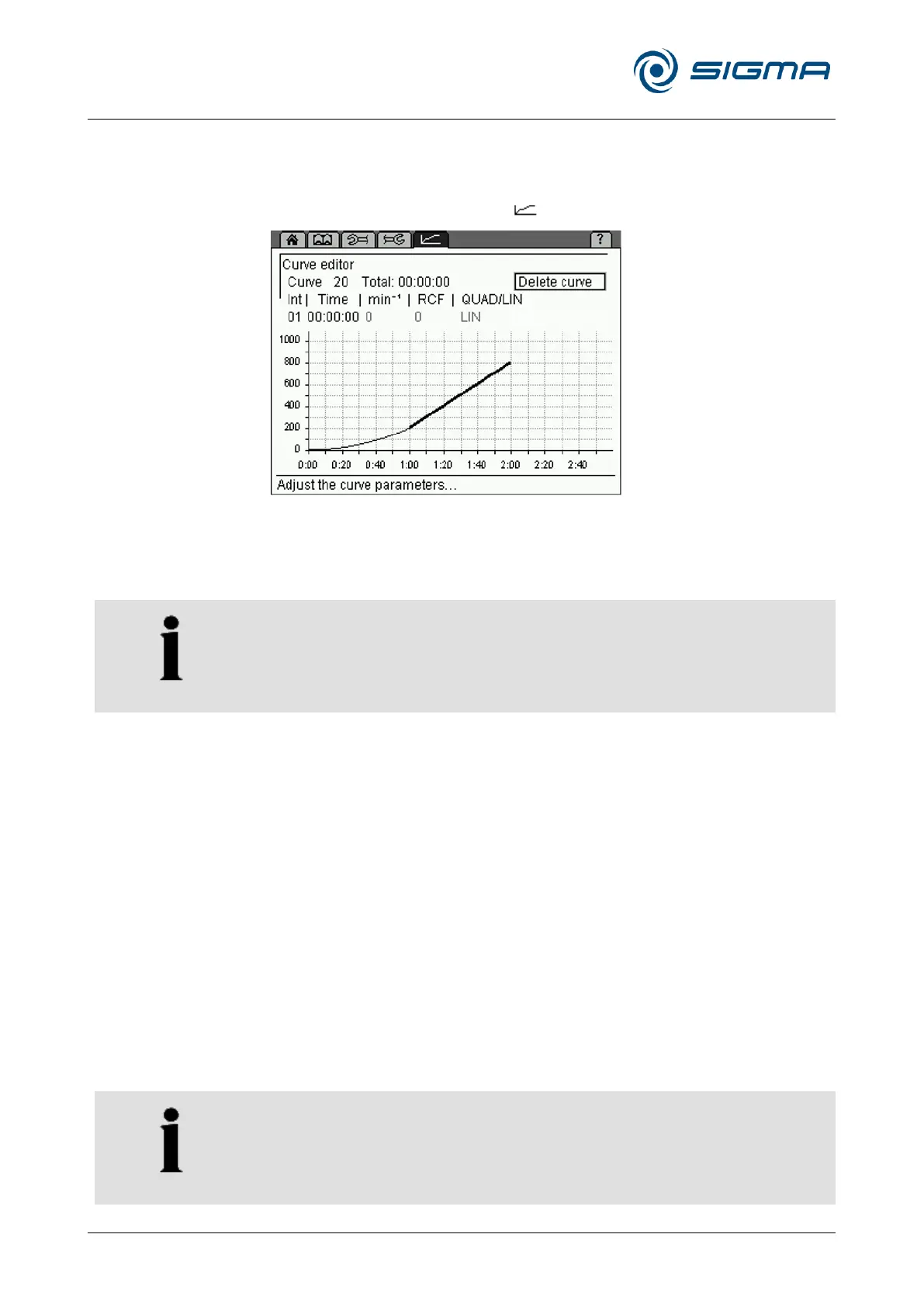
6.3.2.9 Curve menu
This menu is used to create and edit customised acceleration and
deceleration curves (see chapter 11.3 - "Acceleration and deceleration
curves"). It is symbolised by the " " symbol on the menu bar.
• Select the "Curve" menu. The curve editor will be displayed.
• Select a curve number between 20 and 29 in the input field "Curve". If
the curve number is already used, the stored curve will be displayed.
• The input field "Int" is used to specify the interval number of the
process. Up to ten intervals can be entered for a curve.
• Enter the interval time of the current interval into the input field "Time".
While doing so, certain restrictions must be taken into consideration
(see below).
• Enter the desired acceleration under "min
-1
" (rpm) or "RCF". While doing
so, certain restrictions must be taken into consideration (see below).
The values are interdependent.
• In the first interval, "QUAD/LIN" can be used to select a linear or
quadratic rise. All of the other intervals are linear.
The field "Total" shows the total runtime of the process. The maximum total
runtime of a curve depends on the slope of the curve and on the final speed
of the rotor.



 To Next Page