87
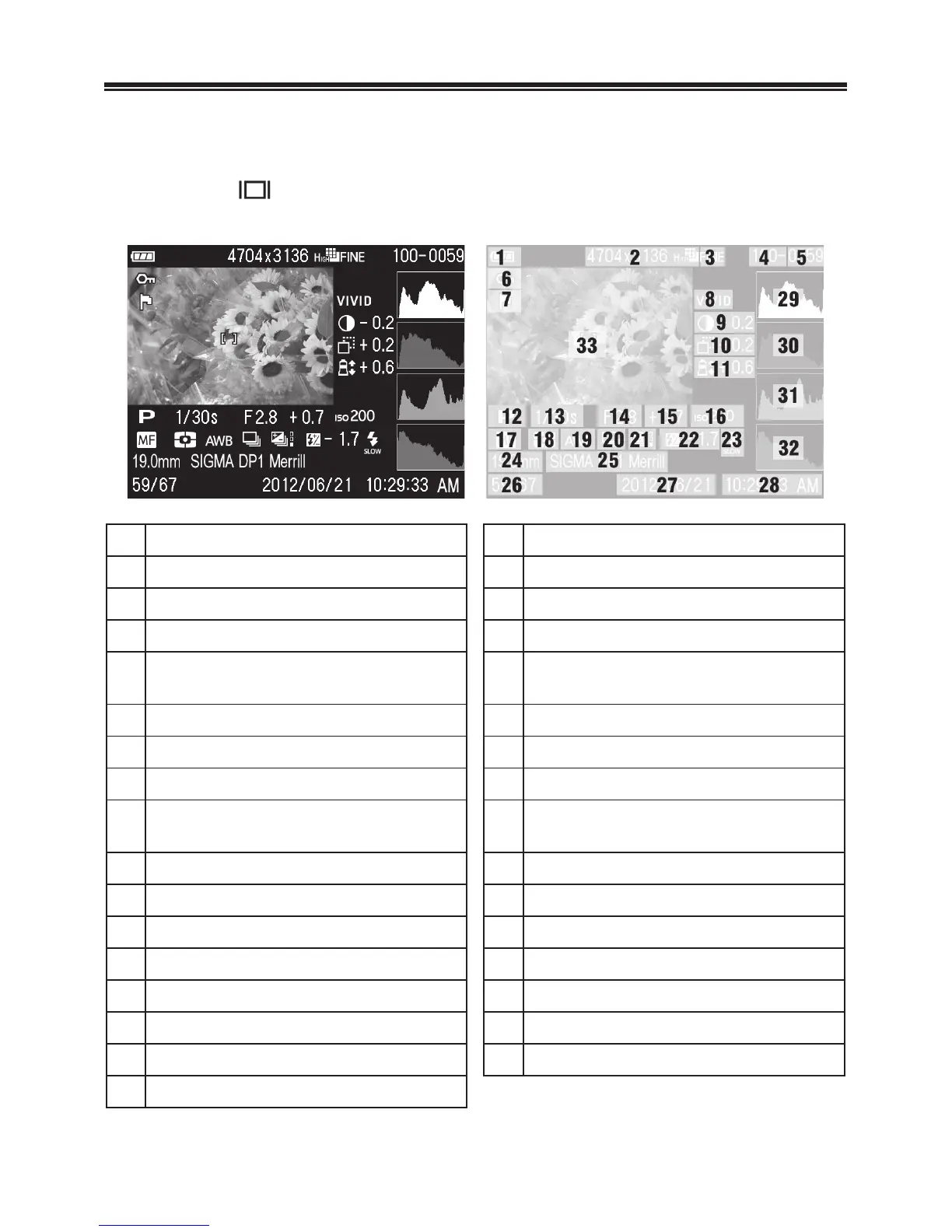
VIEWING IMAGE INFORMATION
The Image Info Screen contains additional information about each
image.
Press the
button several times from the Single-Image or
Zoomed-In View.
1
Battery Level Indicator
18
Metering Mode
2
Image Size
19
White Balance
3
Image Quality
20
Drive Mode
4
Folder numbering
21
Auto Bracket *
5
File numbering
22
Flash Exposure Compensation
Value
6 Lock * 23 Flash Mode *
7
Mark *
24
Focal Length
8
Color Mode
25
Camera name
9
Contrast
26
File Number /
total files recorded
10 Sharpness 27 DATE
11
Saturation
28
TIME
12
Exposure Mode
29
Histogram (Brightness)
13
Shutter Speed
30
Histogram (Red)
14
F Number
31
Histogram (Green)
15
Exposure Compensation Value
32
Histogram (Brue)
16
ISO Sensitivity
33
Focusing Frame
17
Focus Mode *
*If these features are set, the icon will be displayed.



 To Next Page
 Loading...










