Instruction Manual
20220653 / Rev. C 27
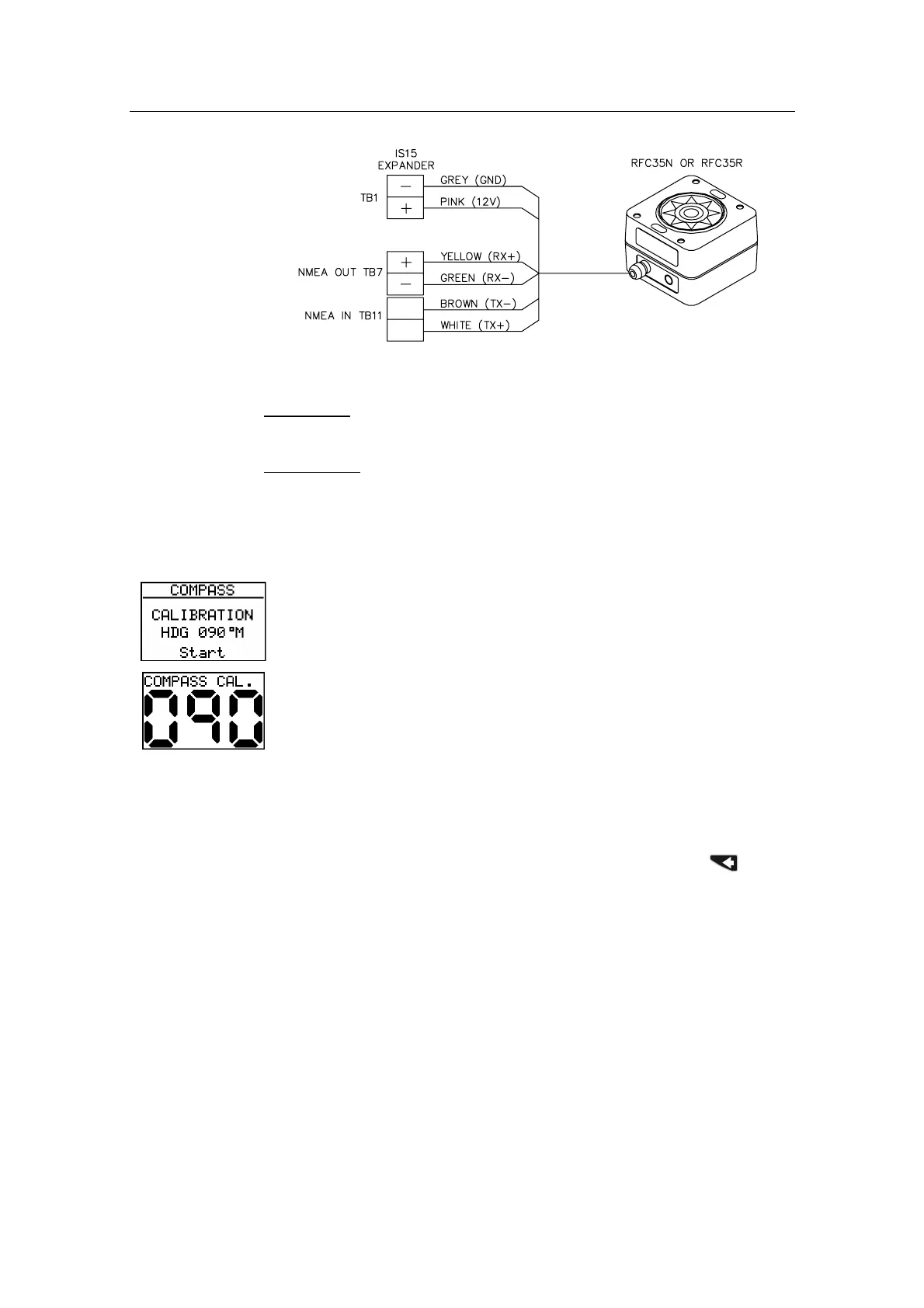
Figure 5-9 RFC35N connection to IS15 Expander
NMEA in:
‘Heading’ and ‘Calibration Completed’ from
compass.
NMEA out:
‘Start Calibration’ to compass.
Compass Calibration
Access the screens in the Compass Menu Group. Calibration and data
input should be carried out in the same sequence as described below.
This function will activate the automatic compass calibration
procedure.
Notes! 1. The procedure will not work with a single
instrument head connected to the compass.
2. Do not use the calibration procedure when the IS15
is connected to a Simrad autopilot.
Before you begin the compass calibration, make sure you
have enough open water around you to make a full
clockwise turn at low speed. (Complete turn should take
about 1 minute).
1. Start turning the boat to starboard and press the
button
and hold for 2 seconds. The LCD flashes ‘CAL’.
2. When the calibration is completed, (after having made
approximately 1 ¼ turns), the display will read ‘Done’.


 To Next Page