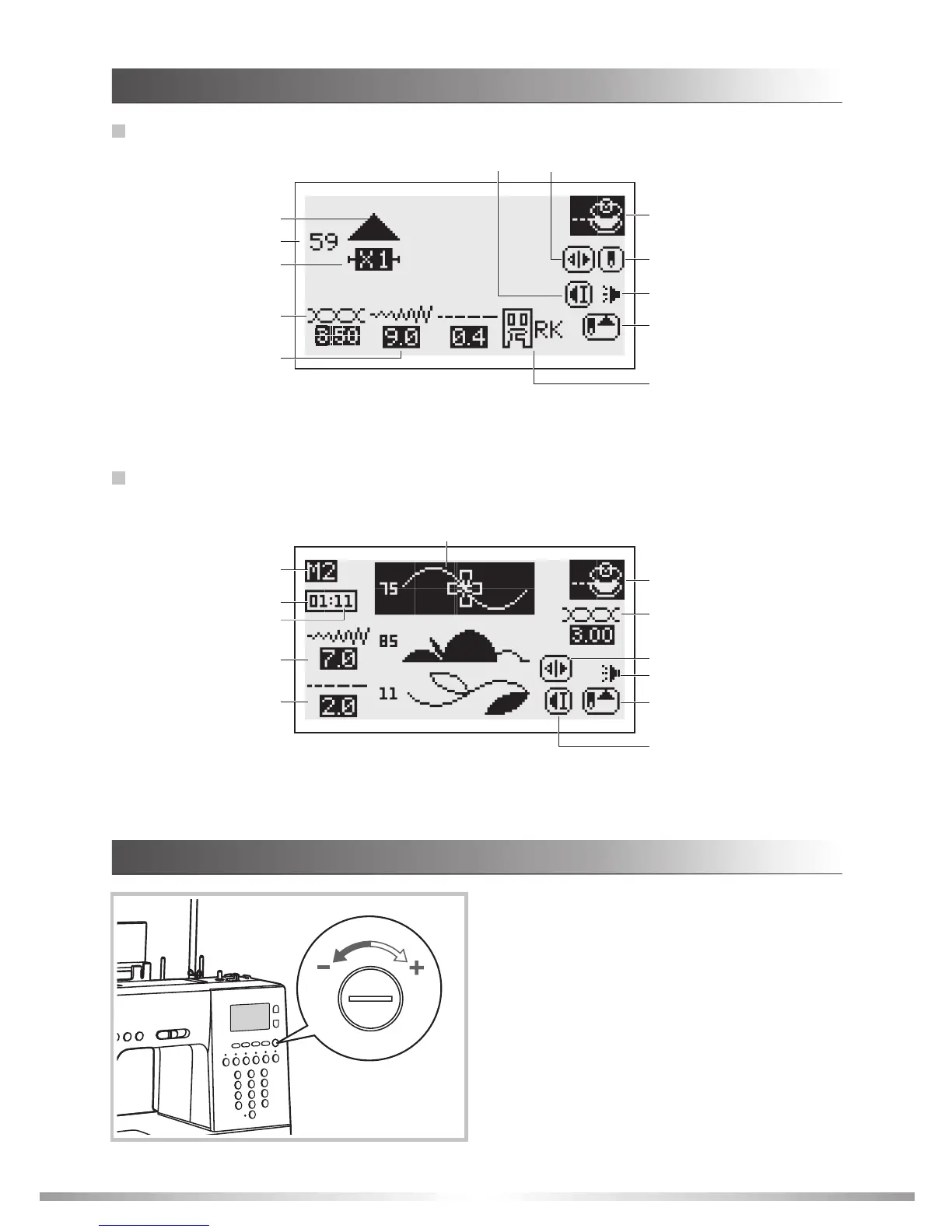
Memory
Elongation
LCD SCREEN BRIGHTNESS CONTROL
The LCD screen brightness control dial is located
at the right of LCD screen. Use this to dial adjust
the sharpness of the LCD .
If no indication is shown on the screen after
switching on the power, adjust the LCD screen
brightness with the dial.
LCD screen brightness : Turn the dial to the
.
screen
right
toward the "+"
LCD screen darkness : Turn the dial to the left
toward the " ".
21
Pattern
Stitch length
Suggested presser foot
and identification letter
Mirror
Tension
Pattern number
Magnification
Auto-stop
Needle up position
Sound on/off
Total number of unit
Number of current unit
Stitch width
Stitch length
Memory group
Pattern to edit
Bobbin winding
Sound on/off
Needle up position
Auto-stop
Mirror
GETTING READY
UNDERSTANDING THE LCD SCREEN
Single needle
Stitch width
Tension
Bobbin winding








 To Next Page