CUTTING THE THREAD
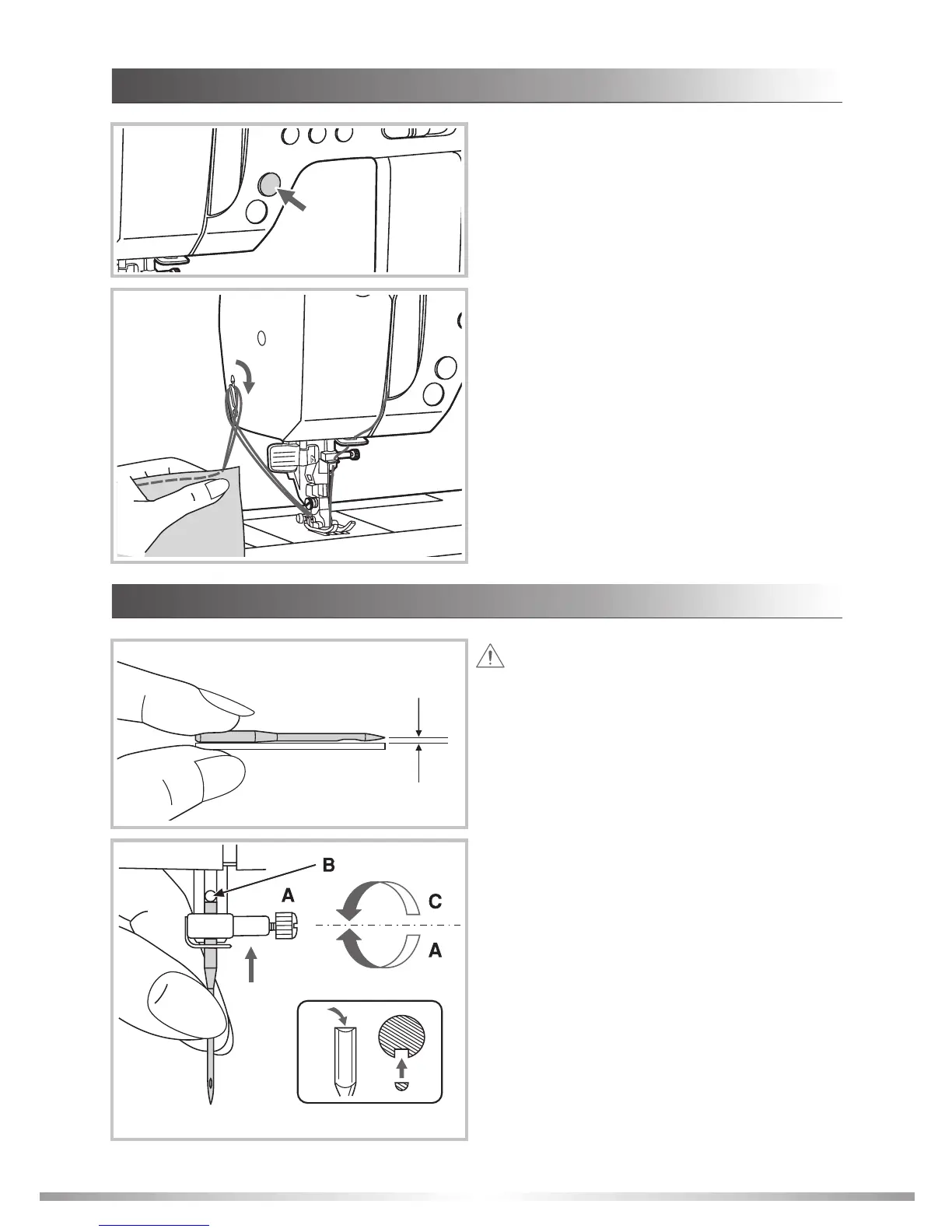
Use the thread cutter on the face plate to cut the
threads.
Raise the presser foot. Remove the fabric, draw
the threads to the left side of the face plate and
cut using the thread cutter.
The threads are cut at the proper length to start
the next seam.
Attention: Turn power switch to OFF (
when replacing the needle !
"O")
Change the needle regularly. A bent or damaged
needle can cause skipped stitches, damage fabric
or break while sewing.
To check the needle, place the flat side of the
needle on a flat surface. Discard any damaged
or bent needles.
Before changing the needle, use the handwheel
to raise the needle to its highest position.
A. Loosen the needle clamp screw and remove
the damaged needle.
B. With the flat side of the needle facing the back,
insert a new needle up as far as it will go.
C. Securely tighten the needle clamp screw.
REPLACING THE NEEDLE
33
Press thread cutter button after finishing sewing
and the machine will trim the threads.
GETTING READY








 To Next Page