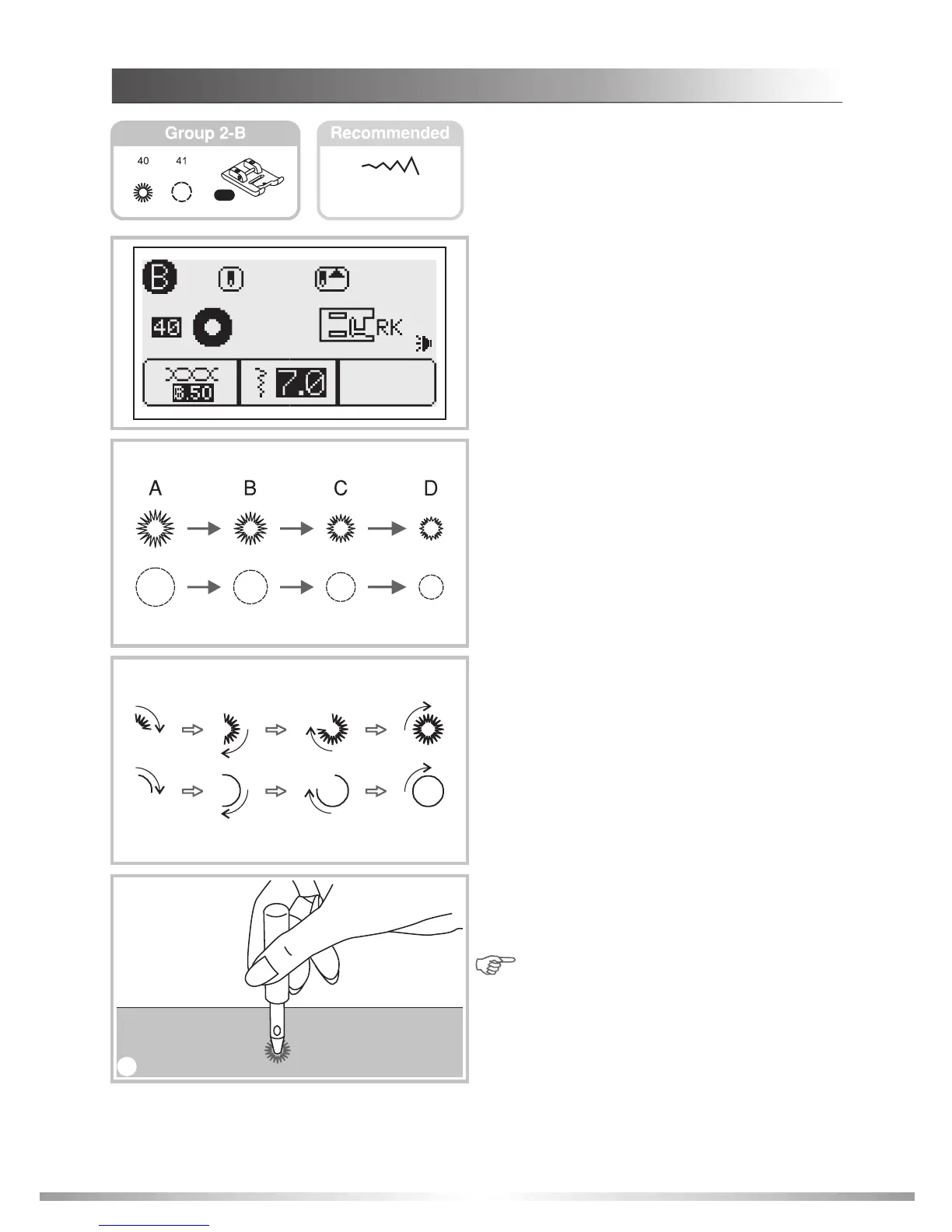
EYELET STITCH
1. Select pattern 40 or 41 from Group 2-B
Patterns to get the eyelet stitch.
Attach the satin stitch presser foot "RK".
2. Press the "" or "+" stitch width adjustment
button to select the eyelet size.
Size of eyelet.
A. 8.0mm (5/16 inch).
B. 7.0mm (1/4 inch).
C. 6.0mm (15/64 inch).
D. 5.0mm (3/16 inch).
3. Lower the needle into the fabric at the
beginning of the stitching, and then lower the
presser foot lever.
Once sewing is completed, the machine auto-
matically sews reinforcement stitches, then
stops.
4. Make a hole in the center using an eyelet
punch.
* Eyelet punch is not included with the machine.
Note: If fine thread is used, the stitching
may be sparse. If this occurs, sew the
eyelet twice; one on top of the other.
2
3
4
5.0~8.0
64
STITCHES
40:
41:
Select for sewing eyelets on belts, doll
clothes, heirloom sewing, etc.
Select for sewing eyelets on belts, doll
clothes, heirloom sewing, etc.
RK
1








 To Next Page