86
Editing patterns
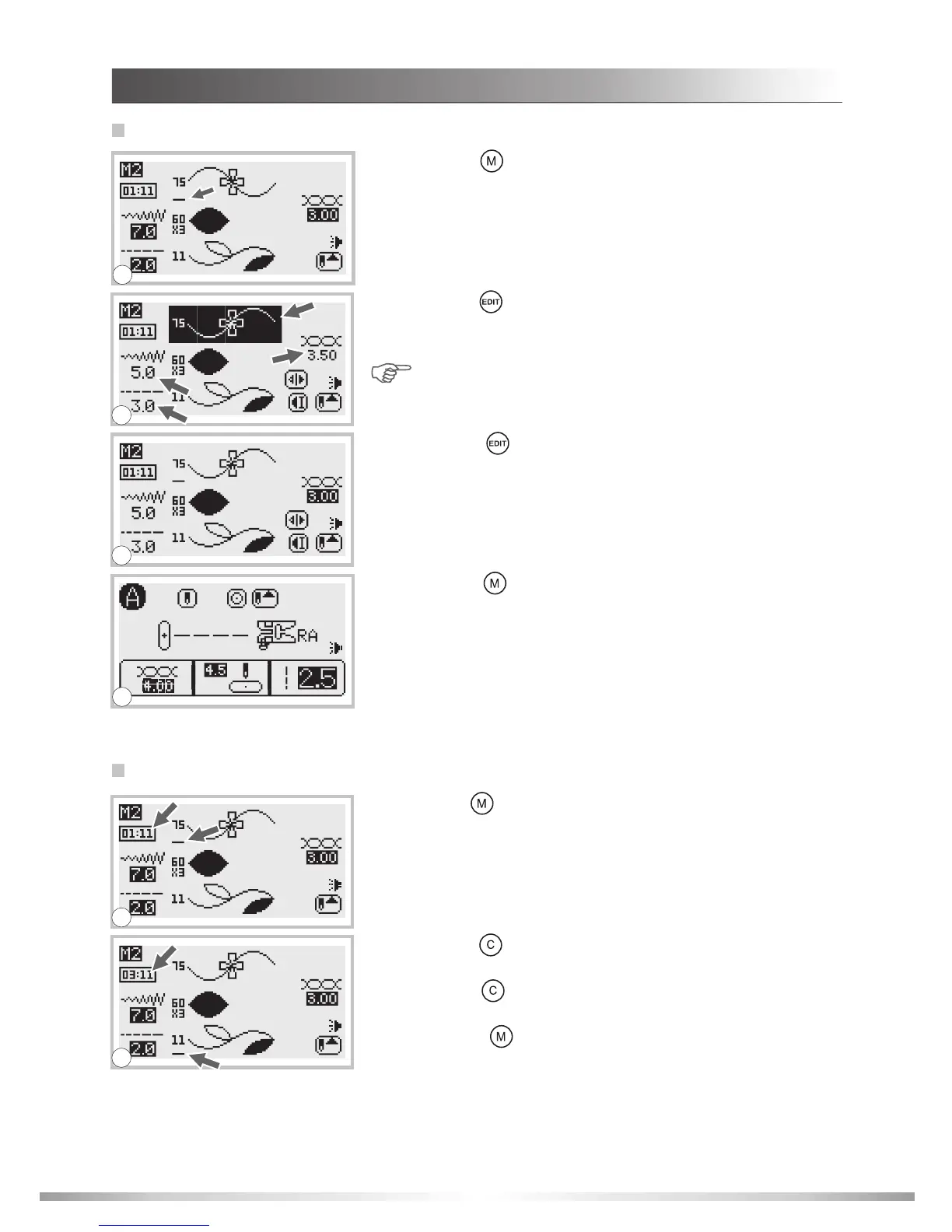
1. Press the " " button and the number of the memory you
wish to edit. Press the stitch width adjustment button to move
the cursor to the pattern you wish to edit.
2. Press the " " button to edit the pattern. The stitch length,
stitch width, tension, elongation, mirror imaging and auto-
lock of the patterns can be adjusted.
Note: When adjusting the thread tension, all patterns
tension will also be changed.
1
4. Press the " " button to save the pattern changes and
return to the normal screen.
1. Press the " " button and the number of the memory you wish
to clear a selected pattern. Press the stitch width adjustment
button to move the cursor below the pattern you wish to clear
from the memory.
2. Press the " " button to delete the selected pattern and the
next pattern will move forward upward.
Press the " " button again to clear any additional patterns.
3. Press the " " button to save the pattern changes and
return to the normal screen.
Clearing patterns or letters
1
2
3
2
3. Press the " " button when selected pattern has been
edited in order to return to the browse status. This will allow
additional patterns to be edited if so desired.
DECORATIVE PATTERNS
MEMORY FUNCTION
4








 To Next Page