1
2
4
3
5
6
7
8
9
11
12
13
10
Embroidery – 45
Embroidery Edit – Overview
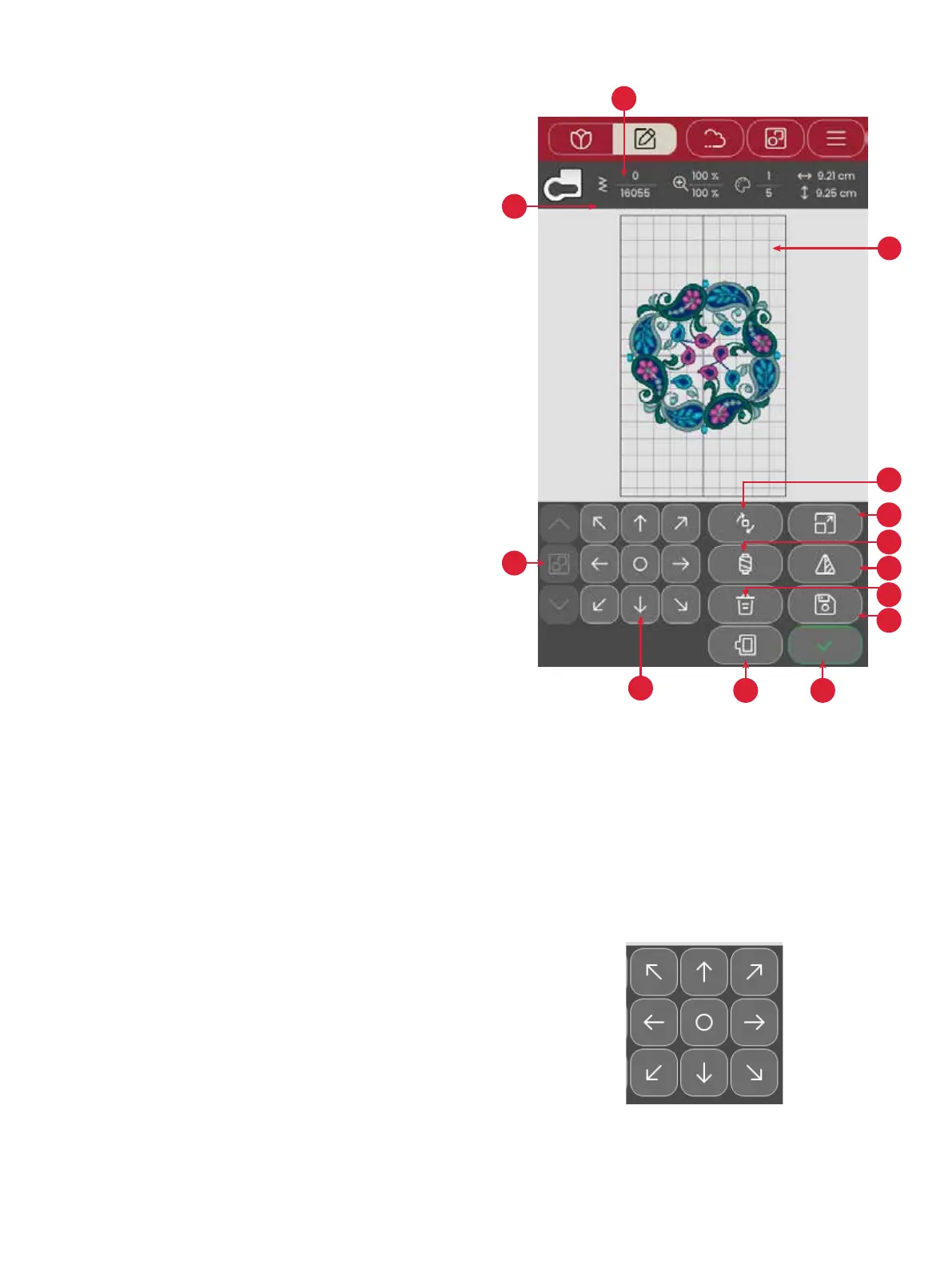
In embroidery edit you can adjust, combine, save and delete
designs and fonts. The loaded design(s) are shown in the em-
broidery area.
1. Embroidery area
2. Rotate options
3. Scale options
4. Thread color edit / Background color
5. Mirror side to side
6. Delete design
7. Save Design
8. Go to embroidery stitch out
9. Hoop selection
10. Control wheel
11. Arrange
12. Design information
13. Total number of stitches in design combination
Control Wheel
Total number of stitches in design combination
Touch and move a selected design with your nger to position
it anywhere in the embroidery area.
Use the wheel to adjust the position of the selected design(s).
Touch the center of the control wheel to position the selected
design(s) in the center of the hoop.
You can see the total stitches in your design combination next
to the presser foot recommendation in embroidery edit.








 To Next Page