63 98 650 D 3439
D 3439.201.07.10.23 10.2017
53
Dentsply Sirona 7Service
Operating Instructions (valid for USA) Sirona Dental CAD/CAM System
7.3.2.2
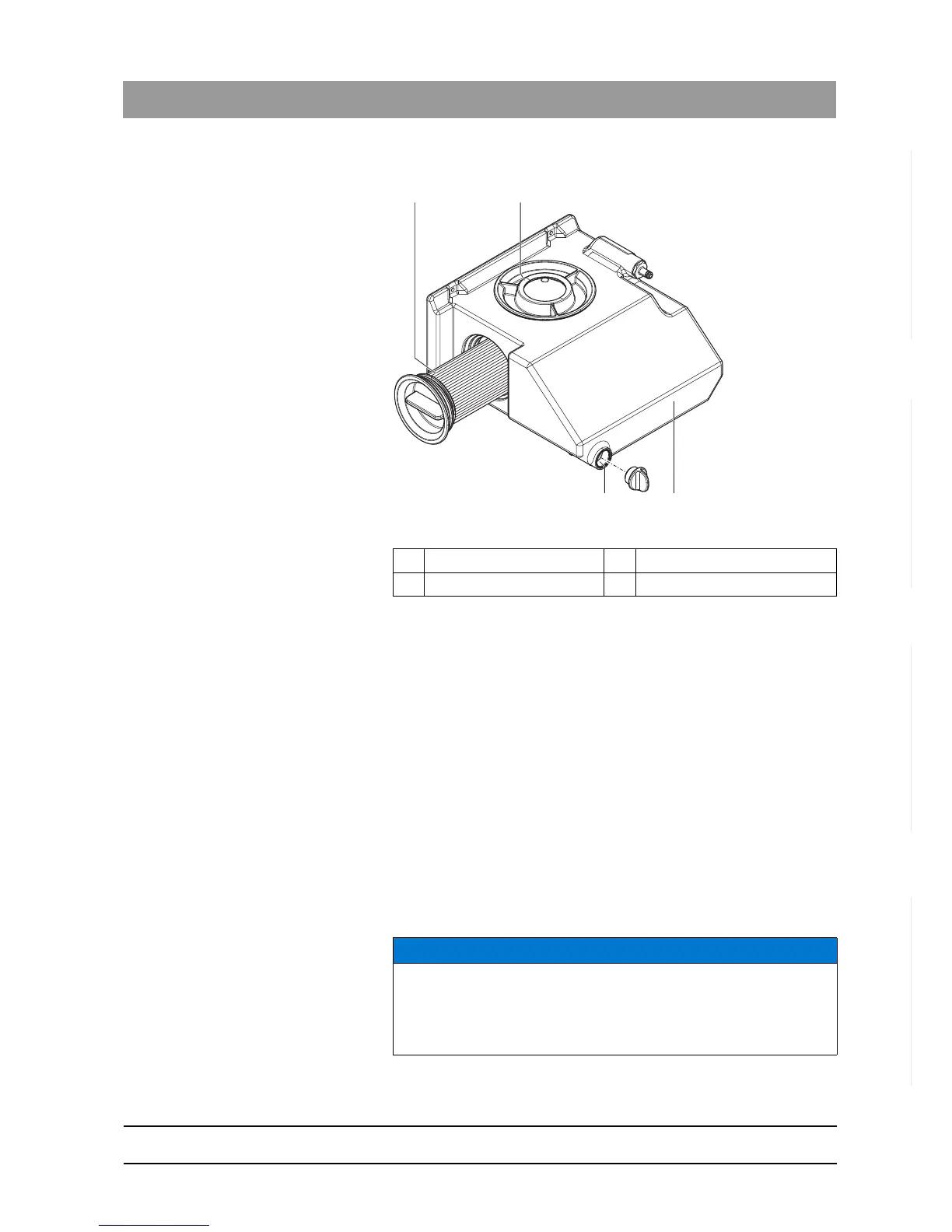
Water tank CEREC MC XL Basic
Water tank
To change the water, proceed as follows:
✔ The unit is switched on.
✔ No machining process is running.
1. Pull out the water tank at the front of the unit.
2. Open the drain opening.
3. Drain the water tank.
4. Turn the tank cap counter-clockwise and take it off. If you find the tank
cap hard to open by hand, use the tank cap opener (see "Opening the
tank cap").
5. Unscrew the side cap.
6. Remove the filter insert from the tank and clean the filter thoroughly
under running water.
7. Rinse the water tank.
8. Insert the cleaned filter with its cap into the unit and screw it tight.
9. Close the drain opening.
10. Add approx. 75 ml of DENTATEC to the tank.
A Filter insert C Tank
B Tank cap D Tank drain
NOTICE
Foaming not permissible!
If any cleaning agents are used, this will create foam, which is not
permitted.
Do not use any cleaning agents.















 To Next Page