61 23 488 D 3474
D 3474.208.01.06.02 04.2010
35
Sirona Dental Systems GmbH Functions
Operator's Manual GALAXIS Reconstructing a panoramic view
båÖäáëÜ
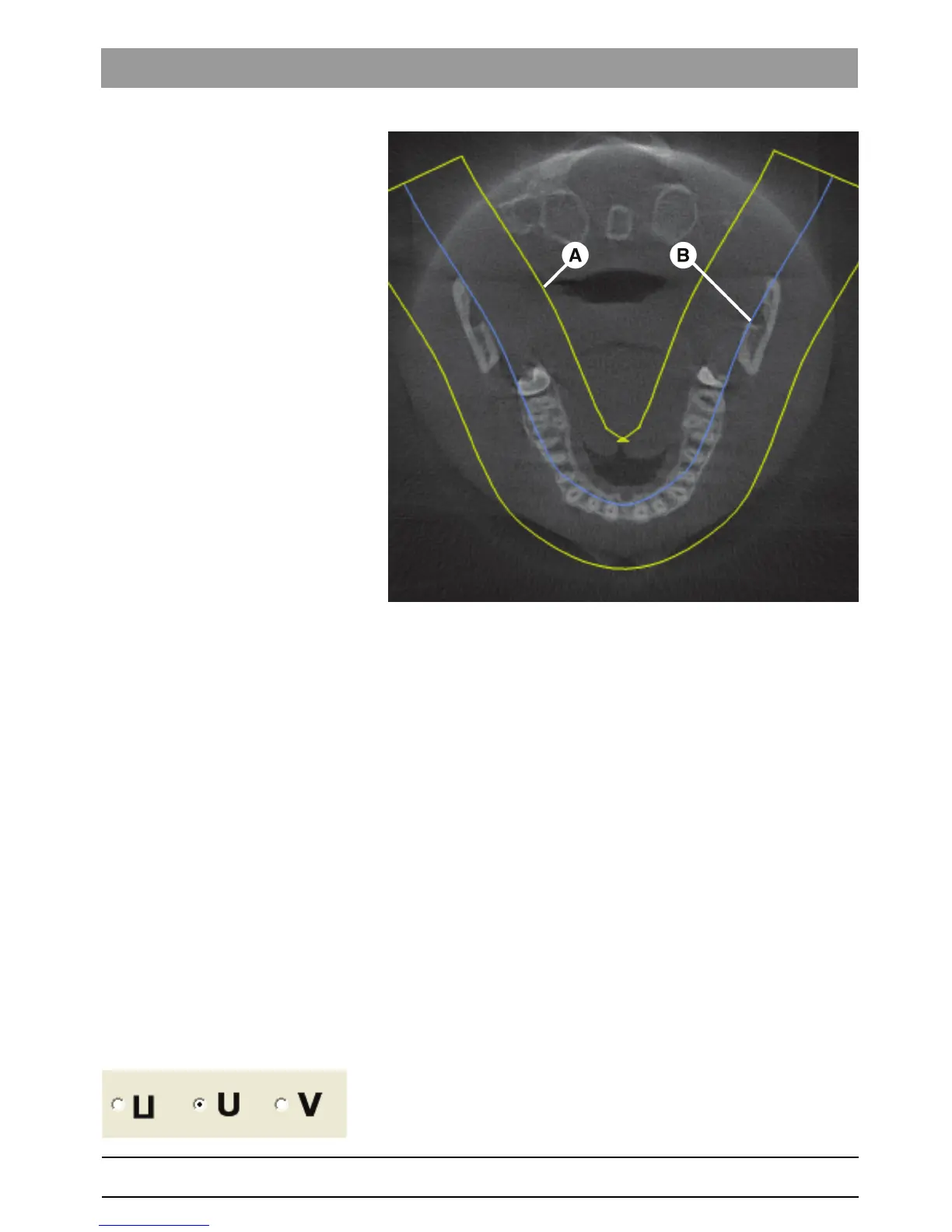
● A yellow, U-shaped region (A) which is used to reconstruct the panoramic
view is displayed in this axial plane.
● Located inside of this region (A) is a blue line (B) which defines the man-
dibular arch.
Goal of optimization The form, position and size of the U-shaped region (A) are to be optimized in
such a way that a higher quality panoramic view is obtained.
Preview A preview of the panoramic view with the current settings is displayed in the
lower part of the
"New Panorama"
dialog box.
The position of the axial slice is indicated in this preview by a yellow line.
Optimization points ● The region (A) should include all teeth and the jaw.
● The region (A) should be positioned so that the roots of the teeth are dis-
played as centrally as possible. Ideally, the blue line of the mandibular
arch (B) should run through the center of the roots of the teeth.
Tools
empty
Moving the U-shaped region
The U-shaped region can be selected and moved.
empty
Changing the shape of the dentition
The shape of the dentition (anterior teeth) can be changed via the radio but-
tons in the
"Jaw Shape"
dialog box.















 To Next Page