63 22 726 D3561
D3561.201.01.03.02 05.2012
167
Sirona Dental Systems GmbH 4 Operation
Operating Instructions SINIUS / SINIUS CS 4.13 Configuration of the treatment center (setup)
båÖäáëÜ
4.13.6 Configuring the network connection
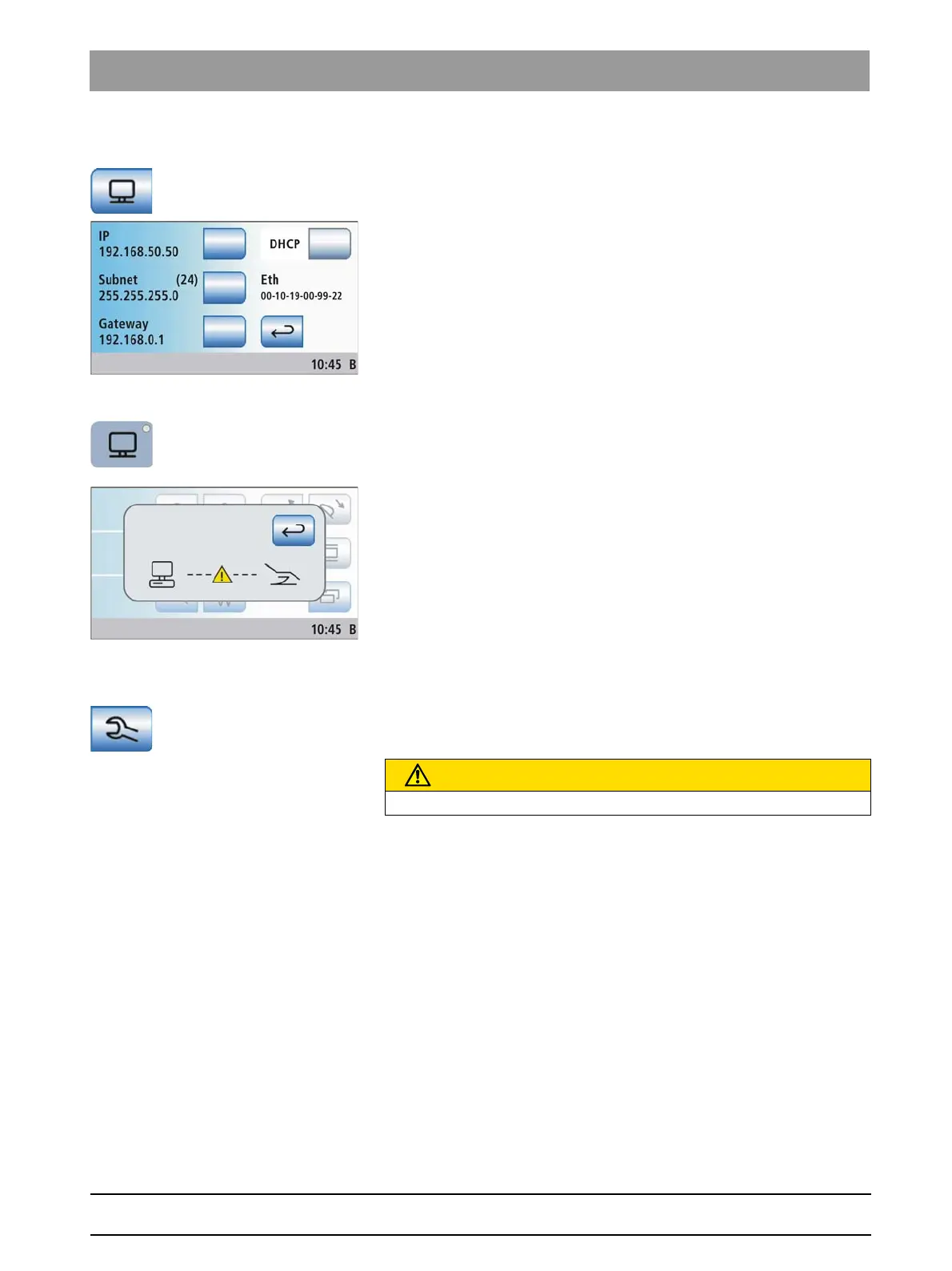
Configuring the network connection
➢ Touch the
Network connection
key in the setup program.
The sub-screen
Network connection
opens. It shows the current
network configuration.
Call in your data processing specialist for network configuration.
The network configuration is described in detail in the SINIUS / SINIUS
CS installation instructions.
Error message
Error message
If no connection between the treatment center and the PC exists, an error
message is displayed on the touchscreen by pressing the
SIVISION
program change key.
1. Check the network configuration.
2. Additional settings must be made at the PC end. For details, please
refer to the manual "Installation and Configuration of SIUCOM plus/
SIVISION connect".
4.13.7 Opening the Service domain
Opening the Service domain
The Service domain is intended to be used only by service engineers, see
"Service Manual".
Operating errors by the user:
➢ Please contact your service engineer or your dental depot.
CAUTION
A user operating error may cause malfunctions and hazards.















 To Next Page