63 22 726 D3561
D3561.201.01.03.02 05.2012
173
Sirona Dental Systems GmbH 5 Care, cleaning and maintenance by the practice team
Operating Instructions SINIUS / SINIUS CS 5.2 Surfaces
båÖäáëÜ
2. Disinfect the EasyTouch user interface by means of wipe disinfection.
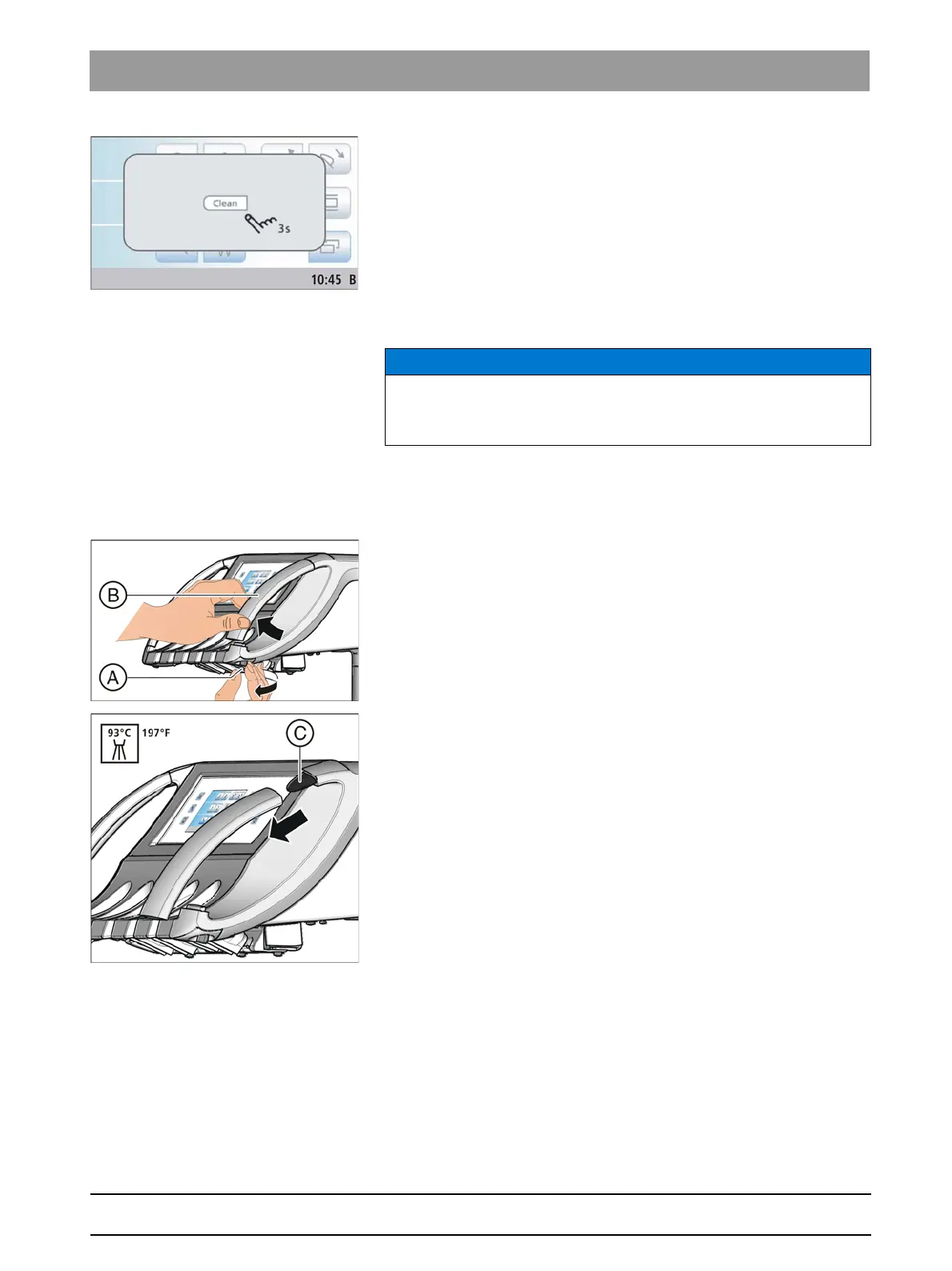
3. Press and hold the
Clean
fixed key on the dentist element (> 3 s).
The touchscreen and fixed keys are now reactivated.
5.2.3 Disinfecting handles
Disinfecti ng handles
Care and cleaning agents
The handles on the instrument holder of the dentist and assistant element
can be spray, wipe and thermally disinfected. They can be detached.
SINIUS dentist element
1. Loosen the screw A.
The handle B is unlocked.
2. Slightly lift the handle B and pull it from guide bracket C.
3. Repeat this procedure for the opposite handle.
Proceed in the reverse order when reattaching the handle.
NOTICE
Approved care and cleaning agents
Use only care and cleaning agents which have been approved by Sirona
(see "Care and cleaning agents" [ → 170]).















 To Next Page