63 22 726 D3561
D3561.201.01.03.02 05.2012
57
Sirona Dental Systems GmbH 4 Operation
Operating Instructions SINIUS / SINIUS CS 4.3 Foot control
båÖäáëÜ
Cursor path
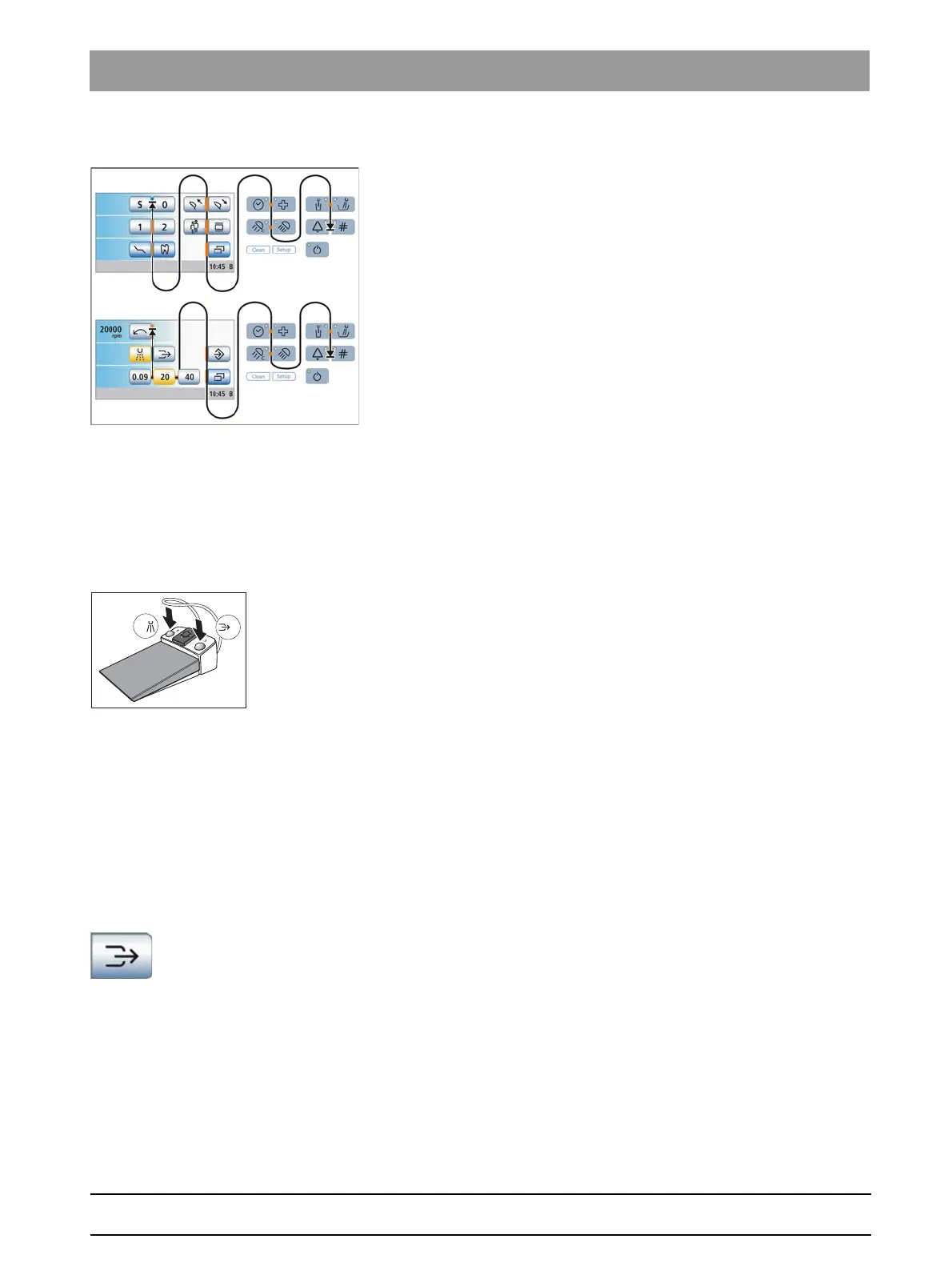
The cursor path runs between the pairs of keys, moving from top to
bottom and from left to right, usually in multiple loops. The cursor path can
be traversed between the starting and end points either in a forward or a
reverse direction.
If no further cursor position is available on the touchscreen, the cursor
jumps out of the touchscreen. The cursor path is then continued between
the fixed keys on the EasyTouch control panel.
In Instrument programs, all quick setting keys are selected
simultaneously. This is indicated by a horizontal orange bar located
behind the quick setting keys. The speed or intensity is then set by
actuating the 4-way foot control plate to the left or right briefly (values on
quick setting keys) or for a longer time (intermediate values), see
"Operating the cursor control" [ → 58].
The Clean key, Setup routine and main switch cannot be accessed via
the cursor control.
Cursor path on swivel arm dentist eleme nt
This picture shows an example of the control panel of the SINIUS dentist
element. The cursor path of the SINIUS CS dentist element also follows
this principle.
Orange and blue bars
A blue bar indicates which functions are assigned with the left or right
button of the foot control. For example, the mouth rinsing position (S) and
entry/exit position (0) chair programs are assigned in the Start program,
while the Spray and Chip blower are assigned in the Instrument program.
If the cursor control without program change is activated, the blue bars
also can be selected with the cursor. If the cursor control with program
change is activated, the blue bars are skipped for faster navigation.
Cursor return
Once a function is activated with the cursor control, the orange cursor
typically returns to the starting position of the program, for instance after
switching on the X-ray image viewer, the operating light or the cuspidor
flushing. The cursor position will not change for functions that are
operated by permanent shifting of the 4-way foot control plate, e.g.,
manual chair adjustment.
Chip blower key in the Instrument program
When the cursor control is activated, the motor and high-speed
handpiece program will display the
Chip blower
key.















 To Next Page