SECTION 2, Page 2 SJKB-40-D, SJKB-40-D/F
JUN. 1999
Base Controls - Electrical
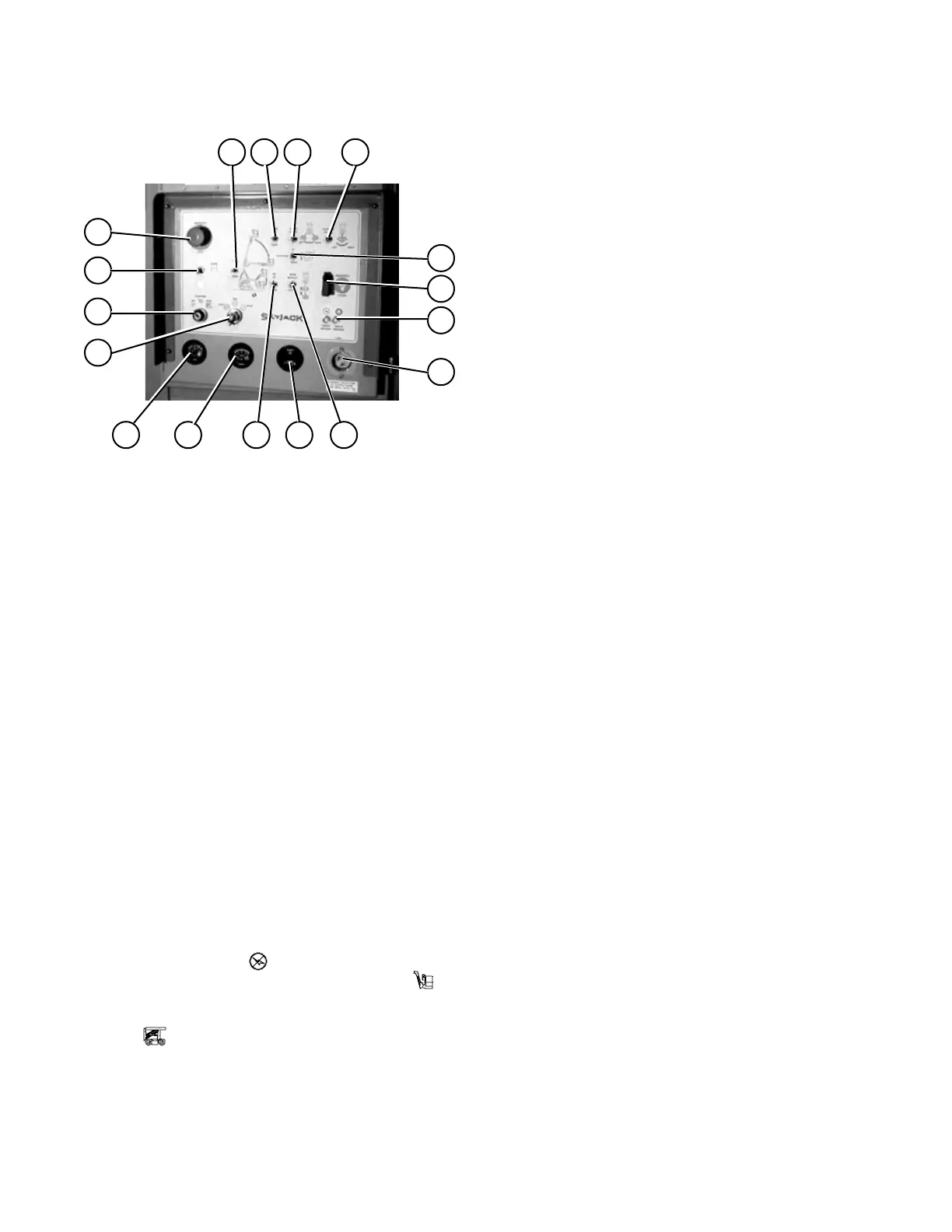
Base Control Panel
Figure 2-1. Base Control Panel and Label
17
161514
13
12
11
10
9
8
7
6
5
432
1
Ma40-201
1. OFF/PLATFORM/BASE SELECT KEY
SWITCH
2. RISER UP/DOWN TOGGLE SWITCH
3. BOOM UP/DOWN TOGGLE SWITCH
4. TURRET ROTATION TOGGLE SWITCH
5. PLATFORM LEVELING TOGGLE SWITCH
6. BOOM RETRACT/EXTEND TOGGLE SWITCH
7. PLATFORM ROTATION TOGGLE SWITCH
8. JIB UP/DOWN TOGGLE SWITCH
9. EMERGENCY STOP BUTTON
10. CIRCUIT BREAKERS
11. ENGINE STOP/RUN/START SELECT SWITCH
12. ENGINE CHOKE/GLOW PLUG SWITCH
13. EMERGENCY PUMP ENABLE SWITCH
14. FUEL GUAGE
15. VOLT METER
16. HOUR METER
17. 110 VOLT RECEPTACLE
BASE CONTROL PANEL - This control station is located
on the rotating turret in the hydraulic/electric cabinet. It
contains the following controls:
1. OFF/PLATFORM/BASE SELECT KEY SWITCH -
Turning the key to the “ ” (off) position disconnects
power from the control circuit. When the “ ”
(platform) position is selected, power is directed to the
control station on the platform. When the switch is held
in the “ ” (base) position power is directed to the
control station on the base.
2. RISER UP/DOWN TOGGLE SWITCH - This switch
controls the up/down movement of the riser section. To
raise the riser section, push and hold this toggle switch
to the “ ñ “ (up) position. Release switch to stop. To
lower the riser section, push and hold this toggle switch
to the “ ò “ (down) position. Release switch to stop.
3. BOOM UP/DOWN TOGGLE SWITCH - This switch
controls the up/down movement of the boom section. To
raise the boom section, push and hold this toggle switch
to the “ ñ “ (up) position. Release switch to stop. To
lower the boom section, push and hold this toggle switch
to the “ ò “ (down) position. Release switch to stop.
4. TURRET ROTATION TOGGLE SWITCH - This
switch controls clockwise and counterclockwise turret
rotation. To rotate the turret clockwise, push and hold
this toggle switch to the “ ï “ (left) position. Release
switch to stop. To rotate the turret counterclockwise,
push and hold this toggle switch to the “ ð “ (right)
position. Release switch to stop.
5. PLATFORM LEVELING TOGGLE SWITCH - This
switch controls the leveling of the platform if adjustment
is necessary. If the platform is tilted away from the jib,
push and hold this toggle switch to the “ ñ “ (up) position.
Release switch when level. If the platform is tilted toward
the jib, push and hold this toggle switch to the “ ò “
(down) position. Release switch when level.
6. BOOM RETRACT/EXTEND TOGGLE SWITCH -
This switch controls the retraction and extension of the
telescoping boom arm. To retract the boom arm, push
and hold this toggle switch to the “ ñ “ (retract) position.
Release switch to stop. To extend the boom arm, push
and hold this toggle switch to the “ ò “ (extend) position.
Release switch to stop.
7. PLATFORM LEFT/RIGHT ROTATION TOGGLE
SWITCH - This switch controls left and right rotation of
the platform. To rotate the platform to the left, push and
hold this toggle switch to the “ ï “ (left) position. Release
switch to stop. To rotate the platform to the right, push
and hold this toggle switch to the “ ð “ (right) position.
8. JIB UP/DOWN TOGGLE SWITCH - This switch
controls the up/down movement of the jib. To move the
jib upward, push and hold this toggle switch to the “ ñ “
(up) position. Release switch to stop. To move the jib
downward, push and hold this toggle switch to the “ ò “
(down) position. Release switch to stop.



 To Next Page