SECTION 2, Page 6 SJKB-40-D, SJKB-40-D/F
JUN. 1999
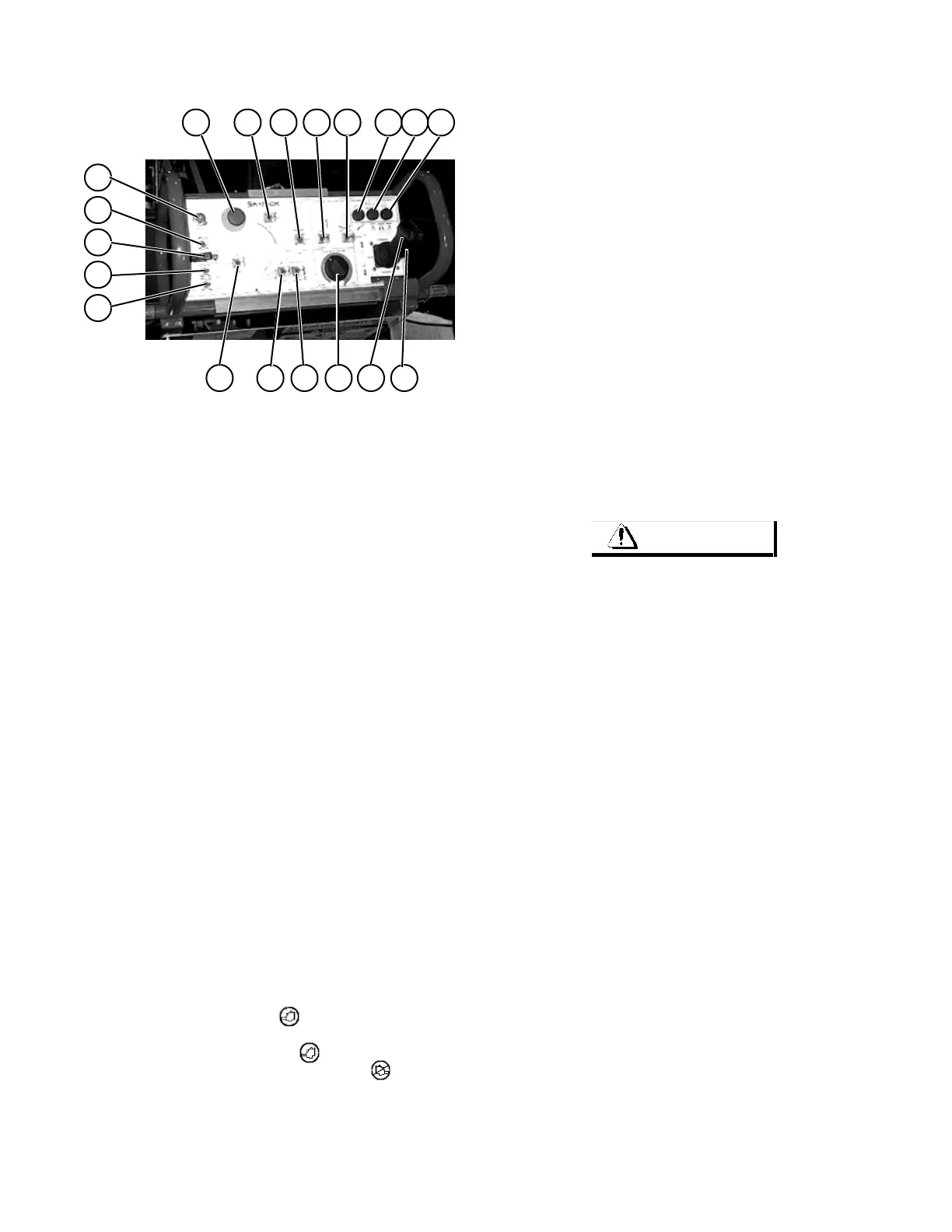
Operator’s Control Console
191817
16 1514
1312
11
10
98
76
5
4
3
2
1
Ma40-210
Figure 2-10. Operator’s Control Console and Label
1. ENGINE STOP/RUN/START SELECT SWITCH
2. ENGINE CHOKE/GLOW PLUG SWITCH
3. EMERGENCY PUMP ENABLE SWITCH
4. FUEL SELECT TOGGLE SWITCH (Dual Fuel)
5. ENGINE SPEED SELECT TOGGLE SWITCH
6. EMERGENCY STOP BUTTON
7. BOOM UP/DOWN TOGGLE SWITCH
8. RISER UP/DOWN TOGGLE SWITCH
9. JIB UP/DOWN TOGGLE SWITCH
10. TURRET ROTATE TOGGLE SWITCH
11. BOOM EXTEND/RETRACT TOGGLE SWITCH
12. PLATFORM LEVELING TOGGLE SWITCH
13. PLATFORM ROTATE TOGGLE SWITCH
14. BOOM SPEED CONTROL ROTARY SWITCH
15. DRIVE/STEER CONTROLLER
16. HORN PUSH-BUTTON
17. ENGINE WARNING LIGHT
18. TILT SENSOR INDICATOR LIGHT
19. FUNCTION ENABLE LIGHT
OPERATOR’S CONTROL CONSOLE - This metal
control station is located at the front of the platform. It
contains the following controls:
IMPORTANT NOTE
The foot switch MUST be depressed and held to use
any control on the operator’s control console.
Refer to Operating Procedures for detailed
instructions on operating these controls.
1. ENGINE STOP/RUN/START SELECT SWITCH -
To start the engine DO NOT depress the foot switch.
Turning the switch to the “ “ (start) position will
engage the starter, once the engine starts, release the
switch and it will return to the “ “ (run) position. To
stop the engine turn the switch to the “ “ (stop)
position. The engine must be running before any
functions can be operated.
2. ENGINE CHOKE/GLOW PLUG SWITCH - This
switch when held in the “ ð “ (right) position, activates
the electric choke on gasoline engines or the glow plugs
on the optional diesel engine.
3. EMERGENCY PUMP SELECT TOGGLE SWITCH
- In the event of an emergency, moving this toggle switch
to the” ï “ (left) position kills the engine, enables the
12 volt emergency pump and allows all functions to be
operated. To resume normal operation, move the switch
to the right position by closing the switch cover.
4. FUEL SELECT TOGGLE SWITCH (Dual Fuel) -
This switch allows the operator to select the fuel source
to be used.
5. ENGINE SPEED SELECT TOGGLE SWITCH - This
switch allows the operator to select from low or high
engine speed.
6. EMERGENCY STOP BUTTON - This red
mushroom-shaped button is designed to cut power to
the platform controls when struck in the event of an
emergency or at work platform shutdown. To restore
power, simply pull button out.
7. BOOM UP/DOWN TOGGLE SWITCH - This switch
controls the up/down movement of the boom section.
To raise the boom section, push and hold this toggle
switch to the “ ñ “ (up) position. Release switch to stop.
To lower the boom section, push and hold this toggle
switch to the “ ò “ (down) position. Release switch to
stop.
8. RISER UP/DOWN TOGGLE SWITCH - This switch
controls the up/down movement of the riser section. To
raise the riser section, push and hold this toggle switch
to the “ ñ “ (up) position. Release switch to stop. To
lower the riser section, push and hold this toggle switch
to the “ ò “ (down) position. Release switch to stop.
9. JIB UP/DOWN TOGGLE SWITCH - This switch
controls the up/down movement of the jib. To move the
jib upward, push and hold this toggle switch to the “ ñ “
(up) position. Release switch to stop. To move the jib
downward, push and hold this toggle switch to the “ ò “
(down) position. Release switch to stop.
10. TURRET ROTATION TOGGLE SWITCH - This
switch controls clockwise and counterclockwise turret
rotation. To rotate the turret clockwise, push and hold
this toggle switch to the “ ï “ (left) position. Release
switch to stop. To rotate the turret counterclockwise,
push and hold this toggle switch to the “ ð “ (right)
position. Release switch to stop.
WARNING
Depressing the Emergency Stop Button instantly
engages parking brakes.



 To Next Page