How to manually raise an alarm of FIRE
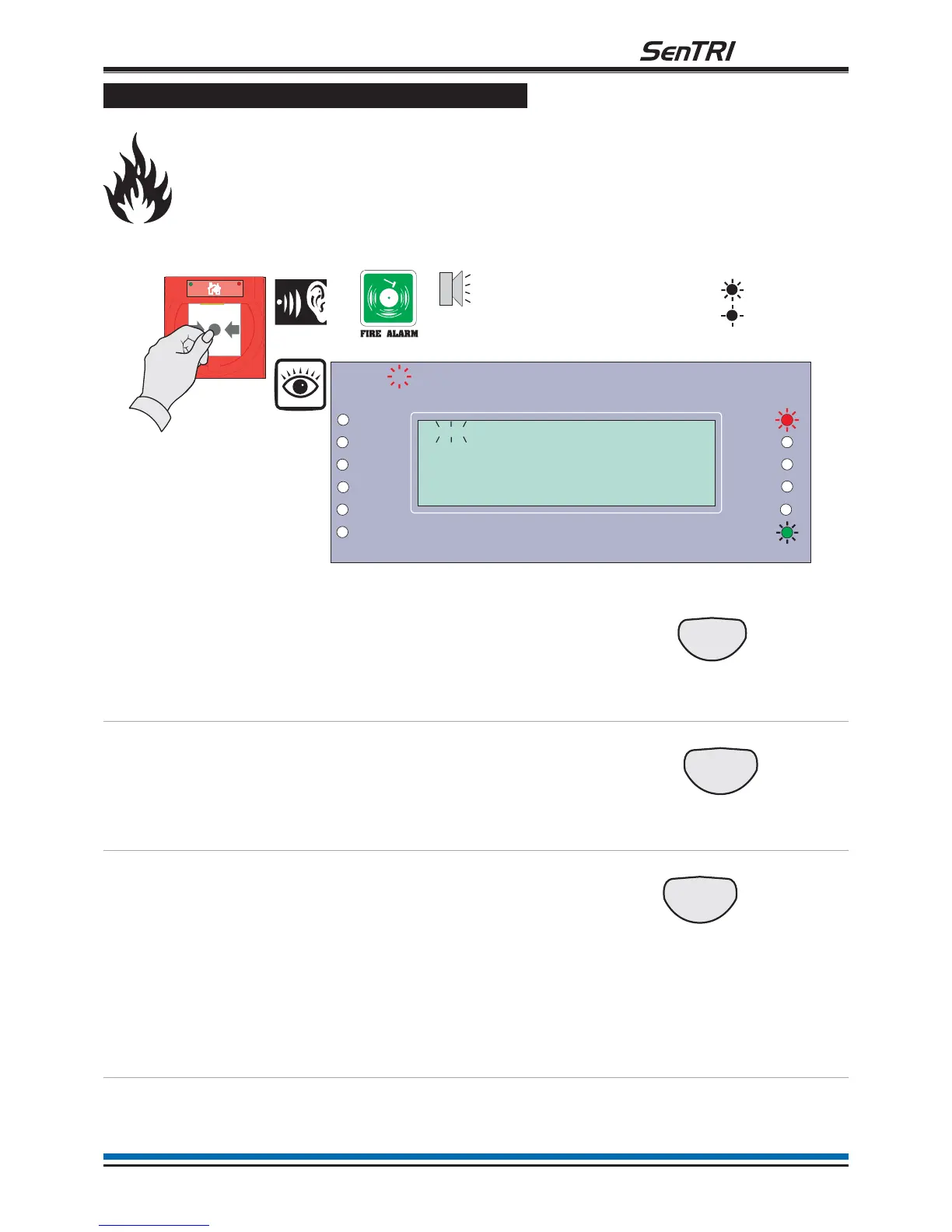
If you see a fire in the protected premises and want to raise a fire alarm to warn occupants in the
building, you can do this manually by:
¨
Going to the nearest manual call point that is located away from the fire hazard.
¨
Press hard with a thumb onto the centre of the glass until it breaks.
To cancel panel buzzer
You can stop the panel buzzer
from sounding.
Press:
Display reads:
'Buzzer cancelled'
To silence alarms
When the emergency is over
the alarm sounders can be
silenced.
Press:
Display reads:
'Alarms silenced'
To reset system
To return the system to
normal condition clear any
residual smoke or heat from
devices and reset any fire
inputs.
Ensure the fire system is
checked by your servicing
organisation if there has
been fire damage in the
protected area.
Press:
Display reads 'System being
Reset - please wait....'
Record the event
Make an entry in the log book
of the event for future
reference.
11
fire system
Panel
buzzer
On
Flashing
Previous Next
1
Zones
Fault
System Fault
Delay
Test
Fire
Power
Power Fault
Verify
CB253
CB254
Disablement
Sounder
First Fire occurred at:
Time: 08:43.10 Tue 17 March 2009
1stFIRE:MCP:Zone 1
15:45
Manual Call point


 To Next Page