Normal condition
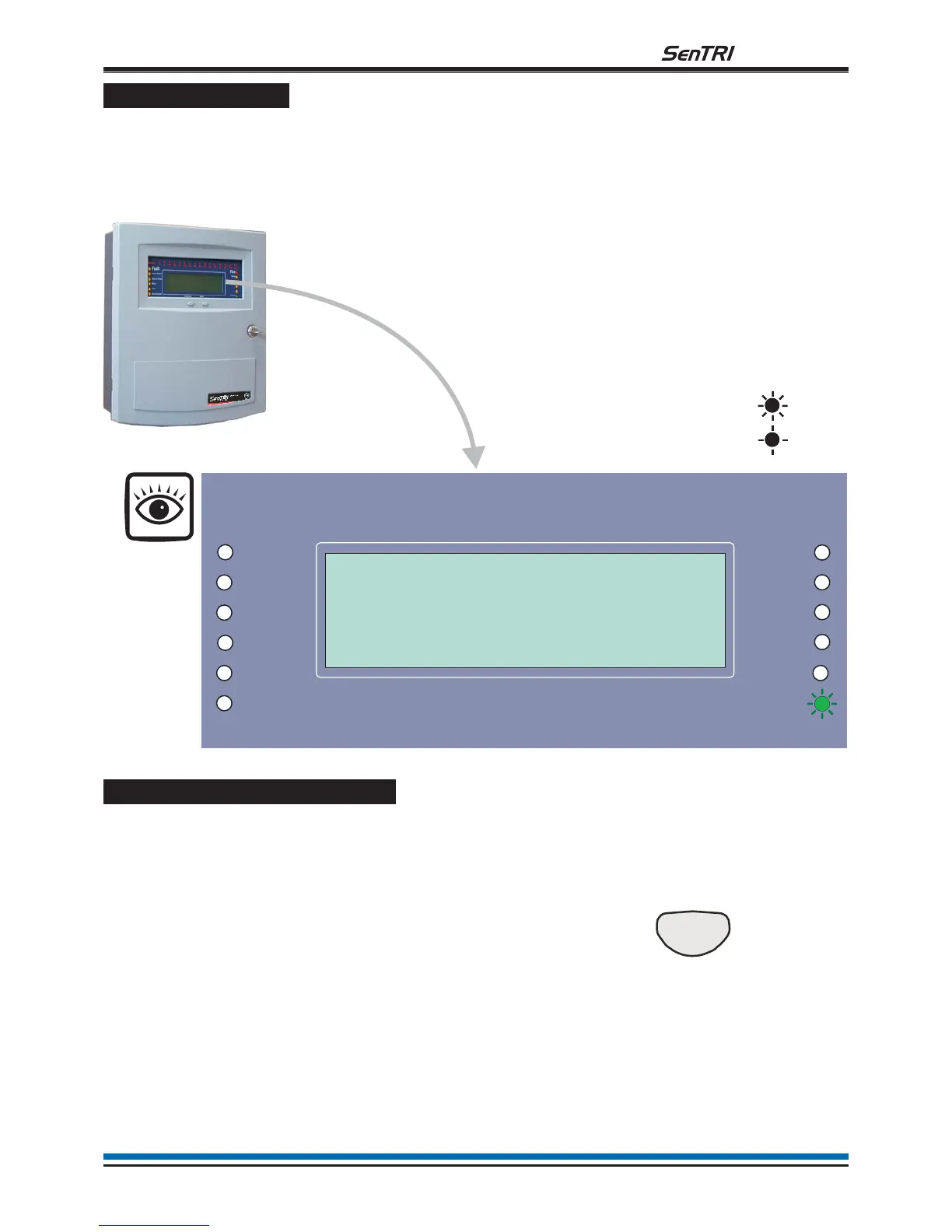
When a system is operating normally and the panel with no faults or disablements:
¨
the display shows a:
'Panel healthy' message at the control panel and
¨
only the 'Power' green indicator is lit.
How to operate a 'U' button
The U1 and U2 buttons may have been configured during commissioning to action user-defined tasks, such as
disablement of devices in areas where smoke may be generated or where plant shutdown is required. The
function of these buttons should be written on the label that is fitted on the back of the outer door.
To activate a 'U' button. You can activate the
predefined task by operating
the 'U' button.
Press:
n-canbe1or2.
Display reads what task is
being carried out.
9
fire system
SenTRI Fire Syst
em
DesignedtoEN54Pt2&4
Panel healthy
15:45
On
Flashing
Previous Next
SenTRI Fire System
Designed to EN54 Pt 2 & 4
Panel healthy
15:45
Fault
System Fault
Delay
Test
Fire
Power
Power Fault
Verify
CB253
CB254
Disablement
Sounder
Un


 To Next Page