Maintenance
Replacing the glass on a SenTRI Manual Call Point
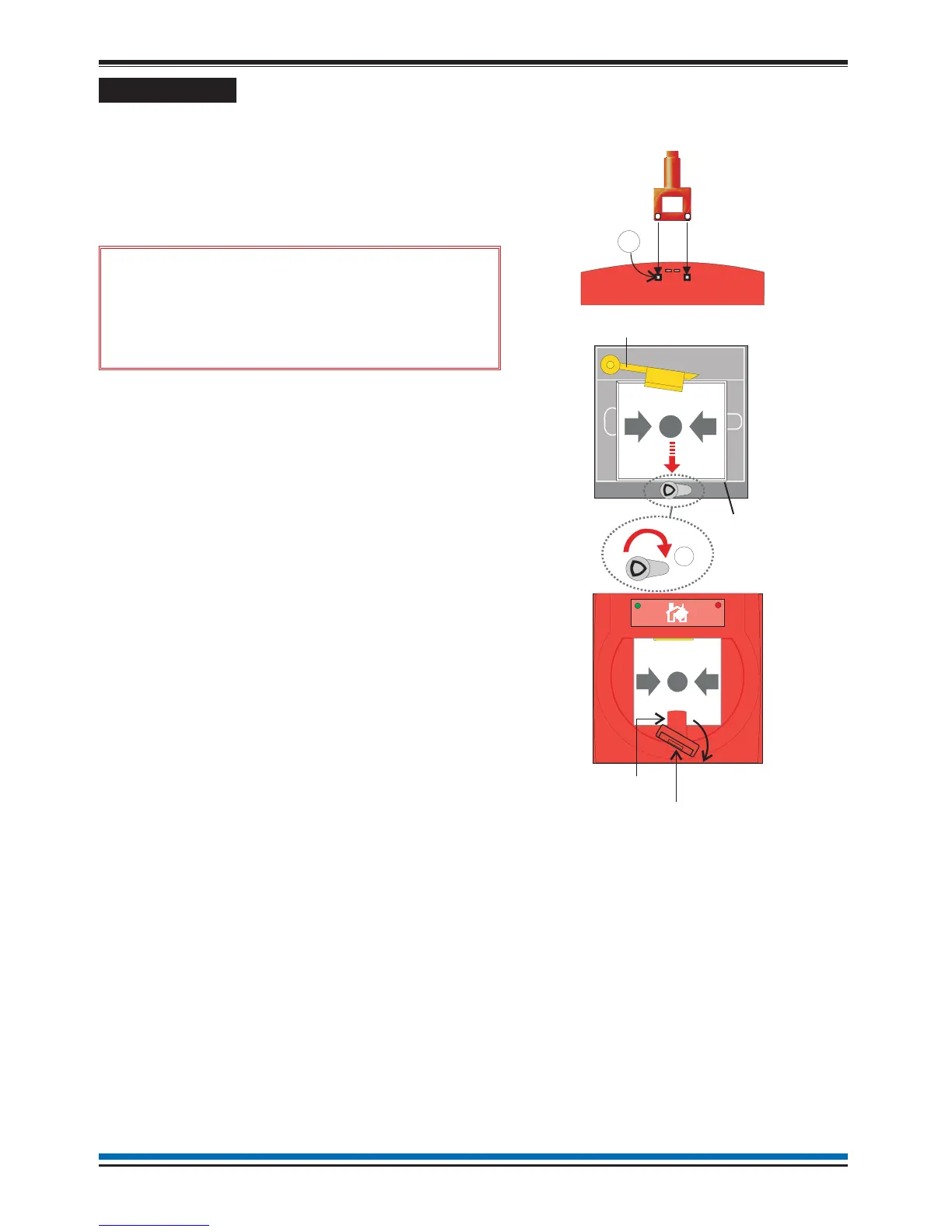
a. Disengage the front cover from the call point
assembly using the end of the test key. Insert the key
into the slots 'E' and from the bottom edge lift out the
cover.
b. Carefully remove broken glass from the call point.
&
Take appropriate precautions
when clearing the broken glass to prevent
injury.
c. Insert the key in the keyhole and turn the key such
that the tab is at position 'F' and then insert a new
glass as shown. Ensure the glass has engaged into
the yellow arm.
d. Hook the front cover onto the top edge of the call
point assembly and then push the bottom edge down
until it clicks shuts. Check both hooks on the top of
the front cover are locked onto the call point
assembly.
e. Turn the test key anticlockwise one quarter of a turn
such that the glass is held under the yellow arm and
to reset the call point for normal operation.
SEN-891 Spare MCP glass (Pack of 10)
71167-91 Test key (Pack of 10)
Resetting the resettable element on a SenTRI Manual Call Point
Slide the keyhole cover upwards to expose the keyhole. Insert the test key in the keyhole and turn it clockwise
by one quarter of a turn. Then turn the test key anticlockwise by one quarter of a turn to reset the call point
element.
30
Operating instructions
E
F
GLASS
YELLOW ARM
Test Ke


 To Next Page