User Guide 20
HOW TO READ YOUR TAGG MAP
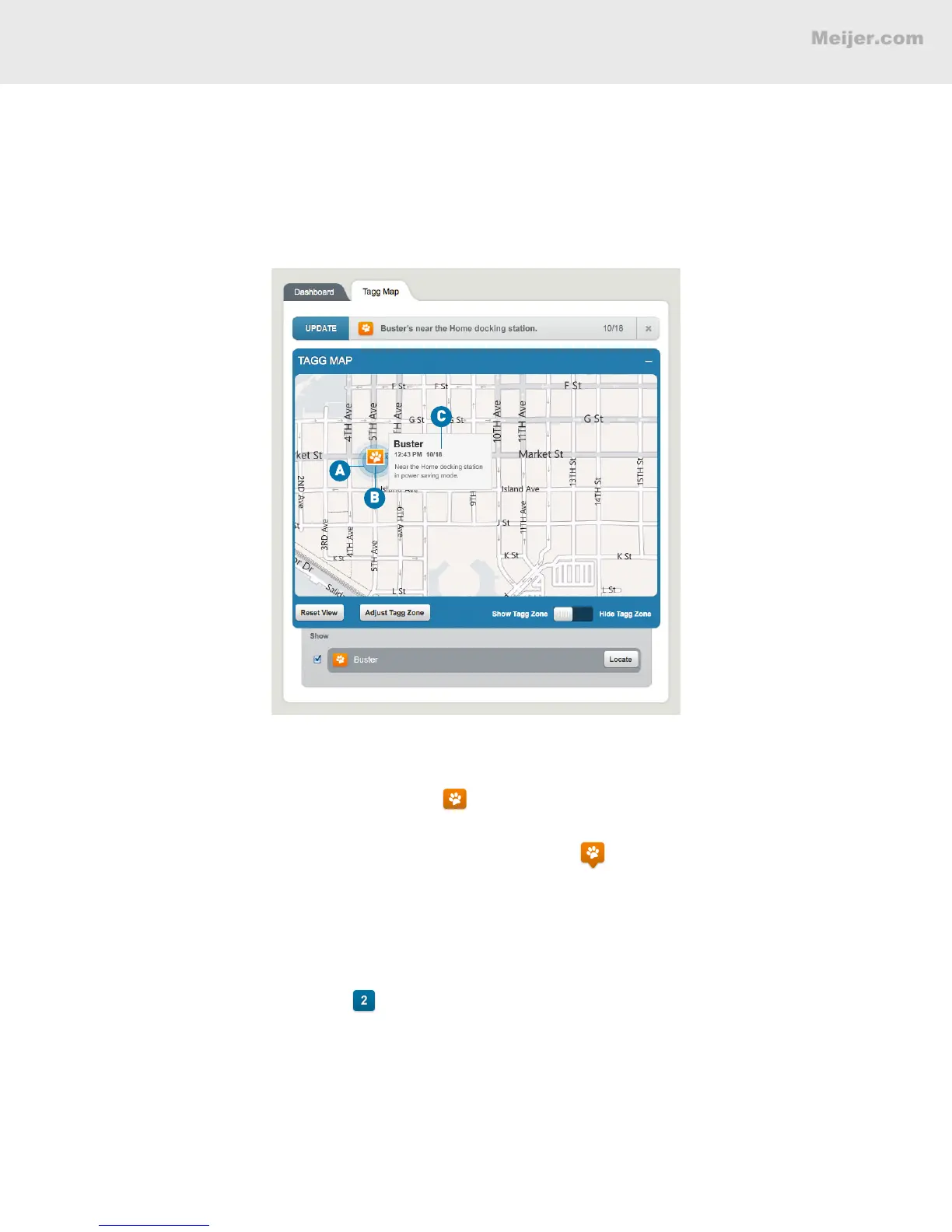
Inside the Tagg Zone
When your pet (we’ll call him Buster) is near the docking station, the Tagg tracker will be in power
saving mode to maximize your battery.
(Your screen will look similar to this.)
A. The Tagg zone is the blue circle around Buster’s home.
B. Buster’s location is identied by a paw icon . Since he’s close to the docking station, in the Tagg
zone and in power saving mode, there’s no pinpointed GPS location.
When Buster’s location is identied by a paw icon with a point: , it means there is a GPS location
available.
C. Hover over Buster’s paw icon to see his most recent recorded location, including the date and time.
Multiple Pets in the Tagg Zone
If you have more than one pet near the docking station in power saving mode, their locations are
identied by a single blue square: . The number in the center indicates the number of pets currently
near the docking station.


 To Next Page