User Guide 15
StepIII:PersonalizeYourPet'sProle
You can personalize your Tagg account by customizing your pet prole.
1. To create a new pet prole, click Add A Pet.
2. Fill in your pet's name and select a paw icon.
If you started creating your pet prole at activation by lling in your pet's name, just click on your pet's
prole above the Add A Pet button.
Upload Your Pet Photos
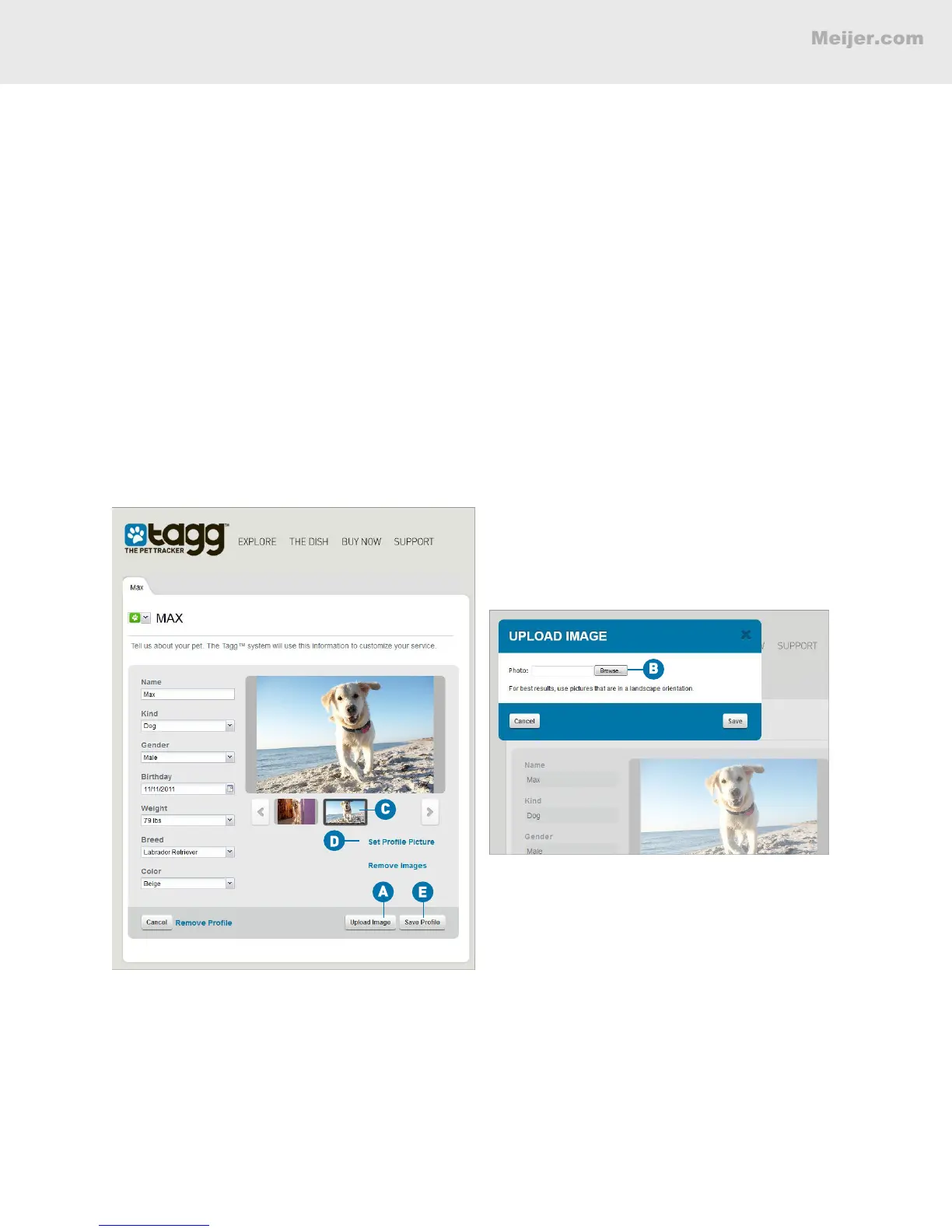
A. Open your pet's prole page and click Upload Image. You can add up to 10 pictures of your pet
to your photo gallery.
B. In the Upload Image window, Browse and select the image le you want to add (for best resuls,
use pictures that are in landscape orientation).
(Your screen will look similar to this.)
Set a Dashboard Pet Profile Picture
C. In your gallery, click on the photo you want to use.
D. Click Set Prole Picture. Use the viewer rectangle to identify the area of the photo that you want to use.
E. Click Save Prole.
To change the prole picture, just repeat the steps above.
BASIC SETUP



 To Next Page