User Guide 29
MANAGE YOUR DEVICES
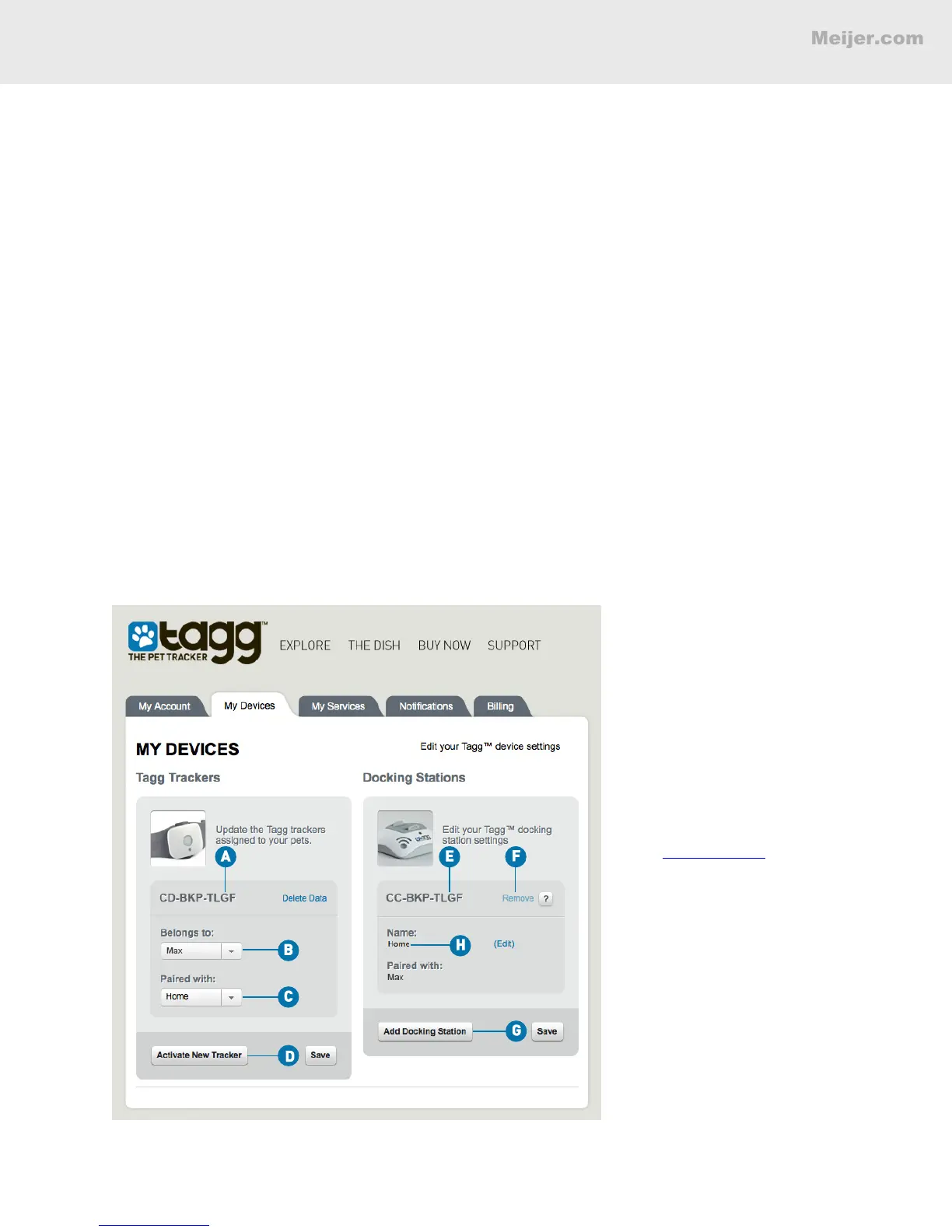
All activity involving your devices – the Tagg tracker and docking station – can be managed through
your Tagg account. To view each device, click My Devices under Manage in the right column.
Tagg Trackers
This is where you can view and manage all of your Tagg trackers.
A. Your unique tracker ID.
B. See which pet the tracker belongs to.
C. See which docking station is paired with the tracker.
D. Activate a new tracker.
To change the tracker or docking station paired to your pet, use the drop-down menus.
Note: A tracker can only be paired with a single docking station.
Docking Stations
This is where you can view and manage all of your docking stations.
E. Your unique docking station ID.
F. Remove a docking station.
G. Add a docking station.
H. Your docking station's name.
(Your screen will look similar to this.)
Note: You must always
have at least one
docking station active in
your account. For more
information, please visit
the Answer Center in
the Support section of
www.tagg.com.


 To Next Page