User Guide 21
HOW TO READ YOUR TAGG MAP
Outside the Tagg Zone
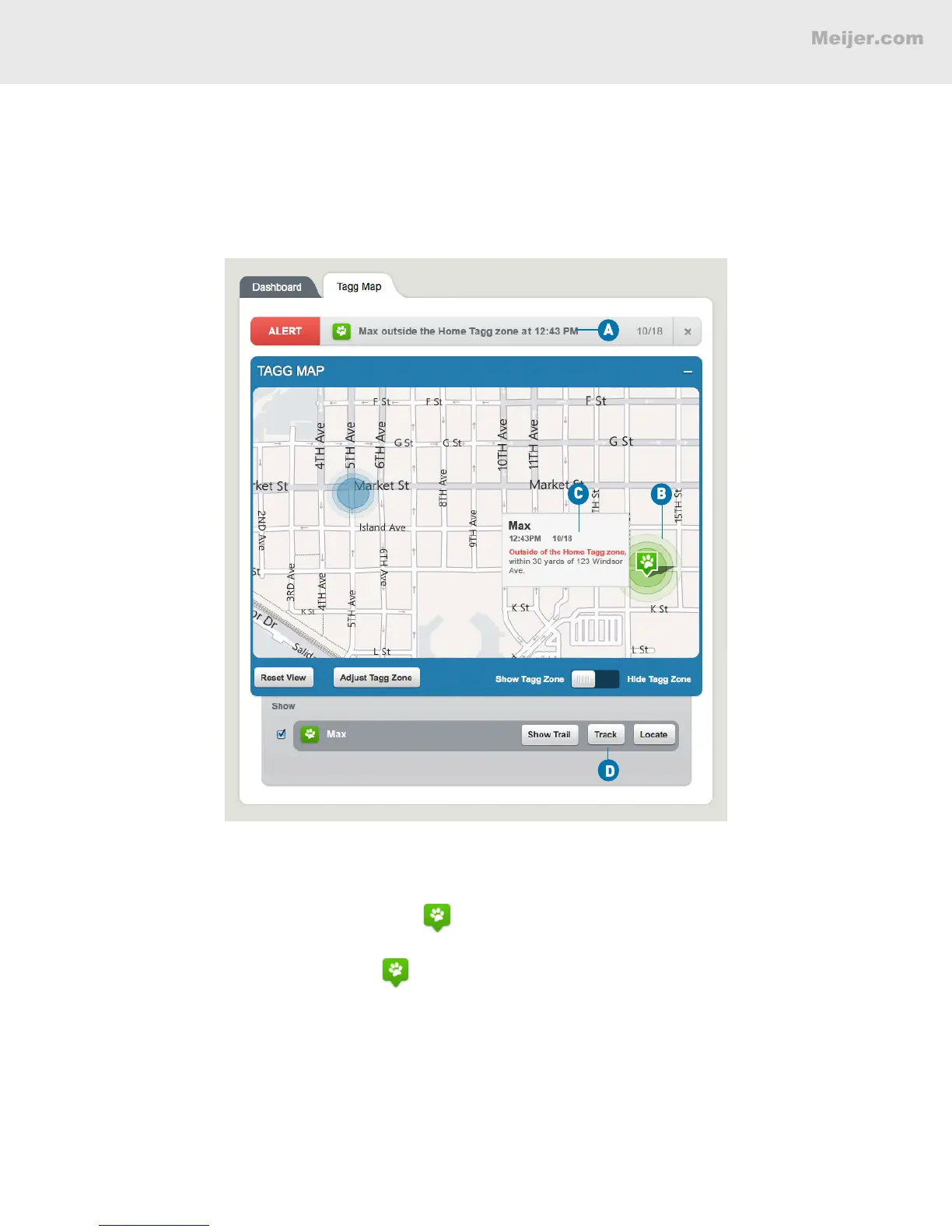
When your dog (we’ll call him Max) leaves the Tagg zone, the system sends an alert to your Tagg
account. If you have opted-in to receive email and text notications, you will receive them as well.
(Your screen will look similar to this.)
A. An Alert headline appears at the top of the map to let you know that Max is outside the Tagg zone.
B. A paw icon with a pinpoint on the bottom shows you where Max is. The pinpoint means that
there is a GPS location available.
C. When you hover over the paw icon, it shows you that Max is “outside the Tagg zone” and gives
you an estimated street address with the specic date and time of Max’s last recorded location.
D. In the tracker command bar below the Tagg map, you’ll nd the Locate, Track and Show Trail
buttons for Max.


 To Next Page
 Loading...