User Guide 9
TAGG DASHBOARD AND MAP OVERVIEW
The Tagg dashboard and map are two areas that you’ll use often on the Tagg website.
• Dashboard: This gives you a quick view of your Tagg account – it’s what you use to manage your
devices and your Tagg service.
• Map: This is where you’ll see your pet’s current and most recent locations, and where you can
visually locate or track him if he leaves the Tagg zone.
Once you’ve created your account and activated your Tagg tracker, you can start using the dashboard
and map to keep track of your pet. See page 12 for more on activating your Tagg tracker.
Tagg Dashboard
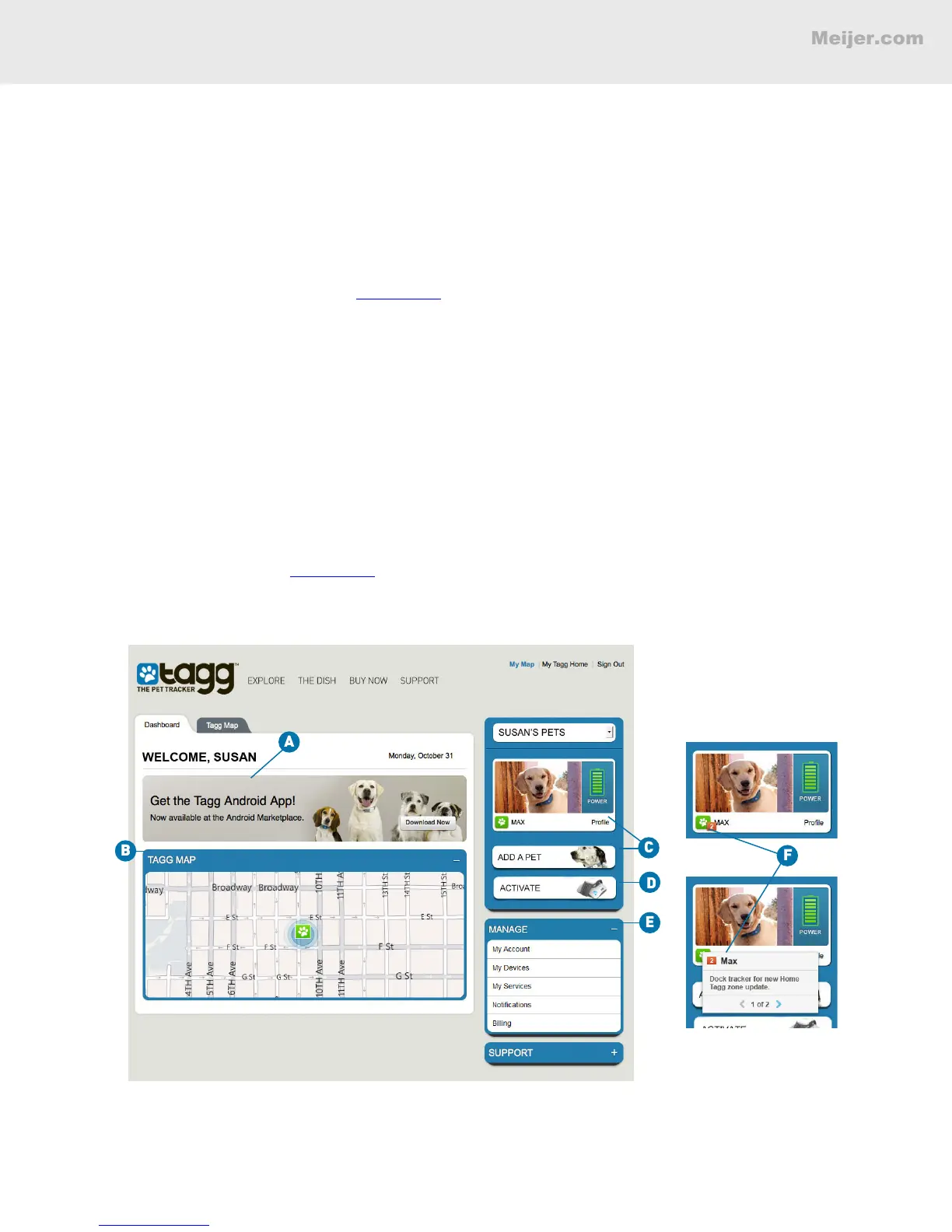
As you see on the screen below, the dashboard is where you can:
A. Find out about new Tagg features and services.
B. Get a quick view of the Tagg map.
C. Create or modify your pet’s prole.
D. Activate the Tagg tracker.
E. Manage your accounts, devices, service, notications and billing.
F. View pending updates. See page 19 for details.
(Your screen will look similar to this.)


 To Next Page