ENGLISH
IOMMASIPXX09-GB 04
27
10-40 kVA
MASTERYS IP+
6
MIMIC PANEL
6.1 MIMIC PANEL.
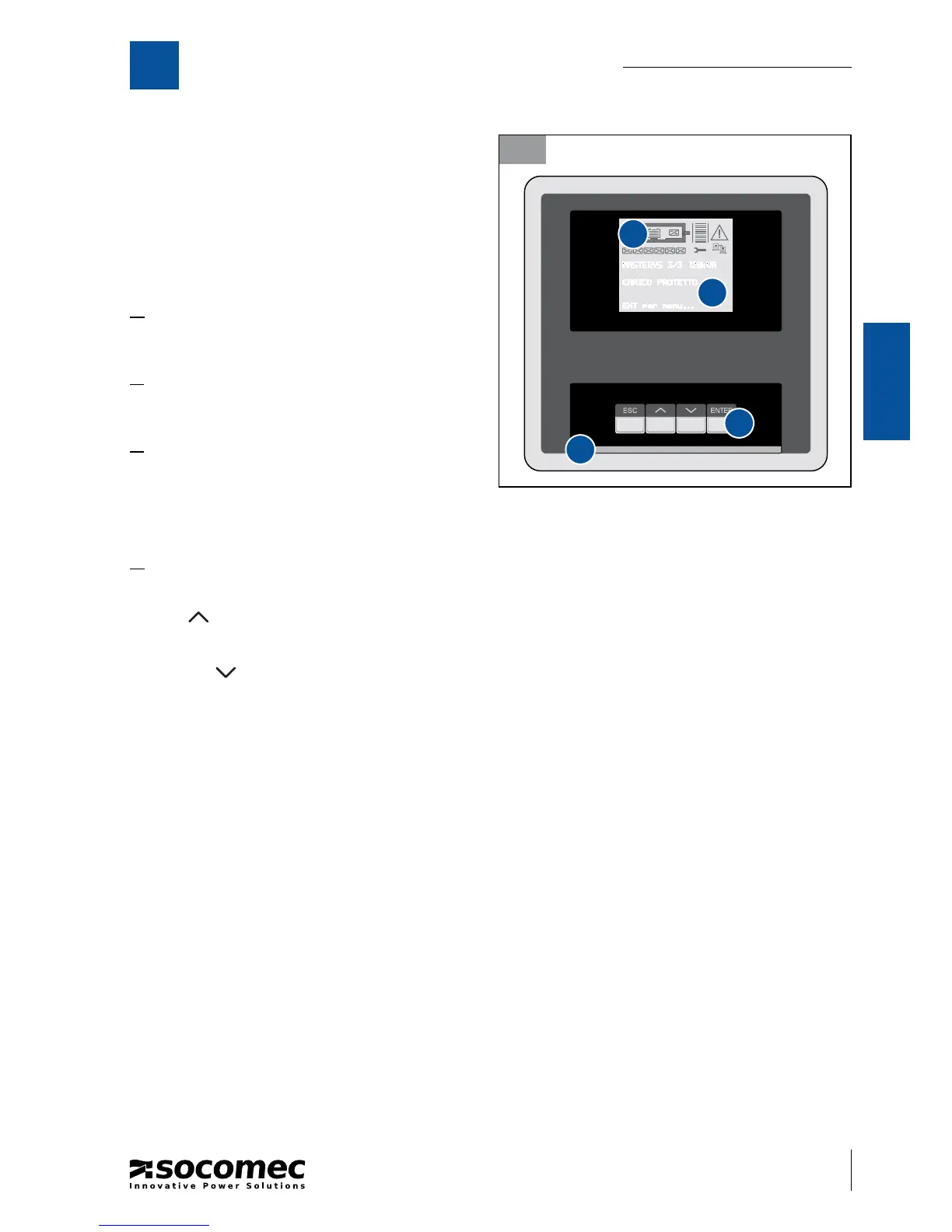
The LCD mimic panel ( gure 6.1-1) on the door of the
UPS provides all the information relating to operating
status, electrical measurements, access to controls and
con guration parameters.
The information is grouped into four sections:
A. ideograms that identify the subsets and the en-
ergy ow;
B. multicoloured luminous bar that identi es the
condition of the power supply to the load;
C. alphanumeric information that uses a menu layout
to provide details on any alarms that may occur
and on the measurements, controls and param-
eters.
D. use of the buttons:
· ESC: exit from the current menu/parameter/action;
· UP
: scrolls the available menus/values upwards. It increases the value each time it is pressed when chang-
ing a parameter;
· DOWN
: scrolls the available menus/values downwards. It decreases the value each time it is pressed when
changing a parameter;
· ENTER: enters the menu displayed on the screen to con rm the choice/changes made.
6.1-1
A
B
C
D





 To Next Page