12 Chapter 2: Getting Started
Getting Started
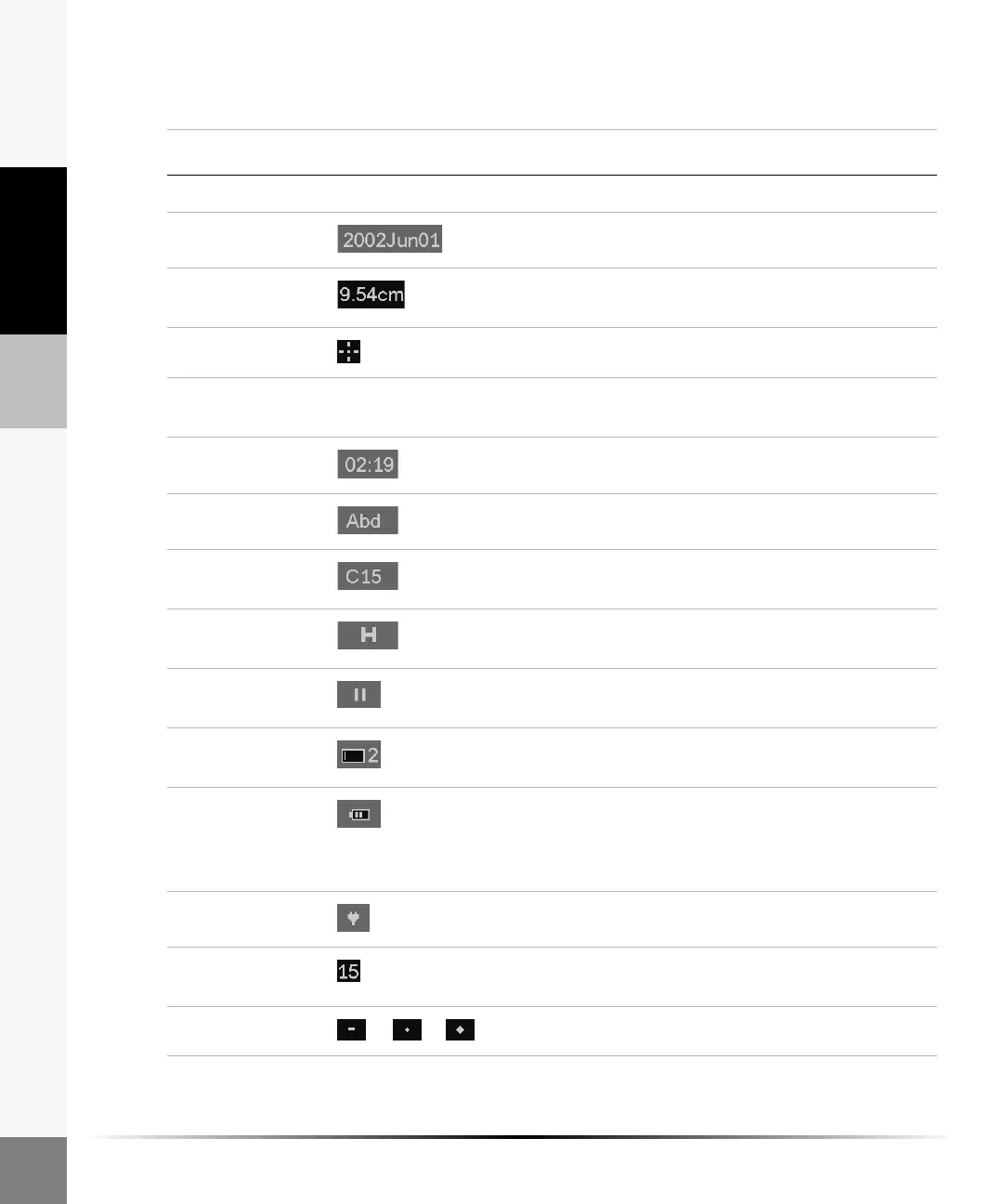
Table 2: Screen Layout and Icons
Screen Area Icon/Information Description
Patient Name/ID Displays current patient name and identification.
Date Displays date.
Measurement Displays measurement in centimeters when image is
frozen and calipers are displayed.
Caliper A cursor used to measure distance on a frozen image.
On-screen menu Context sensitive menu that displays menu options
depending on the current mode of the system.
Time Displays time.
Exam type Displays exam type.
Transducer Displays the type of transducer (C15 or L25)
permanently attached to the system.
Harmonic icon
(C15 only)
Displayed when tissue harmonic imaging is on.
Freeze image
icon
Displayed when the image is frozen.
Image storage
icon
Displays the number of images saved in the system.
The system stores up to 74 images.
Battery charge
icon
Displays the level of the battery charge. The more bars
you see, the greater the charge. When the battery
becomes very low, no bars are displayed and the icon
flashes.
AC power icon Displayed if the system is plugged into AC power.
Depth Numeric value showing current depth in centimeters
from skin line to current depth.
Depth markers Indicates depth markers.



 To Next Page