Resetting
to
the
default
You can reset the main functions
of
the recording mode when the mode dial
is set to P, A, S, or M.
MENU
button
-+
0 2
-+
[Rec
mode
reset]
--+
[OK]
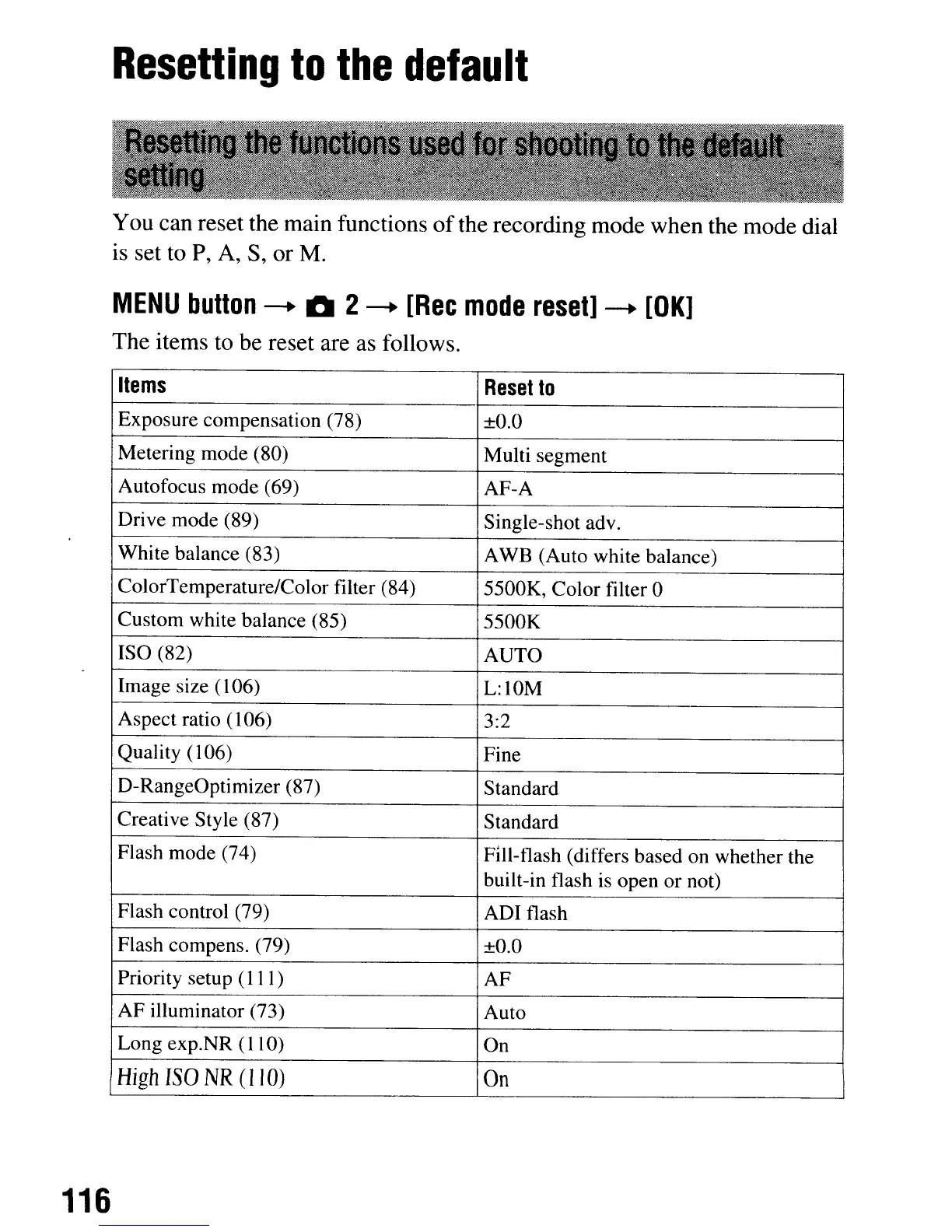
The items to be reset are as follows.
Items
Reset
to
Exposure compensation (78)
±O.O
Metering mode (80)
Multi segment
Autofocus mode (69)
AF-A
Drive mode (89)
Single-shot adv.
White balance (83)
AWB (Auto white balance)
ColorTemperature/Color filter (84)
5500K, Color filter 0
Custom white balance (85)
5500K
ISO (82)
AUTO
Image size (106)
L:I0M
Aspect ratio (106)
3:2
Quality
(l06)
Fine
D-RangeOptimizer (87)
Standard
Creative Style (87)
Standard
Flash mode (74)
Fill-flash (differs based on whether the
built-in flash is open or not)
Flash control (79) ADI flash
Flash compens. (79)
±O.O
Priority setup (111)
AF
AF illuminator (73) Auto
Long exp.NR (110)
On
High
ISO
NR
(I
10)
On
116
Resetting
to
the
default
You can reset the main functions
of
the recording mode when the mode dial
is set to P, A, S, or M.
MENU
button
-+
0 2
-+
[Rec
mode
reset]
--+
[OK]
The items to be reset are as follows.
Items
Reset
to
Exposure compensation (78)
±O.O
Metering mode (80)
Multi segment
Autofocus mode (69)
AF-A
Drive mode (89)
Single-shot adv.
White balance (83)
AWB (Auto white balance)
ColorTemperature/Color filter (84)
5500K, Color filter 0
Custom white balance (85)
5500K
ISO (82)
AUTO
Image size (106)
L:I0M
Aspect ratio (106)
3:2
Quality
(l06)
Fine
D-RangeOptimizer (87)
Standard
Creative Style (87)
Standard
Flash mode (74)
Fill-flash (differs based on whether the
built-in flash is open or not)
Flash control (79) ADI flash
Flash compens. (79)
±O.O
Priority setup (111)
AF
AF illuminator (73) Auto
Long exp.NR (110)
On
High
ISO
NR
(I
10)
On
116













 To Next Page