Checking
the
number
of
recordable
images
•
Jro
I
~
±O.o
I
AUTO
~
"C
o I
::
1-
~.
-
90%1
FINE
ICL
:C!!O)
~
~
CD
n
C»
3
CD
-
C»
Note
•
If
"0"
is flashing in yellow, the memory card is full. Replace the memory card with
another one, or delete images in the current memory card (pages 21, 102).
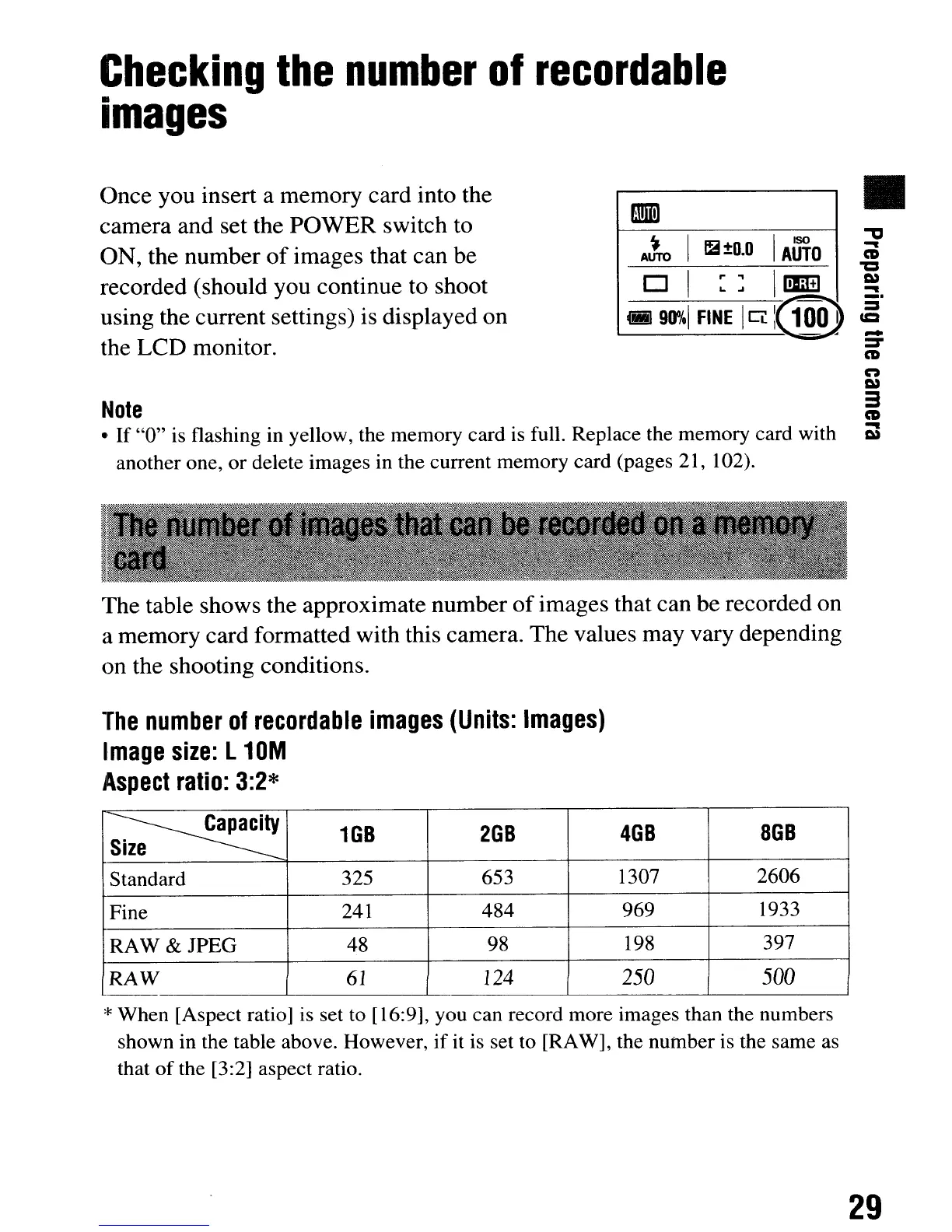
Once you insert a memory card into the
camera and set the POWER switch to
ON, the number
of
images that can be
recorded (should you continue to shoot
using the current settings) is displayed on
the LCD monitor.
The table shows the approximate number
of
images that can be recorded on
a memory card formatted with this camera. The values may vary depending
on the shooting conditions.
The
number
of
recordable
images
(Units:
Images)
Image
size:
L
10M
Aspect
ratio:
3:2*
~
1GB
2GB
4GB
8GB
Size
Standard 325
653 1307
2606
Fine
241
484
969 1933
RAW
& JPEG
48 98 198
397
RAW
61
124
250
500
*When [Aspect ratio] is set to [16:9], you can record more images than the numbers
shown in the table above. However,
if
it is set to [RAW], the number is the same as
that
of
the [3:2] aspect ratio.
29
Checking
the
number
of
recordable
images
•
Jro
I
~
±O.o
I
AUTO
~
"C
o I
::
1-
~.
-
90%1
FINE
ICL
:C!!O)
~
~
CD
n
C»
3
CD
-
C»
Note
•
If
"0"
is flashing in yellow, the memory card is full. Replace the memory card with
another one, or delete images in the current memory card (pages 21, 102).
Once you insert a memory card into the
camera and set the POWER switch to
ON, the number
of
images that can be
recorded (should you continue to shoot
using the current settings) is displayed on
the LCD monitor.
The table shows the approximate number
of
images that can be recorded on
a memory card formatted with this camera. The values may vary depending
on the shooting conditions.
The
number
of
recordable
images
(Units:
Images)
Image
size:
L
10M
Aspect
ratio:
3:2*
~
1GB
2GB
4GB
8GB
Size
Standard 325
653 1307
2606
Fine
241
484
969 1933
RAW
& JPEG
48 98 198
397
RAW
61
124
250
500
*When [Aspect ratio] is set to [16:9], you can record more images than the numbers
shown in the table above. However,
if
it is set to [RAW], the number is the same as
that
of
the [3:2] aspect ratio.
29













 To Next Page