Viewing
images
on
a
TV
screen
1
Turn
off
both
your
camera
and
the
TV,
and
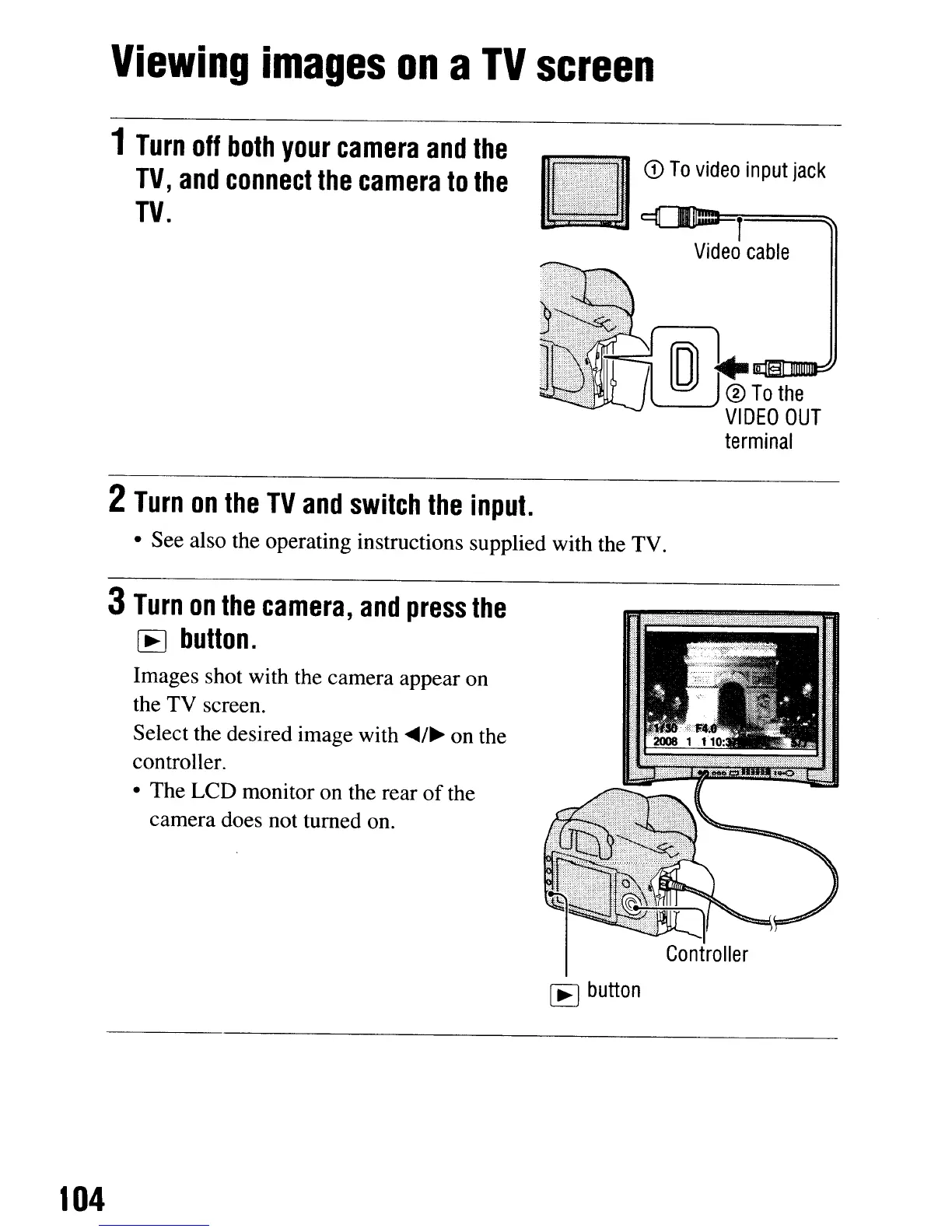
connect
the
camera
to
the
TV.
lil
@nT-.0I1llv=idt=e°=t-r=in=pu=t=ja=ck~
Video
cable
2
Turn
on
the
TV
and
switch
the
input.
• See also the operating instructions supplied with the TV.
3
Turn
on
the
camera,
and
press
the
[E]
button.
Images shot with the camera appear on
the TV screen.
Select the desired image with
~/~
on the
controller.
• The LCD monitor on the rear
of
the
camera does not turned on.
[E]
button
104
Viewing
images
on
a
TV
screen
1
Turn
off
both
your
camera
and
the
TV,
and
connect
the
camera
to
the
TV.
lil
@nT-.0I1llv=idt=e°=t-r=in=pu=t=ja=ck~
Video
cable
2
Turn
on
the
TV
and
switch
the
input.
• See also the operating instructions supplied with the TV.
3
Turn
on
the
camera,
and
press
the
[E]
button.
Images shot with the camera appear on
the TV screen.
Select the desired image with
~/~
on the
controller.
• The LCD monitor on the rear
of
the
camera does not turned on.
[E]
button
104













 To Next Page