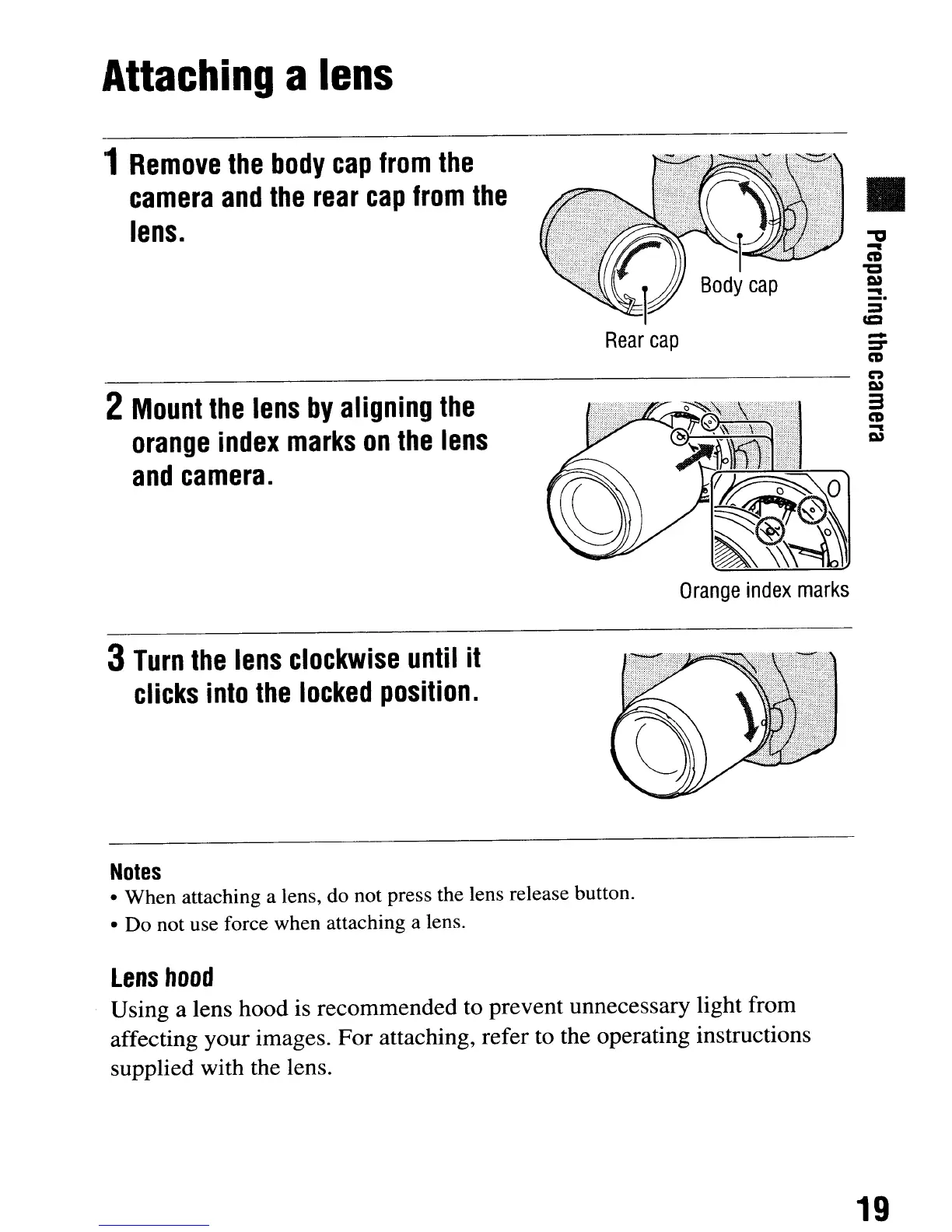
Rear
cap
Attaching
a
lens
1
Remove
the
body
cap
from
the
camera
and
the
rear
cap
from
the
lens.
2
Mount
the
lens
by
aligning
the
orange
index
marks
on
the
lens
and
camera.
•
-
:::T
ca
~
I»
3
ca
-
I»
Orange
index
marks
3
Turn
the
lens
clockwise
until
it
clicks
into
the
locked
position.
Notes
•
When
attaching a lens, do not press the lens release button.
•
Do
not use force when attaching a lens.
Lens
hood
Using a lens hood is recommended to prevent unnecessary light from
affecting your images. For attaching, refer to the operating instructions
supplied with the lens.
19
Rear
cap
Attaching
a
lens
1
Remove
the
body
cap
from
the
camera
and
the
rear
cap
from
the
lens.
2
Mount
the
lens
by
aligning
the
orange
index
marks
on
the
lens
and
camera.
•
-
:::T
ca
~
I»
3
ca
-
I»
Orange
index
marks
3
Turn
the
lens
clockwise
until
it
clicks
into
the
locked
position.
Notes
•
When
attaching a lens, do not press the lens release button.
•
Do
not use force when attaching a lens.
Lens
hood
Using a lens hood is recommended to prevent unnecessary light from
affecting your images. For attaching, refer to the operating instructions
supplied with the lens.
19













 To Next Page