EasyManua.ls Logo

Sony a200 - Page 160

Sony a200
203 pages
Print Icon
To Next Page IconTo Next Page
To Previous Page IconTo Previous Page
Loading...
Pre
aration
DSLR-A200
.-
a200
Play ack
1111I111111111111111111111111
3277947110
To
return
to
the
shooting
mode:
[E]
To
play
back
a
previous
or
next
image:
press
~/~
on
the
controller.
L-
To
delete
the
image
Press
00.
© 2008 Sony Corporation Printed
in
Japan
~
HOldth.e.
grip of
the
.....
camera
Support
the
lens
from
below
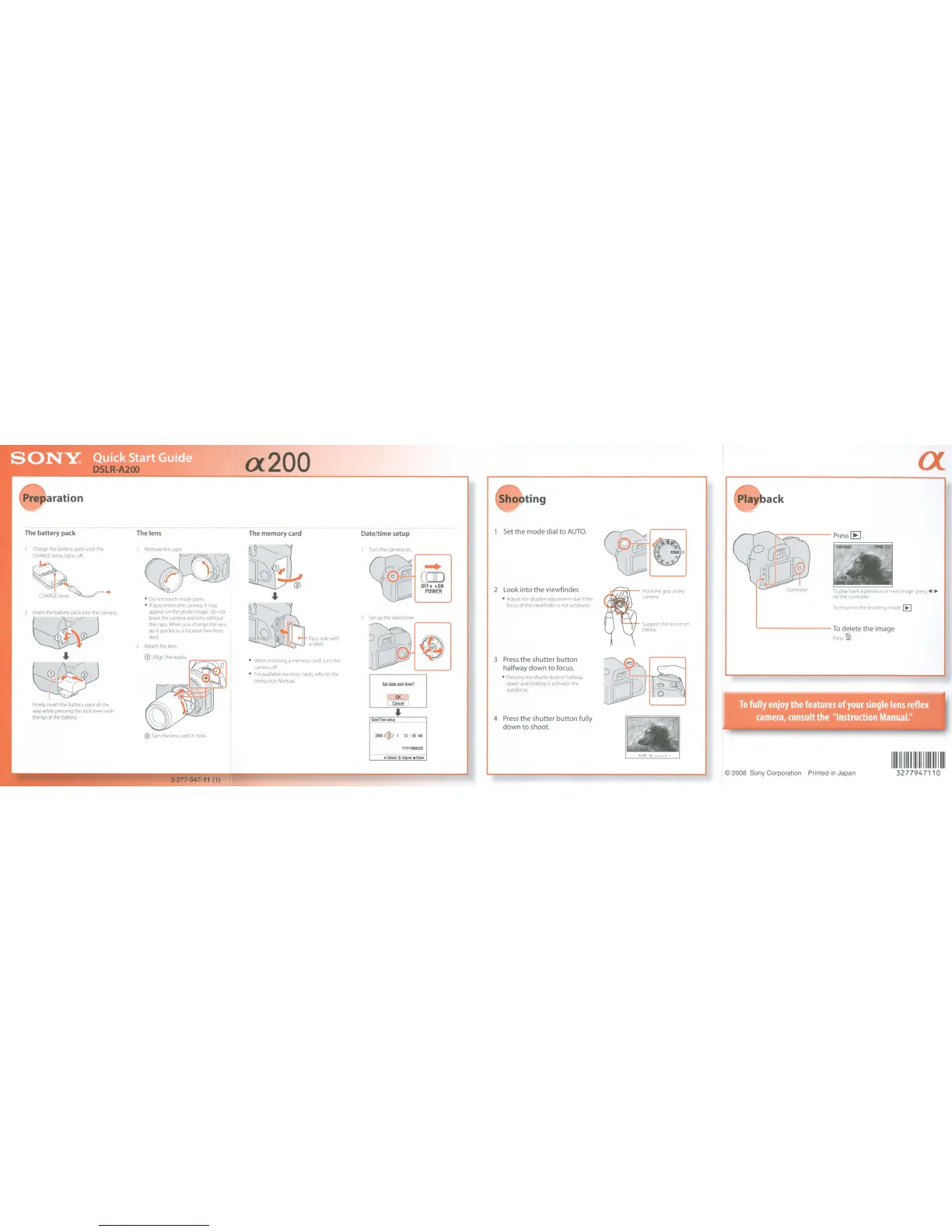
Press
the shutter
button
halfway
down
to
focus.
Pressing
the
shutter button
halfway
down
and
holding it
activates
the
autofocus
Look into
the
viewfinder,
Adjust
the diopter-adjustment
dial
if
the
focus
of
the
viewfinder
is
not
achieved.
4
Press
the shutter
button
fully
down
to
shoot.
1 Set
the
mode dial
to
AUTO,
~
CID
OFF,
,ON
POWER
oSelect~A(fust.Enter
~
'--
__
-J
I
Turn
the
camera
on.
2
Set
up the date/time.
Date/time setup
The
memory card
When
inserting a memory
card,
turn
the
camera
off.
For
available
memory
cards,
refer
to
the
Instruction
Manual.
~~J
~
...
~
J
()'
~~1-
Face
side
with
~~
a
label
®
Turn
the
lens
until it
clicks.
3-277-947-11 (1)
1
Remove
the
caps.
Do
not touch
inside
parts
If
dust
enters
the
camera.
it
may
appear
on
the
photo
image.
Do
not
leave
the
camera
and
lens
without
the
caps.
When
you
change
the
lens,
do
it
quickly
in
alocation
free
from
dust.
2
Anach
the
lens
The
lens
Firmly
Insert
the
battery
pack
all
the
way
while
pressing
the lock
lever
with
the tip of the battery
1
Charge
the
battery
pack
until
the
CHARGE
lamp lights
off.
~
CHARGL~
..
The
battery pack
Pre
aration
DSLR-A200
.-
a200
Play ack
1111I111111111111111111111111
3277947110
To
return
to
the
shooting
mode:
[E]
To
play
back
a
previous
or
next
image:
press
~/~
on
the
controller.
L-
To
delete
the
image
Press
00.
© 2008 Sony Corporation Printed
in
Japan
~
HOldth.e.
grip of
the
.....
camera
Support
the
lens
from
below
Press
the shutter
button
halfway
down
to
focus.
Pressing
the
shutter button
halfway
down
and
holding it
activates
the
autofocus
Look into
the
viewfinder,
Adjust
the diopter-adjustment
dial
if
the
focus
of
the
viewfinder
is
not
achieved.
4
Press
the shutter
button
fully
down
to
shoot.
1 Set
the
mode dial
to
AUTO,
~
CID
OFF,
,ON
POWER
oSelect~A(fust.Enter
~
'--
__
-J
I
Turn
the
camera
on.
2
Set
up the date/time.
Date/time setup
The
memory card
When
inserting a memory
card,
turn
the
camera
off.
For
available
memory
cards,
refer
to
the
Instruction
Manual.
~~J
~
...
~
J
()'
~~1-
Face
side
with
~~
a
label
®
Turn
the
lens
until it
clicks.
3-277-947-11 (1)
1
Remove
the
caps.
Do
not touch
inside
parts
If
dust
enters
the
camera.
it
may
appear
on
the
photo
image.
Do
not
leave
the
camera
and
lens
without
the
caps.
When
you
change
the
lens,
do
it
quickly
in
alocation
free
from
dust.
2
Anach
the
lens
The
lens
Firmly
Insert
the
battery
pack
all
the
way
while
pressing
the lock
lever
with
the tip of the battery
1
Charge
the
battery
pack
until
the
CHARGE
lamp lights
off.
~
CHARGL~
..
The
battery pack

Table of Contents

Related product manuals