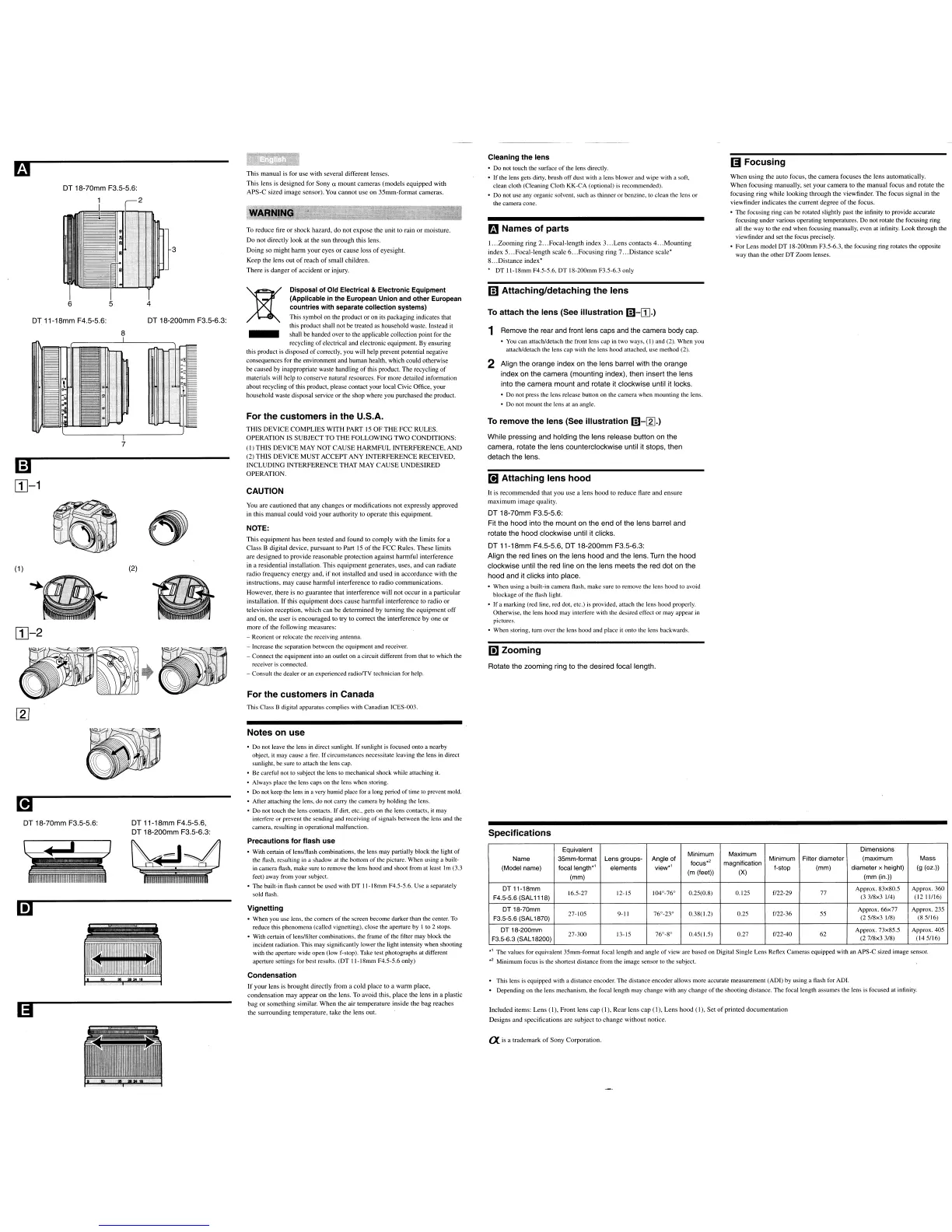
When
using
the
auto
focus, the
camera
focuses
the
lens
automatically.
When
focusing manually, set
your
camera
to the
manual
focus
and
rotate
the
focusing ring
while
looking
through
the
viewfinder.
The
focus
signal
in
the
viewfinder
indicates
the
current
degree
of
the
focus.
• The focusing ring can be rotated slightly past the infinity to provide accurate
focusing under various operating temperatures. Do not rotate the focusing ring
all the way to the end when focusing manually, even at infinity. Look through the
viewfinder and set the focus precisely.
• For Lens model DT 18-200mm F3.5-6.3, the focusing ring rotates the opposite
way than the other DT Zoom lenses.
lSI
Focusing
Rotate the zooming ring to the desired focal length.
Ii]
Zooming
• Do not press the lens release button on the camera when mounting the lens.
• Do not mount the lens at an angle.
Cleaning
the
lens
• Do not touch the surface
of
the lens directly.
•
If
the lens gets dirty, brush
off
dust with a lens blower and wipe with a soft,
clean cloth (Cleaning Cloth KK-CA (optional)
is
recommended).
• Do not use any organic solvent, such as thinner
or
benzine, to clean the lens or
the camera cone.
mNames
of
parts
mAttaching/detaching the lens
It is
recommended
that
you
use
a
lens
hood
to
reduce
flare
and
ensure
maximum
image
quality.
2 Align the orange index on the lens barrel with the orange
index on the camera (mounting index), then insert the lens
into the camera mount and rotate it clockwise until it locks.
I.
..
Zooming
ring 2
...
Focal-Iength index 3
...
Lens
contacts
4
...
Mounting
index 5
...
Focal-Iength
scale
6
...
Focusing
ring 7
...
Distance
scale'
8
...
Distance
index'
• DT
ll-18mm
F4.5-5.6, DT 18-200mm F3.5-6.3 only
To attach
the
lens
(See
illustration
m-[1].)
DT 18-70mm F3.5-5.6:
Fit the hood into the mount on the end of the lens barrel and
rotate the hood clockwise until it clicks.
DT
11-18mm F4.5-5.6, DT 18-200mm F3.5-6.3:
Align the red lines on the lens hood and the lens. Turn the hood
clockwise until the red line on the lens meets the red dot on the
hood and it clicks into place.
• When using a built-in camera flash, make sure to remove the lens hood to avoid
blockage
of
the flash light.
• If a marking (red line, red dot, etc.)
is
provided, attach the lens hood properly.
Otherwise, the lens hood may interfere with the desired effect or may appear
in
pictures.
• When storing, turn over the lens hood and place
it
onto the lens backwards.
To remove
the
lens
(See
illustration
m-[g].)
[!]
Attaching lens
hood
While pressing and holding the lens release button on the
camera, rotate the lens counterclockwise until it stops, then
detach the lens.
1 Remove the rear and front lens caps and the camera body cap.
•
You
can attach/detach the front lens cap
in
two ways,
(I)
and (2). When you
attach/detach the lens
cap
with the lens hood attached, use method (2).
You are
cautioned
that
any
changes
or
modifications
not
expressly
approved
in this
manual
could
void
your
authority to
operate
this
equipment.
To
reduce
fire
or
shock
hazard,
do
not
expose
the
unit to rain
or
moisture.
Do
not directly
look
at the
sun
through
this lens.
Doing
so
might
harm
your
eyes
or
cause
loss
of
eyesight.
Keep
the lens
out
of
reach
of
small
children.
There
is
danger
of
accident
or
injury.
This
manual
is for
use
with several
different
lenses.
This
lens
is
designed
for
Sonya
mount
cameras
(models
equipped
with
APS-C
sized
image
sensor). You
cannot
use
on
35mm-format
cameras.
NOTE:
For the customers in Canada
CAUTION
This
equipment
has
been
tested
and
found to
comply
with
the
limits
for
a
Class
B digital device,
pursuant
to
Part
15
of
the
FCC
Rules.
These
limits
are
designed
to provide
reasonable
protection
against
harmful
interference
in a residential installation.
This
equipment
generates,
uses,
and
can
radiate
radio frequency energy and,
if
not installed
and
used
in
accordance
with
the
instructions,
may
cause
harmful
interference
to
radio
communications.
However, there is no
guarantee
that
interference
will
not
occur
in a
particular
installation.
If
this
equipment
does
cause
harmful
interference to
radio
or
television reception,
which
can
be
determined
by
turning
the
equipment
off
and
on, the
user
is
encouraged
to try to
correct
the
interference
by
one
or
more
of
the following measures:
- Reorient or relocate the receiving antenna.
- Increase the separation between the equipment and receiver.
- Connect the equipment into
an
outlet on a circuit different from that to which the
receiver
is
connected.
- Consult the dealer or an experienced radiorrV technician for help.
For the customers in the U.S.A.
THIS
DEVICE
COMPLIES
WITH
PART
15
OF
THE
FCC
RULES.
OPERATION
IS
SUBJECT
TO
THE
FOLLOWING
TWO
CONDITIONS:
(I)
THIS
DEVICE
MAY
NOT
CAUSE
HARMFUL
INTERFERENCE,
AND
(2)
THIS
DEVICE
MUST
ACCEPT
ANY
INTERFERENCE
RECEIVED,
INCLUDING
INTERFERENCE
THAT
MAY
CAUSE
UNDESIRED
OPERATION.
Disposal
of
Old Electrical & Electronic Equipment
(Applicable in the European Union and other European
countries with separate collection systems)
This symbol on the product or
on
its packaging indicates that
this product shall not be treated as household waste. Instead it
shall be handed over to the applicable collection point for the
recycling
of
electrical and electronic equipment. By ensuring
this product is disposed
of
correctly, you will help prevent potential negative
consequences for the environment and human health, which could otherwise
be caused by inappropriate waste handling
of
this product. The recycling
of
materials will help to conserve natural resources. For more detailed information
about recycling
of
this product, please contact your local Civic Office, your
household waste disposal service or the shop where you purchased the product.
}
I
4
DT 18-200mm F3.5-6.3:
(2)
I
7
8
I
DT 18-70mm F3.5-5.6:
1
1~TI"""""""'""""
DT 11-18mm F4.5-5.6:
[1]-2
(1
)
m
[1]-1
This Class B digital apparatus complies with Canadian ICES-Om.
DT 18-70mm F3.5-5.6:
m
DT 11-18mm F4.5-5.6,
DT 18-200mm F3.5-6.3:
\iC;tJ
Notes on use
• Do not leave the lens
in
direct sunlight.
If
sunlight
is
focused onto a nearby
object,
it
may cause a fire.
If
circumstances necessitate leaving the lens in direct
sunlight,
be
sure to attach the lens cap.
• Be careful not to subject the lens to mechanical shock while attaching
it.
• Always place the lens caps on the lens when storing.
•
Do
not
keep the lens
in
a very humid place for a long period
of
time
to
prevent mold.
• After attaching the lens, do not carry the camera by holding the lens.
• Do not touch the lens contacts. If dirt, etc., gets on the lens contacts,
it
may
interfere or prevent the sending and receiving
of
signals between the lens and the
camera, resulting
in
operational malfunction.
Precautions
for
flash
use
• With certain
of
lens/flash combinations, the lens may partially block the light
of
the flash. resulting
in
a shadow at the bottom
of
the picture. When using a built-
in
camera flash, make sure to remove the lens hood and shoot from at least
1m
(3.3
feet) away from your subject.
• The built-in flash cannot
be
used with DT 11-18mm F4.5-5.6. Use a separately
sold flash.
Vignetting
• When you use lens, the comers
of
the screen become darker than the center. To
reduce this phenomena (called vignetting), close the aperture by I to 2 stops.
• With certain
of
lens/filter combinations, the frame
of
the filter may block the
incident radiation. This may significantly lower the light intensity when shooting
with
the
aperture wide open (low f-stop). Take test photographs at different
aperture settings for best results. (DT
ll-18mm
F4.5-5.6 only)
Condensation
If
your
lens is
brought
directly
from
a
cold
place
to a
warm
place,
condensation
may
appear
on
the lens.
To
avoid this,
place
the
lens
in
a plastic
bag
or
something similar.
When
the
air
temperature
inside
the
bag
reaches
the surrounding
temperature,
take
the
lens
out.
Specifications
Equivalent
Minimum Maximum
Dimensions
Name
35mm-format
Lens
groups-
Angle of
focus"
magnification
Minimum
Filter
diameter
(maximum
Mass
(Model
name)
focallength·
'
elements
view·
1
f-stop
(mm)
diameter
x height)
(g (oz.))
(mm)
(m(feet))
(X)
(mm(in.))
DTll-18mm
Approx. 83x80.5
Approx.360
F4.5-5.6
(SAL
1118)
16.5-27 12-15
104°_76°
0.25(0.8)
0.125
f/22-29
77
(3 3/8x3 1/4)
(1211/16)
DT
18-70mm
Approx. 66x77
Approx.235
F3.5-5.6
(SAL
1870)
27-105 9-11
76°_23°
0.38(1.2)
0.25
f/22-36
55
(25/8x3
1/8)
(85/16)
DT
18-200mm
13-15
76°_8°
f/22-40
Approx. 73x85.5 Approx.405
F3.5-6.3
(SAL
18200)
27-300
0.45(1.5)
0.27
62
(2 7/8x3 3/8)
(145/16)
.1
The values for equivalent 35mm-format focal length and angle
of
view are based on Digital Single Lens Reflex Cameras equipped with an APS-C sized image sensor.
.,
Minimum focus is the shortest distance from the image sensor to the subject.
• This lens
is
equipped with a distance encoder. The distance encoder allows more accurate measurement (ADO by using a flash for AD!.
• Depending on the lens mechanism, the focal length may change with any change
of
the
shooting distance. The focal length assumes the lens is focused at infinity.
Included items:
Lens
(I),
Front
lens
cap
(I),
Rear
lens
cap
(I),
Lens
hood
(I),
Set
of
printed
documentation
Designs
and
specifications
are
subject
to
change
without
notice.
lX
is a
trademark
of
Sony
Corporation.













 To Next Page