25
Programming the CD
tracks
–– Programme Play
You can make a programme of up to 25 tracks
from the CD in the order you want them to be
played.
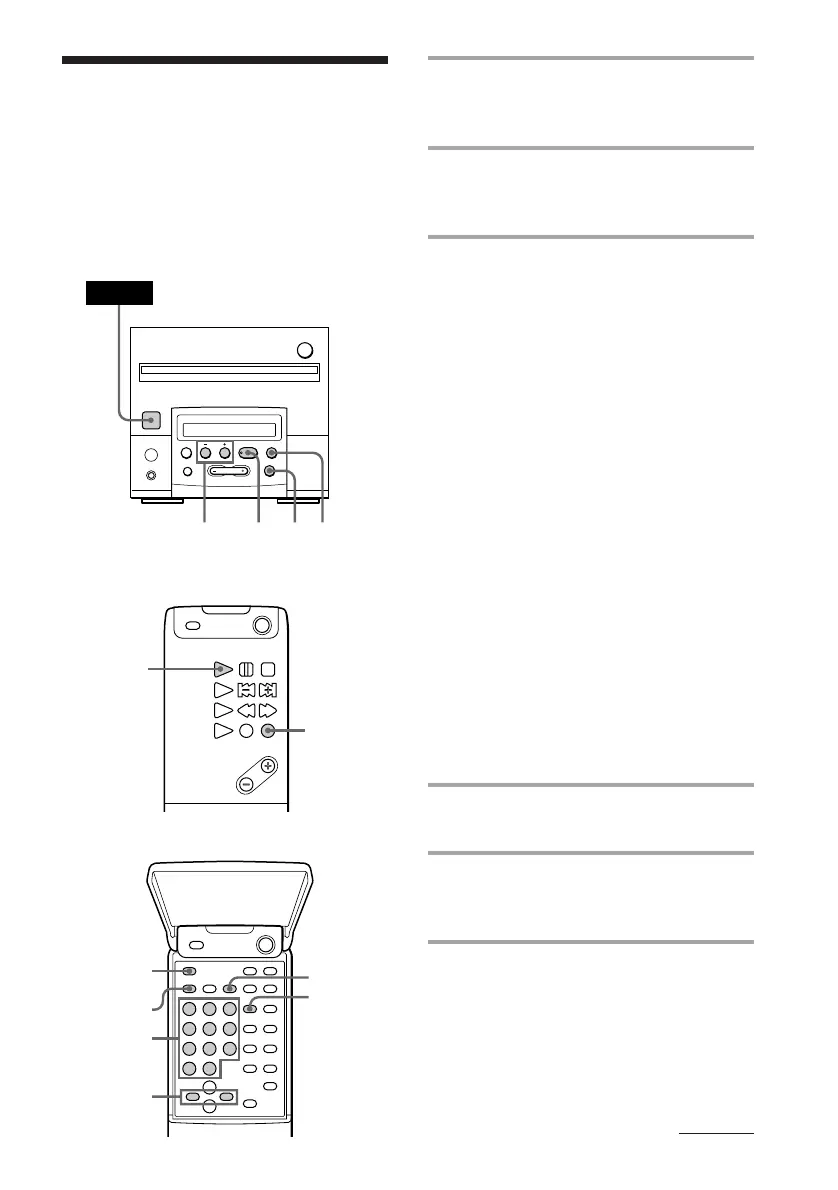
Remote (outside)
Remote (inside)
1 Press FUNCTION repeatedly until
“CD” appears in the display of the
tuner CD player.
2 Press PLAY MODE repeatedly until
“PROGRAM” appears in stop
mode.
3 Do either a or b.
a Selecting tracks with the number
buttons on the remote.
Press the number buttons to enter the
tracks you want to programme in the
order you want.
To programme a track with a number
over 11, use the >10 button.
After each step, the total playing time
including the selected track and the
number of total tracks appears.
If you’ve made a mistake
Press CLEAR, then press the correct
number button.
b Selecting tracks while checking the
total playing time
1 Press =0 or )+ (? or /
on the remote) until the track number
you want appears in the display. The
total playing time including the
selected track flashes in the display.
2 Press PLAY MODE.
The step number (number of the
playing order) appears for about one
second, then the total playing time
lights up.
4 Repeat step 3 to programme
additional tracks.
5 Press ^ (CD ( on the remote).
All the tracks play in the order you
selected.
To cancel the Programme Play
Press PLAY MODE repeatedly until
“PROGRAM” disappears.
Tuner CD player
continued
§
0
)
=
+
·P p
513
POWER
p
5
1
Number
buttons
2,3
3
1
CLEAR
DISPLAY



 To Next Page