Basic Operations
15
To record on
One side
Both sides*
Slide DIRECTION to
D
a
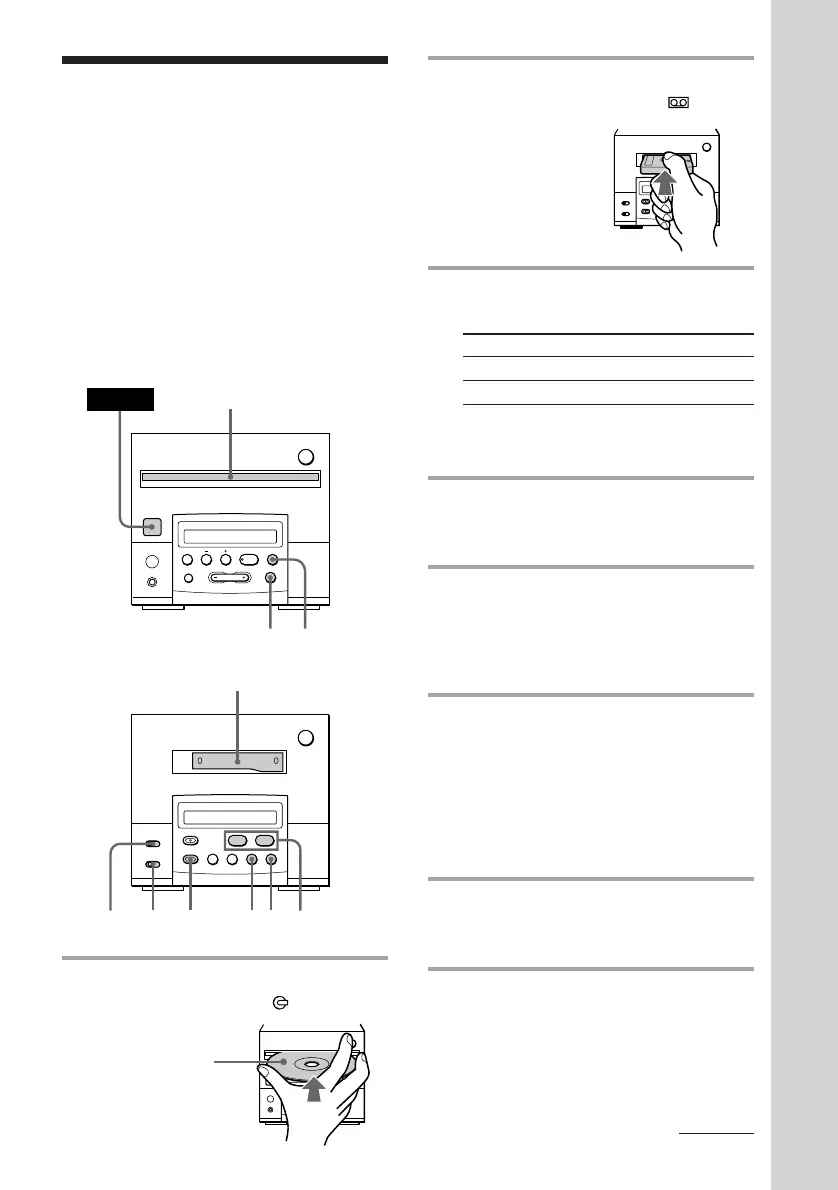
2 Insert a cassette.
The cassette is pulled in and
appears.
3 Slide DIRECTION to select dual or
single-sided recording.
* Recording always stops at the end of the
lower side. Be sure to start from the upper
side.
4 Press FUNCTION repeatedly until
“CD” appears in the display of the
tuner CD player.
5 Press CD SYNC on the cassette
deck.
The cassette deck stands by for
recording, and the CD player stands by
for playing.
6 Press ( or 9 to select the tape
side to start recording on.
To start from the upper side, press (
(TAPE ( on the remote).
To start from the lower side, press 9
(TAPE ( on the remote again)*.
* Recording will be made only on the lower
side.
7 Press P.
Recording starts. After about 10
seconds, the CD starts playing.
Recording a CD on a
tape
— CD Synchro Recording
(for the customers who purchased
TC-TX101 only)
With the label
side up.
§
0
)
=
+
·P p
Tuner CD player
Cassette deck
(option)
The CD SYNC button lets you record from a
CD to a tape easily. You can use TYPE I
(normal) or TYPE II (CrO
2) cassette, since the
tape deck automatically detects the tape type.
Before recording, make sure the tabs on the
cassette have not been removed.
1 Insert a CD.
The CD is pulled in and appears.
§
0
)
·ª
p
P
§
0
)
=
+
·P p
2
POWER
1
5763
p
p
4
DOLBY
NR
continued



 To Next Page