28
0
)
=
+
·P p
§
SCROLL
2
2
1
n
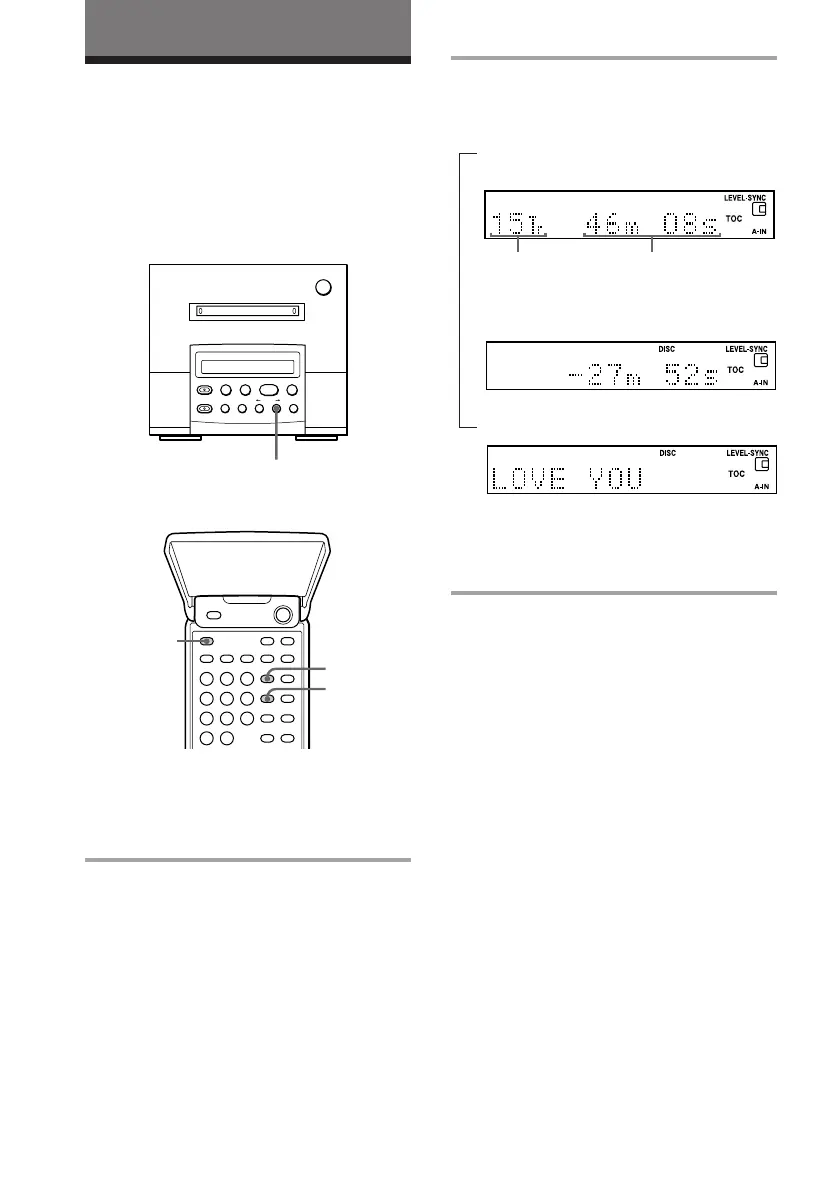
2 Press DISPLAY in stop mode.
Each time you press the button, the
display changes as follows:
Total track numbers and the playing
time.
µ
Remaining recordable time (recordable
MDs only*
1
).
µ
Disc name*
2
.
*
1
The remaining recordable time of the disc is
not shown for premastered MDs.
*
2
“No Name” appears if no disc name is
stored.
The displays are different from the above-
mentioned in the Programme Play mode.
The MD Deck
Using the display
(for the customers who purchased
MDS-MX101 only)
Remote (inside)
Total track numbers Total playing time
You can check the remaining time and total
playing time of an MD.
MD deck (option)
Checking the total track number,
total playing time, remaining
time, and disc name
1 Press FUNCTION repeatedly until
“MD” appears in the display of the
tuner CD player.



 To Next Page