Control for HDMI/External Audio Device
71
GB
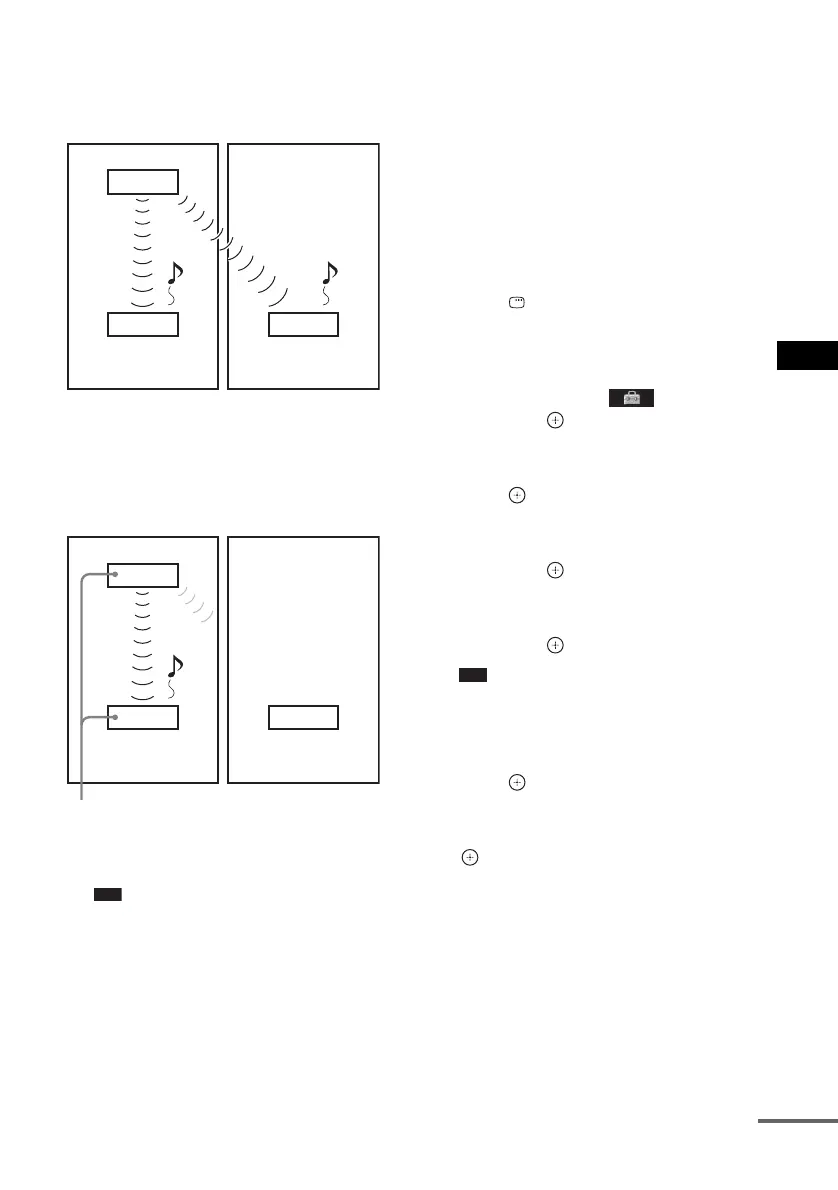
x Before pairing
Sound transmission is established by the ID
(example).
x After pairing
Sound transmission is established between the
paired S-AIR
main unit and S-AIR sub unit(s)
only.
1 Place the S-AIR sub unit that you want
to pair near the S-AIR main unit.
Note
• Remove headphones from the surround
amplifier (if connected).
2 Match the IDs of the S-AIR main unit
and the S-AIR sub unit.
• To set the ID of the S-AIR main unit, see
“To set the ID of the S-AIR main unit”
(page 68).
• To set the ID of the S-AIR sub unit, refer
to the operating instructions of the S-AIR
sub unit.
3 Press FUNCTION repeatedly until
“DVD” appears in the front panel
display.
4 Press DISPLAY while the system is
in stop mode.
The Control Menu display appears on the
TV screen.
5 Press X/x to select [SETUP],
then press .
The options for [SETUP] appear.
6 Press X/x to select [CUSTOM], then
press .
The Setup Display appears.
7 Press X/x to select [AUDIO SETUP],
then press .
The options for [AUDIO SETUP] appear.
8 Press X/x to select [S-AIR SETUP t],
then press .
Note
• When the wireless transmitter is not inserted in
the S-AIR main unit, [S-AIR SETUP] cannot be
selected.
9 Press X/x to select [PAIRING], then
press .
The confirmation display appears.
10 Press C/c to select [YES], then press
.
The S-AIR main unit starts pairing.
To not perform pairing, select [NO].
11 Start pairing of the S-AIR sub unit.
x For the surround amplifier
Refer to the operating instructions of the
surround amplifier.
When sound transmission is established,
the confirmation display appears.
S-AIR main unit
ID A
S-AIR sub unit
ID A
ID A
S-AIR sub unit
Your room
Neighbour
S-AIR main unit
ID A
S-AIR sub unit
ID A
ID A
S-AIR sub unit
Your room
Neighbour
Pairing
No transmission
cont
nue












 To Next Page